Why it happens
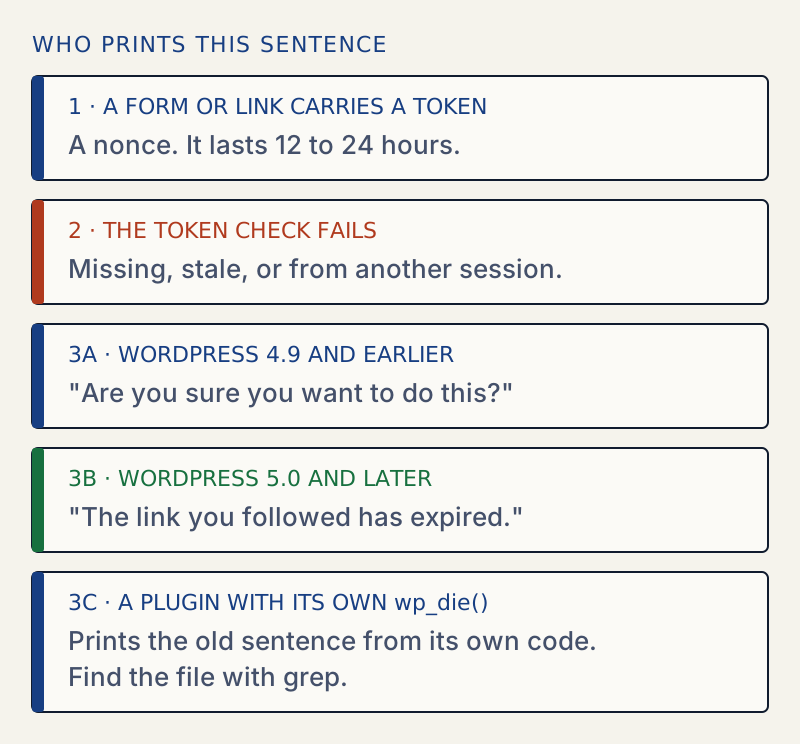
- The security token (nonce) on the form or link was missing, expired, or belongs to another session. This is the same check that produces "The link you followed has expired" on current WordPress.
- The site runs WordPress 4.9 or earlier, which printed this exact wording for a failed token check.
- A plugin or theme prints this sentence from its own code when its own token check fails. WordPress core does not print it.
- An upload was larger than PHP's
post_max_size, so the token never arrived. This is the usual cause on a theme or plugin upload. - A cache served an old copy of the admin page, or you were logged out in another tab.
How to fix it
Try the fixes in this order. Each one is independent: stop as soon as the error is gone.
Find out where the message comes from
- Check your WordPress version under Dashboard → Updates, or run
wp core version. WordPress 4.9 and earlier print this wording for a failed token check. 5.0 and later do not. - On 5.0 or later, search your code for the sentence. From the WordPress folder, run
grep -rn "Are you sure you want to do this" wp-content/plugins wp-content/themes --include=*.php. The file and line it prints are the code that shows the message. - I tested this with a small plugin that calls
wp_die()with the sentence when its token check fails. The grep found it, and the page showed the message. WordPress's own check on the lab site (WordPress 7.1.4) returned a 403 with the words "The link you followed has expired." - If the grep finds nothing in
wp-content, the sentence may be built from pieces, come from a JavaScript file, or be a browser confirm box from a plugin. Search.jsfiles too, without the--include. - If the message appears as a pop-up with OK and Cancel buttons, it is a confirmation dialog, not an error. Click OK to continue, or Cancel to stop.
Reload and repeat the action
- Open the screen again from the dashboard so that WordPress prints a fresh token, then repeat the action. Do not use the back button.
- If you were logged out, log in again first.
- A token lasts between 12 and 24 hours. A form left open overnight fails for that reason alone.
Rule out an upload that is too large
- If you saw the message while uploading a theme, a plugin or an import file, open Tools → Site Health → Info → Media Handling and compare the file size with the effective limit.
- If the file is larger, follow the steps in the expired link guide. Raising
post_max_sizeandupload_max_filesize, or installing withwp plugin installor SFTP, avoids it.
Rule out caching and conflicts
- Exclude
/wp-admin/from page caching and from any CDN cache, then clear the caches. If the block editor says "Updating failed" instead, see Updating failed, the response is not a valid JSON response. - Deactivate the plugin that owns the screen, or all plugins with
wp plugin deactivate --all --skip-plugins, and repeat the action. If it works, reactivate them one at a time. - Update the plugin or theme that prints the message. A form that leaves out its token fails every time. Before updating, read how to update plugins safely.
Update WordPress if it is 4.9 or earlier
- Take a full backup first, and do the work on a staging copy of the site. If the copy fails, restore the backup instead of pushing on.
- Current WordPress needs PHP 7.4 or newer. A site that still prints the 4.9 wording usually runs an old PHP and old plugins, and those may not work on PHP 7.4 or later.
- Update plugins and the theme first on the copy. Raise PHP only after you have confirmed they support it. Raising PHP and updating core in the same step can take the site down, so do them one at a time.
Search results for this sentence often describe it as a current WordPress error. On WordPress 7.1 it is not one that WordPress prints. I searched the WordPress 7.1 source: the PHP sentence appears only inside the deprecated wp_explain_nonce() function, deprecated since WordPress 3.4.1. The same words also appear in WordPress's admin JavaScript, as the confirm box on the Comments screen when you leave a comment you have edited. That pop-up is a question, not a failed token check.
What changed#
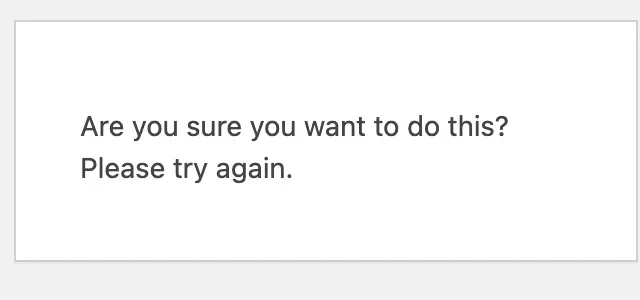
The failed-token message used to read "Are you sure you want to do this?". I compared the source for several releases:
| WordPress | Words used by the token check |
|---|---|
| 4.9 and earlier (I checked 3.9, 4.0, 4.5 and 4.9) | "Are you sure you want to do this?", then a link "Please try again." when WordPress knows the previous page |
| 5.0 and later (I checked 5.0, 5.5, 6.0, 6.4 and 7.1) | "The link you followed has expired.", then the same link when WordPress knows the previous page |
So on any release since 5.0 the same problem reads differently. If you see the older wording today, it comes from one of three places:
- A site still on WordPress 4.9 or earlier.
- A plugin or theme that has its own security check and its own wording, usually through
wp_die(). - A confirmation pop-up, which is a question and not an error. WordPress itself shows one on the Comments screen when you leave an edited comment, and plugins add their own.
What the message means#
For the first two, the meaning is the same as the one in the expired link guide. WordPress or the plugin checks a token that is sent with the form. The check failed, and it refuses to carry on, so that a forged link cannot make you delete or change something by accident.
On WordPress 4.9 the page was titled "WordPress Failure Notice" and was sent with a 403 status. On current WordPress, the title is "An error occurred." I read both in the source for those releases.
For plugin and theme authors#
If your own code prints this message, check these three things:
- The form outputs the token with
wp_nonce_field( 'your_action' ), or the link is built withwp_nonce_url(). - The handler checks it with
check_admin_referer( 'your_action' )orwp_verify_nonce(), using the same action name. - You do not cache the page that prints the token.
check_admin_referer() produces WordPress's own message when the check fails. Printing your own sentence with wp_die() hides the cause, and it uses a different status code from WordPress.
After it is fixed#
Repeat the action once, and check that the setting or the upload took effect. If a plugin update changed other settings, see how to find and undo changed settings.
Sources
- WordPress core: wp_die() · How any code, including a plugin, prints a message and stops
- WordPress core: check_admin_referer() · The token check that prints WordPress's own failure message
- WordPress: nonces · What a nonce is and how long it lasts
- WordPress core: wp_nonce_ays() · The function in functions.php that prints The link you followed has expired.; read it at the 6.8.3 tag
- WordPress core: wp_explain_nonce() (deprecated) · Holds the old sentence and is deprecated since 3.4.1
One email when something breaks or changes.
New plugins and re-tested guides, about twice a month. Never a sales pitch.