Why it happens
- The upload is larger than PHP's
post_max_size. PHP then discards the whole request, including the security token, and WordPress reports the token as missing. This is the usual cause when you upload a theme or plugin zip. - The form page was open for too long. WordPress security tokens (nonces) last between 12 and 24 hours by default.
- You were logged out in the meantime, in another tab or by a session timeout, so the token no longer belongs to your session.
- A cache or CDN served an old copy of an admin page, so the token in the form is not yours or is out of date.
- A plugin or theme builds its own form or link and does not include the token, or generates it with the wrong name.
- A security plugin or firewall removes or changes the request.
How to fix it
Try the fixes in this order. Each one is independent: stop as soon as the error is gone.
Reload the page and try again
- Do not use the browser's back button. Open the screen again from the dashboard so WordPress prints a fresh token, then repeat the action.
- If you were logged out, log in again and then repeat the action.
- If it works the second time and the page had been open for hours, that was the cause. Nothing else needs fixing.
Check whether the upload is too big
- Use this fix if the error appeared on Plugins → Add Plugin → Upload Plugin, Appearance → Themes → Add Theme → Upload Theme, or an import.
- Open Tools → Site Health → Info → Media Handling. Compare the size of your file with "Max size of post data allowed", "Max size of an uploaded file" and "Max effective file size". The smaller of the first two is the real limit.
- Media → Add New also shows the effective limit as "Maximum upload file size".
- If your zip is bigger than the limit, raise
post_max_sizeandupload_max_filesizein the next fix, or skip the upload form and use SFTP or WP-CLI. - I confirmed this cause: with
post_max_sizeat 1 MB, uploading a 3 MB plugin zip returned this message with a 403 status. The PHP log said "POST Content-Length of 3001566 bytes exceeds the limit of 1048576 bytes". With both settings at 8 MB, the same zip installed normally.
Raise the PHP upload limits
- In the hosting control panel, look for PHP settings, PHP options or a MultiPHP INI editor, and raise
upload_max_filesizeandpost_max_size. Setpost_max_sizeat least as high asupload_max_filesize, since the whole request includes the file. - Without a panel option, a
.user.inifile in the WordPress root works on many PHP-FPM hosts. Addupload_max_filesize = 64Mandpost_max_size = 64M. It can take several minutes to apply. - On Apache with PHP as a module,
php_value upload_max_filesize 64Mandphp_value post_max_size 64Min.htaccessdo the same. On other setups those lines cause a 500 error. See the 500 Internal Server Error if that happens. - Reload Site Health → Info → Media Handling to confirm the new values. If they did not change, the host controls them. Ask the host to raise them.
Install without the upload form
- Unzip the plugin or theme on your computer and upload the folder to
wp-content/pluginsorwp-content/themesover SFTP. Then activate it from the dashboard. - With WP-CLI,
wp plugin install /path/to/plugin.zipandwp theme install /path/to/theme.zipinstall from a local file and ignore the form limits. I ran the first on a test site and it installed the plugin. - Add
--activateto activate the plugin as well.
Rule out caching and the session
- Exclude
/wp-admin/and/wp-login.phpfrom page caching and from CDN caching. Admin pages carry per-user tokens and should never be cached. - Clear the page cache and the browser cache, then log out and in.
- Check that you use the same address every time. A login on
www.example.comand an admin page onexample.comuse different cookies, and the token does not match.
Look at a plugin or theme form
- If the error is tied to one plugin screen, deactivate that plugin and try again. With WP-CLI,
wp plugin deactivate name --skip-plugins. - Update the plugin. A form that leaves out the token fails every time, for every user.
- If a security plugin or firewall is active, check its log at the time of the request, and add the screen or the upload to its allow list.
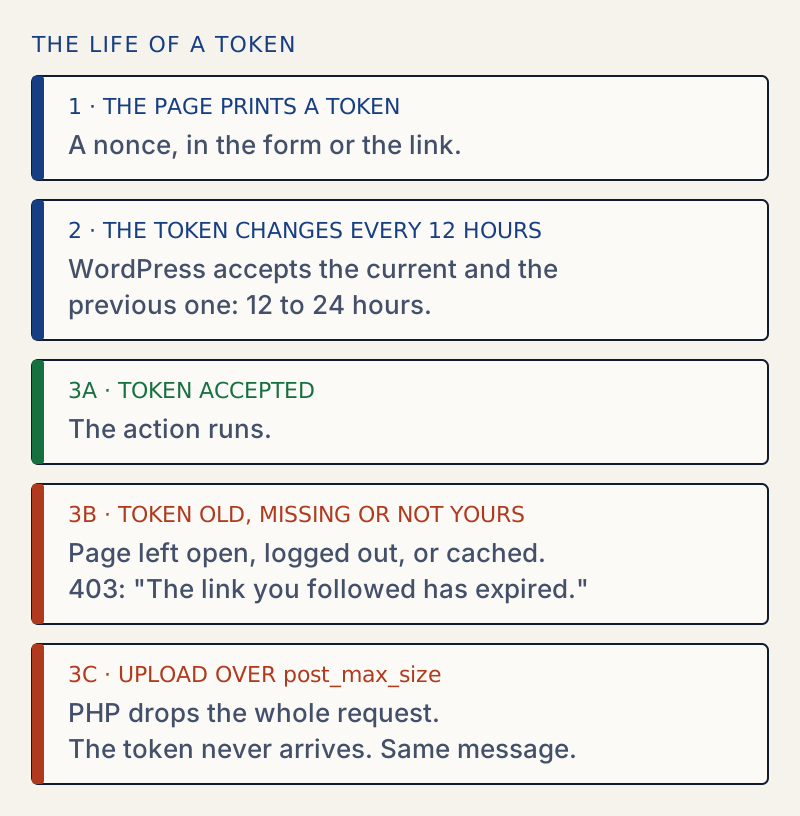
Nearly every action in the WordPress dashboard that changes something carries a short-lived security token called a nonce. When WordPress receives the request, it checks the token. If the token is missing or does not match, WordPress stops and shows this message. The check protects you from a forged link or form that would make you act without meaning to.
So the message does not mean the link is old in every case. It means the token was not accepted.
What the page shows#
On WordPress 7.1.4 the page has the title "An error occurred." and the text "The link you followed has expired." When WordPress knows where you came from, it adds a link labelled "Please try again." that goes back to the previous page. The status is 403. I confirmed all of this by sending a settings form with a bad token.

If you remember an older message, "Are you sure you want to do this?", that is the same check in older versions of WordPress. See the "Are you sure" error for what changed.
How long a token lasts#
By default, WordPress changes the token every 12 hours and accepts the current and the previous one. A token is therefore valid for between 12 and 24 hours. I read this in wp_nonce_tick(): the default lifetime is a day, and the tick is half of it. A form left open overnight will often fail. A plugin can change the lifetime with the nonce_life filter.
Why an upload fails this way#
A theme or plugin upload is a form that contains the token and the zip file. If the whole request is larger than post_max_size, PHP throws the request away and fills in nothing. WordPress then finds no token and reports it as expired. The message does not mention size, which is why this cause is hard to guess.
| Setting | What it limits |
|---|---|
upload_max_filesize | The largest single file in the request |
post_max_size | The whole request, including every field and file |
WordPress treats the smaller of the two as the effective limit. A zip below upload_max_filesize can still fail if post_max_size is lower.
After it is fixed#
Repeat the action once to confirm it works. If you raised the limits, keep them only as high as the largest file you need to upload. If the upload now stops with a different message, see file exceeds the maximum upload size for this site or the uploaded file exceeds the upload_max_filesize directive.
If a plugin or theme change altered other settings, see how to find and undo changed settings.
Sources
- WordPress: nonces · What a nonce protects and how it is checked
- WordPress core: wp_nonce_tick() · The tick is half the lifetime, so a token lasts 12 to 24 hours
- WordPress core: wp_nonce_ays() · Builds this page: the text, the title and the 403 status
- WordPress core: check_admin_referer() · Checks the token and ends the request when it is wrong
- PHP: post_max_size · A POST larger than this leaves $_POST and $_FILES empty
- MDN: 403 Forbidden · What a 403 status means in HTTP
One email when something breaks or changes.
New plugins and re-tested guides, about twice a month. Never a sales pitch.