Why it happens
- The file is bigger than the limit WordPress printed under the upload box (Media → Add New → Maximum upload file size). That limit is the smaller of PHP's
upload_max_filesizeandpost_max_size. The file never leaves your browser. - Only one of the two PHP settings was raised. The other one still sets the limit, so the number on the page does not move.
- The new value was put somewhere your server ignores: a
.user.inifile on Apache with PHP as a module, orini_set()inwp-config.php. Neither can change these two settings there. - The host sets the limit for the whole account, and a file or setting you control cannot go above it.
How to fix it
Try the fixes in this order. Each one is independent: stop as soon as the error is gone.
Read the real limit
- Open Media → Add New. The line under the upload box says "Maximum upload file size: 2 MB." That is the number your browser checks the file against.
- For the two numbers behind it, open Tools → Site Health → Info → Media Handling. "Max size of post data allowed" is
post_max_size. "Max size of an uploaded file" isupload_max_filesize. "Max effective file size" is the smaller of the two, which is the limit. - Compare the size of your file with the effective size. The message only appears when the file is larger than this number. If the file is smaller and the upload fails with a different message, see the uploaded file exceeds the upload_max_filesize directive.
Raise both PHP settings in your host's panel
- Look in your hosting panel for PHP settings, PHP options, MultiPHP INI Editor or similar. This is the route that works on every kind of server, because the host applies it the right way.
- Set
upload_max_filesizeandpost_max_sizeto the same value, a little above your biggest file. For example 64M for both. Keeppost_max_sizeat least as high asupload_max_filesize, because the file travels inside the request. - Reload Media → Add New. I tested a 4.8 MB photo against a 2 MB limit. With both settings at 64M the page said "Maximum upload file size: 64 MB." and the upload finished.
Apache with PHP as a module: use .htaccess
- Add these two lines at the top of the
.htaccessfile in the WordPress folder, above the# BEGIN WordPressblock:php_value upload_max_filesize 64Mandphp_value post_max_size 64M. - On my test site (Apache with
mod_php) the new limit showed on the next page load, and the upload worked. - If you are not sure how PHP runs on your site, Tools → Site Health → Info → Server shows it under "PHP SAPI".
apache2handlermeans a module. Other values, such asfpm-fcgi, mean.htaccessphp_value lines may cause a 500 error. I did not test that case. Remove the lines to get the site back, and use the next fix. See 500 Internal Server Error.
PHP-FPM or CGI: use a .user.ini file
- Create a file named
.user.iniin the WordPress folder with two lines:upload_max_filesize = 64Mandpost_max_size = 64M. - PHP rereads these files every 5 minutes by default (
user_ini.cache_ttl, 300 seconds), so wait before you test. - This only works on CGI and FastCGI. On my Apache
mod_phptest site I created the file with 64M and 64M and the page still said 2 MB, so do not use it there.
Skip the form: WP-CLI, SFTP or the REST API
- These routes do not go through the browser form, so the form limit does not apply. On the same 2 MB test site,
wp media import /tmp/photo.jpgimported the 4.8 MB photo: "Imported file '/tmp/photo.jpg' as attachment ID 13." - A raw
POSTof the same file to/wp-json/wp/v2/mediawith an application password returned 201 Created. - You can also copy the file to the server by SFTP and import it with
wp media import. This helps once or twice. For regular uploads, raise the limit.
If the number changes but the upload still fails
- If your page says 64 MB and the upload then fails with a different message, something after the browser check is stopping it. See the table "What each layer says" below.
- A "413 Request Entity Too Large" or a row stuck at 100% means the web server has its own limit (Apache
LimitRequestBody, nginxclient_max_body_size). Ask your host to raise it.
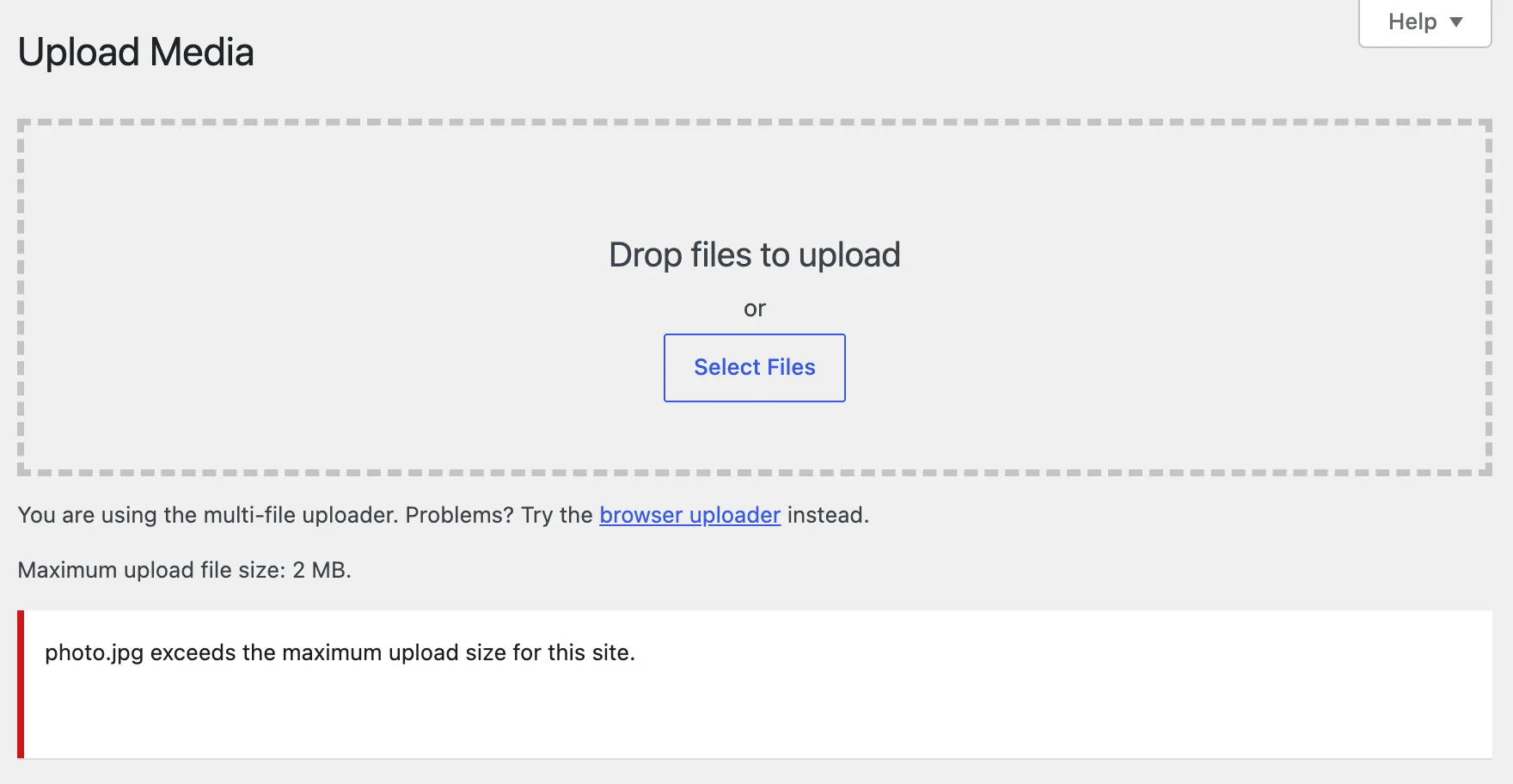
WordPress reads two PHP settings, upload_max_filesize and post_max_size, and takes the smaller. It prints that number under the upload box. When you pick a bigger file, your browser stops the upload and shows this message. Nothing is sent to the server. To clear it, raise both settings and reload the page.
What you see#
On Media → Add New, a red row appears under the upload box with the file name and the message. The line above it shows the limit.
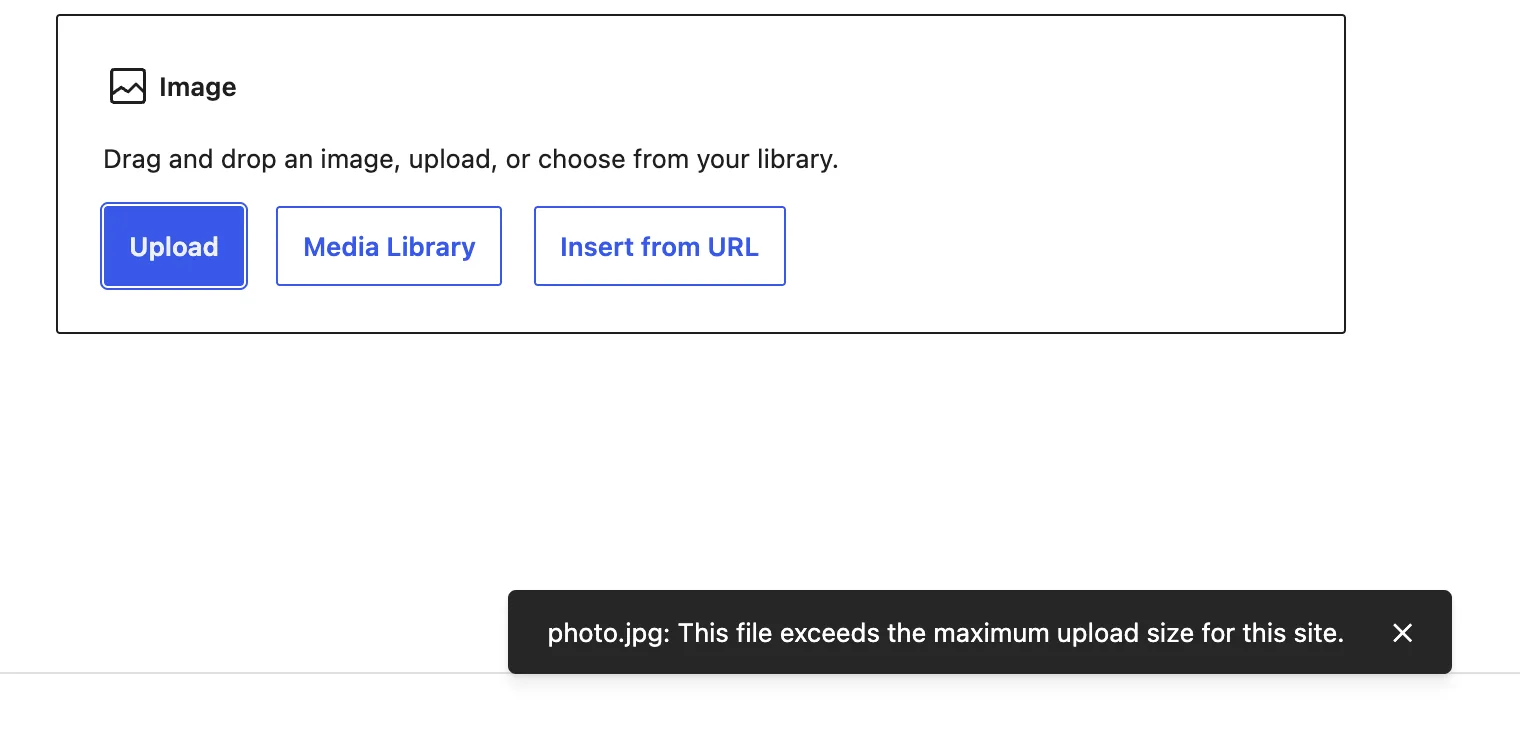
The block editor uses a different sentence for the same check. When you add an image block and upload the same file, a small notice appears at the bottom:
| Screen | Exact text |
|---|---|
| Media → Add New | photo.jpg exceeds the maximum upload size for this site. |
| Block editor, Image block | photo.jpg: This file exceeds the maximum upload size for this site. |
I checked these two screens. WordPress 7.1.4 also has a third wording in its media script, a "File too large" notice that says "photo.jpg" exceeds the maximum upload size. I did not trigger it. It names the same limit, so the fix is the same. The Media Library pop-up and the classic uploader use the Media → Add New wording.
Both screens I tested show the message in the browser before any upload starts. I watched the network on both: no request to async-upload.php or the media API was sent.
How it works#
On each page that can upload, WordPress calls wp_max_upload_size() and hands the result to the browser. The function is short:
$u_bytes = wp_convert_hr_to_bytes( ini_get( 'upload_max_filesize' ) );$p_bytes = wp_convert_hr_to_bytes( ini_get( 'post_max_size' ) );return apply_filters( 'upload_size_limit', min( $u_bytes, $p_bytes ), $u_bytes, $p_bytes );The classic uploader gets it as a max_file_size filter and the block editor as the setting maxUploadFileSize. In the browser, a file larger than that number is refused on the spot with the strings above.
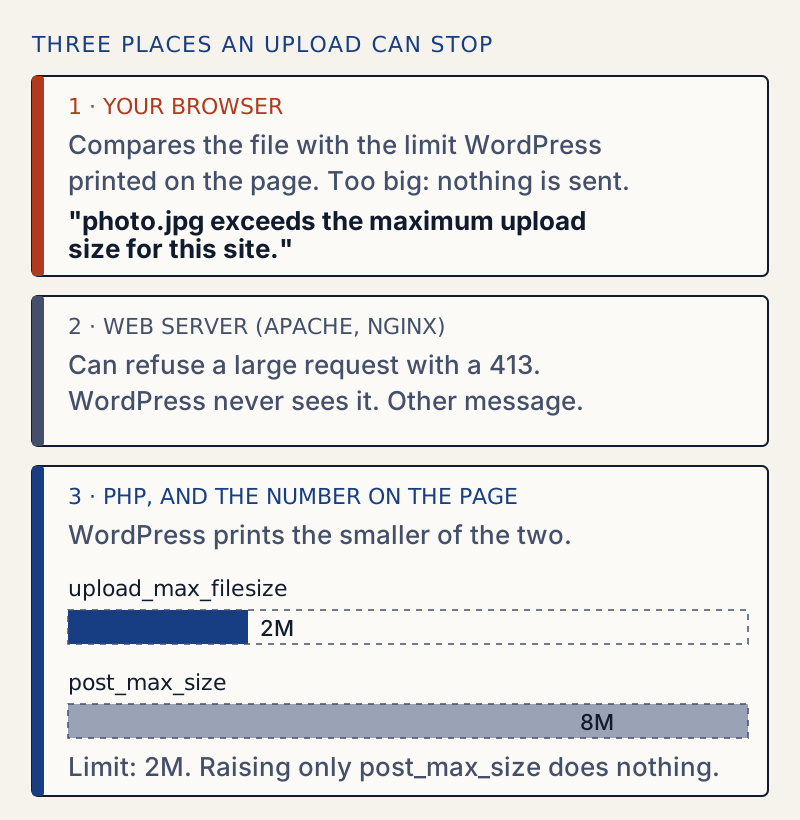
That is why raising one setting does nothing. In the table, "upload max" is upload_max_filesize and "post max" is post_max_size. I set each one alone with .htaccess on a test site:
| upload max | post max | "Maximum upload file size" | 4.8 MB photo |
|---|---|---|---|
| 2M (default) | 8M (default) | 2 MB | Refused in the browser |
| 2M | 64M | 2 MB | Refused in the browser |
| 64M | 2M | 2 MB | Refused in the browser |
| 64M | 8M | 8 MB | Uploaded |
| 64M | 64M | 64 MB | Uploaded |
The first two numbers are PHP's built-in defaults, 2M and 8M. Your host may have different ones.
Which setting methods work#
Here is what I measured on Apache with PHP as a module (php_sapi_name() returned apache2handler), the setup of many shared hosts. PHP's manual says both settings are INI_PERDIR, which means they can be set in php.ini, .htaccess or the server config, but not at run time.
| Method | Result on this setup |
|---|---|
php_value lines in .htaccess | Works. Limit changed on the next load. |
.user.ini with 64M and 64M | Ignored. Still 2 MB. PHP only reads it under CGI and FastCGI. |
ini_set( 'upload_max_filesize', '64M' ) in wp-config.php or a theme | Does nothing. ini_set() returned bool(false) for both settings and they stayed 2M and 8M. |
upload_size_limit filter returning 64 MB | The page says 64 MB. The browser lets the file go. PHP then rejects it. See below. |
On PHP-FPM, the table is different: .user.ini is the file PHP reads and .htaccess php_value lines are not. I did not test FPM, so follow the PHP manual and check the result on Media → Add New.
A bigger limit in a filter does not raise anything#
A common snippet returns a bigger number from the upload_size_limit filter. It changes what the page prints and what the browser allows. It does not change PHP. With the filter at 64 MB and PHP still at 2M and 8M, the browser sent the file and PHP refused it:
“photo.jpg” has failed to upload.The uploaded file exceeds the upload_max_filesize directive in php.ini.So the filter can lower the limit, or make the page tell the truth when the server is already higher. It cannot lift a PHP limit. For that message, see the page for "The uploaded file exceeds the upload_max_filesize directive".
What each layer says#
Once the browser check passes, other layers can still stop the file. I forced each one with the filter set to 64 MB so the browser let the file through:
| Cause | What the owner sees | Server side |
|---|---|---|
upload_max_filesize too low | "The uploaded file exceeds the upload_max_filesize directive in php.ini." | Upload runs, PHP rejects the file |
post_max_size too low (2M, file 4.8 MB) | The row sits at 100% with no error. The request returned 403. | PHP log: "POST Content-Length of 5005087 bytes exceeds the limit of 2097152 bytes" |
Apache LimitRequestBody at 3 MB | The row sits at 100% with no error. The request returned 413. | Response: "413 Request Entity Too Large" |
A row stuck at 100% is the sign. Open the browser's network panel, find the async-upload.php request and read its status. For a 413, ask your host to raise the web server limit. Do not trust a screen that only shows a progress bar.
Edge cases I checked#
- WP-CLI ignores the limit.
wp media importtook the 4.8 MB file with the limit at 2 MB. - The REST API takes a raw body. A plain
POSTof the file to/wp/v2/mediareturned 201 with the limit at 2 MB, because PHP's two limits apply to form uploads. Do not rely on this to skip the limits for people. It is a quirk of how the request is read. - Multisite has its own file size setting, Max upload file size under Network Admin → Settings → Network Settings. WordPress also applies it, so a network limit lower than PHP's gives the same message. I did not test it here. Ask the network admin to raise it.
After it is fixed#
Keep the limit only as high as the biggest file you really upload. A very high limit lets a stuck upload tie up the server for a long time. If the upload dies after a long wait, see maximum execution time exceeded. If the browser shows a web server page instead of this message, see 413 Request Entity Too Large. To read the numbers again at any time, use Tools → Site Health → Info → Media Handling. The guide to Site Health explains the rest of that screen.
Sources
- wp_max_upload_size() (WordPress developer reference) · The smaller of upload_max_filesize and post_max_size, and the upload_size_limit filter
- WordPress core, script-loader.php (uploader strings) · file_exceeds_size_limit: the Media → Add New message text (trunk, not a release tag)
- Gutenberg, upload-media package · The block editor sentence and the maxUploadFileSize setting. I found the string in wp-includes/js/dist/upload-media.js on 7.1.4
- upload_size_limit_filter() (multisite) · Multisite applies its own Max upload file size
- PHP manual: core php.ini directives · upload_max_filesize and post_max_size, and that both are INI_PERDIR (changeable in php.ini, .htaccess or server config)
- PHP manual: changing configuration modes · What the INI_PERDIR, INI_USER and INI_ALL modes mean
- PHP manual: .user.ini files · CGI/FastCGI only, 300 second cache
One email when something breaks or changes.
New plugins and re-tested guides, about twice a month. Never a sales pitch.