Why it happens
- nginx refused the request because its body is bigger than
client_max_body_size. The default is 1 MB, so a photo or a plugin zip over 1 MB is enough. The nginx error log saysclient intended to send too large body. - Apache refused it because of a
LimitRequestBodyline in.htaccess, the virtual host or the server config. Apache's own default is 1 GiB (2.4.54 and later), so a small limit means someone set it. - Two web servers are stacked, for example nginx in front of Apache, and one of them still has a low limit after you raised the other.
- The limit sits in a proxy, a firewall or a CDN (a service between visitors and your server) that you cannot see from WordPress. I could not test those. The page text names who answered.
How to fix it
Try the fixes in this order. Each one is independent: stop as soon as the error is gone.
Find out which server said no
- Read the words on the error page. Apache's page says "The requested resource does not allow request data with POST requests, or the amount of data provided in the request exceeds the capacity limit." and ends with a line such as
Apache/2.4.69 (Debian) Server at …. nginx's page is a plain "413 Request Entity Too Large" withnginx/1.31.8under a line. - If you only see a red banner or a stuck progress bar, open your browser's developer tools, go to Network, upload again and click the red request. Its status reads 413. The page text is under Response.
- Do not trust the
Serverheader alone when two servers are stacked. With nginx in front of Apache and only Apache's limit low, the header saidnginxbut the page saidApache/2.4.69. Go by the page text. - If you use a host's control panel, the log is under Logs or Errors. nginx writes
client intended to send too large body: 2081447 bytes.
nginx: raise client_max_body_size
- Open the nginx site file (often
/etc/nginx/sites-enabled/yoursite.confor/etc/nginx/nginx.conf) and add or changeclient_max_body_size 64m;inside theserver { }block. It is also allowed inhttp { }andlocation { }. Choose a size a little above your biggest file. - Run
sudo nginx -tto check the file, thensudo nginx -s reloadto apply it. Nothing changes until the reload. - I tested 1m (the default), 64m and 0 on the same 2.1 MB photo. With 1m it returned 413. With 64m it went through.
0also let it through, because nginx's documentation says 0 "disables checking of client request body size". Do not use 0 on a live site. - On managed hosting where you cannot edit nginx, ask support to raise it. Tell them the time of the error and that your log says
client intended to send too large body.
Apache: raise or remove LimitRequestBody
- Search for the directive. In the WordPress folder:
grep -n LimitRequestBody .htaccess. Then look in the virtual host and Apache config, usually under/etc/apache2/or/etc/httpd/. - Change the number (it is in bytes) to a size above your biggest file, for example
LimitRequestBody 67108864for 64 MB. Or delete the line. Apache's default is 1073741824 (1 GiB); in 2.4.53 and earlier it was 0, which means no limit. - I tested it with the line set to 1048576 (1 MB): a 2.1 MB upload returned 413. At 67108864 the same file uploaded. With
LimitRequestBody 0and with the line removed, a request of the same size returned 200. - A
.htaccesschange applies on the next request. A change in the server or virtual host config needssudo apachectl graceful(or your host's restart button).
Raise the limit on every server in the chain
- If a 413 stays after you raised one limit, a second server in front of or behind it has its own. Typical chains are nginx in front of Apache, or a host's proxy in front of nginx.
- I tested nginx in front of the lab's Apache with every pair. Only when both allowed the file did it go through. See the table "Two servers in a row" below.
- Change one limit at a time and repeat the upload after each. The page text in the 413 tells you which one you have just fixed.
Then raise PHP's two limits
- Getting past the web server only moves the upload to the next gate. PHP checks
post_max_size(the whole request) andupload_max_filesize(the file). Set both to the same size in your host's panel or.htaccesson Apache with mod_php. The file exceeds the maximum upload size page shows the methods that work and the ones that are ignored. - I measured each gate with one 2.1 MB photo. See the table "Each gate answers differently". Only when all three allow the file does it save.
Check the result in the same place that failed
- Upload the same file again. On Media → Add New the red banner should be gone and the row should turn into a thumbnail.
- If the message changes to "The link you followed has expired.", the web server now lets the file in and PHP's
post_max_sizeis too low. See the link you followed has expired. - If it changes to "The uploaded file exceeds the upload_max_filesize directive in php.ini.", see that error.
A 413 means the web server refused the upload because the request was bigger than its limit. It does this before WordPress can read the file, so WordPress has no message of its own for it. The limit is client_max_body_size on nginx (1 MB by default) or LimitRequestBody on Apache. Raise it, reload the server, and then check that PHP's two limits are high enough.
What you see#
It depends on how you upload. The classic form, such as Plugins → Add New → Upload Plugin, shows the server's page. The uploaders on Media → Add New and in the block editor have no 413 text to show, and display their own words.
| Where you upload | What you see |
|---|---|
| Plugins → Add New → Upload Plugin, themes, importers (normal form) | A full page: "Request Entity Too Large" (Apache) or "413 Request Entity Too Large" (nginx) |
| Media → Add New (drag and drop) | A red banner: "Unexpected response from the server. The file may have been uploaded successfully. Check in the Media Library or reload the page." The row sits at 100% |
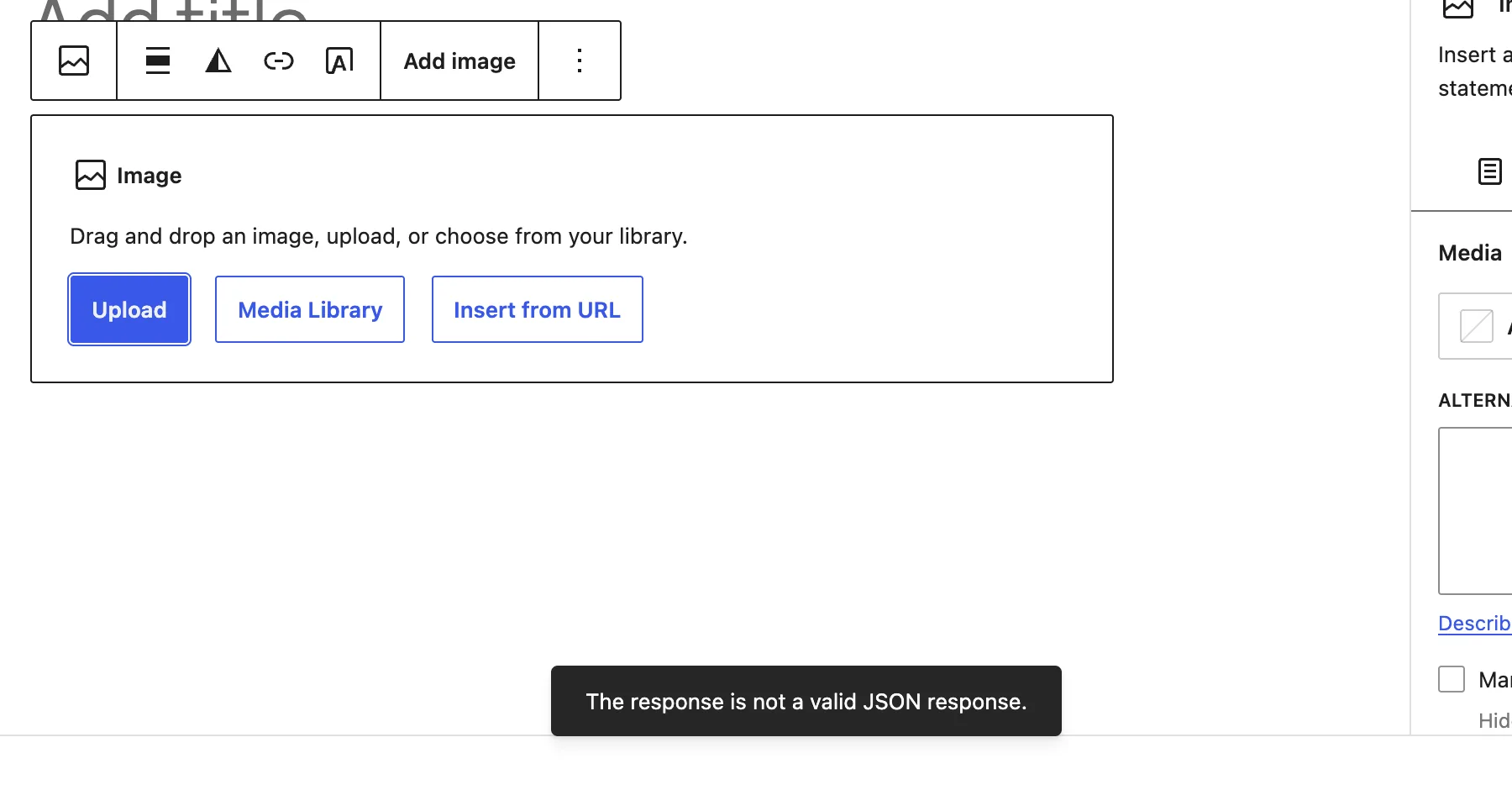
| Block editor, Image block | A small dark notice: "The response is not a valid JSON response." |
Here is the form case on Apache 2.4.69, with a 2.5 MB zip and LimitRequestBody at 1 MB:
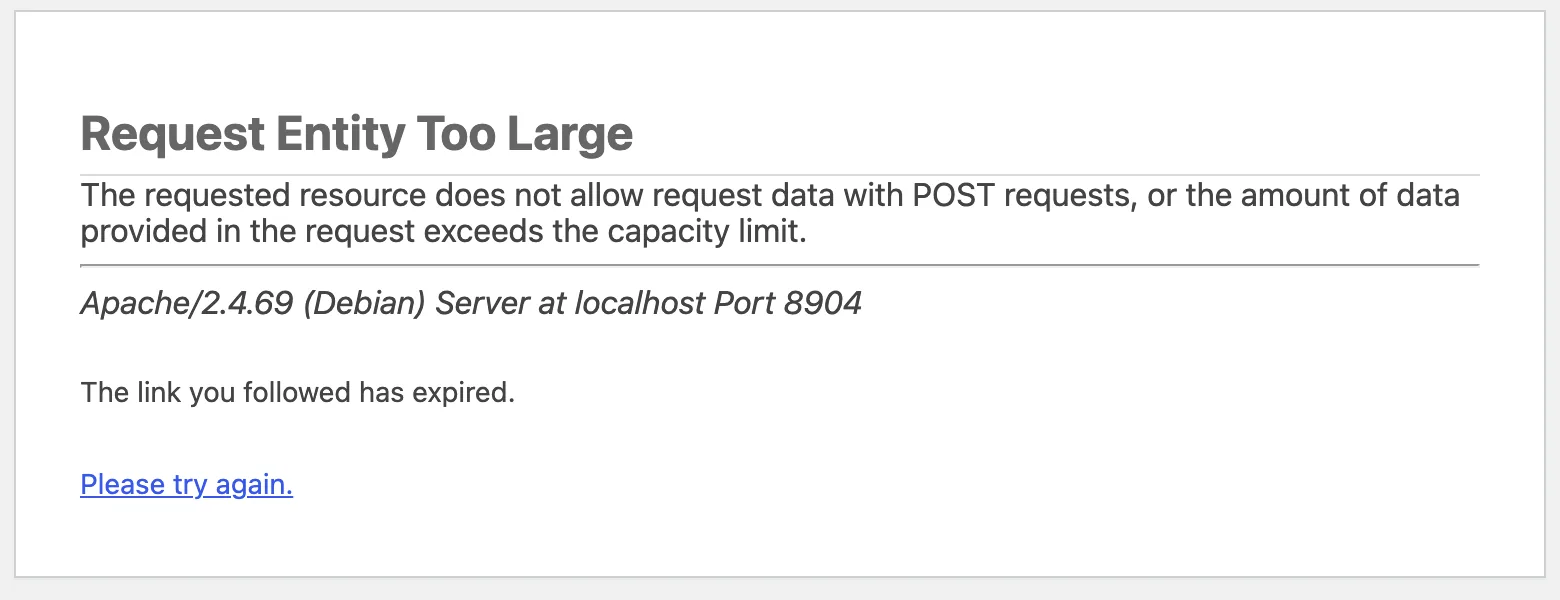
The last two lines are not a second error. On Apache with PHP as a module, Apache sent its 413 and WordPress still started, with no form data. Its security check then failed and added "The link you followed has expired." The status code stayed 413. I did not test PHP-FPM.
The drag-and-drop uploader is the one that confuses people. It shows no 413 at all:
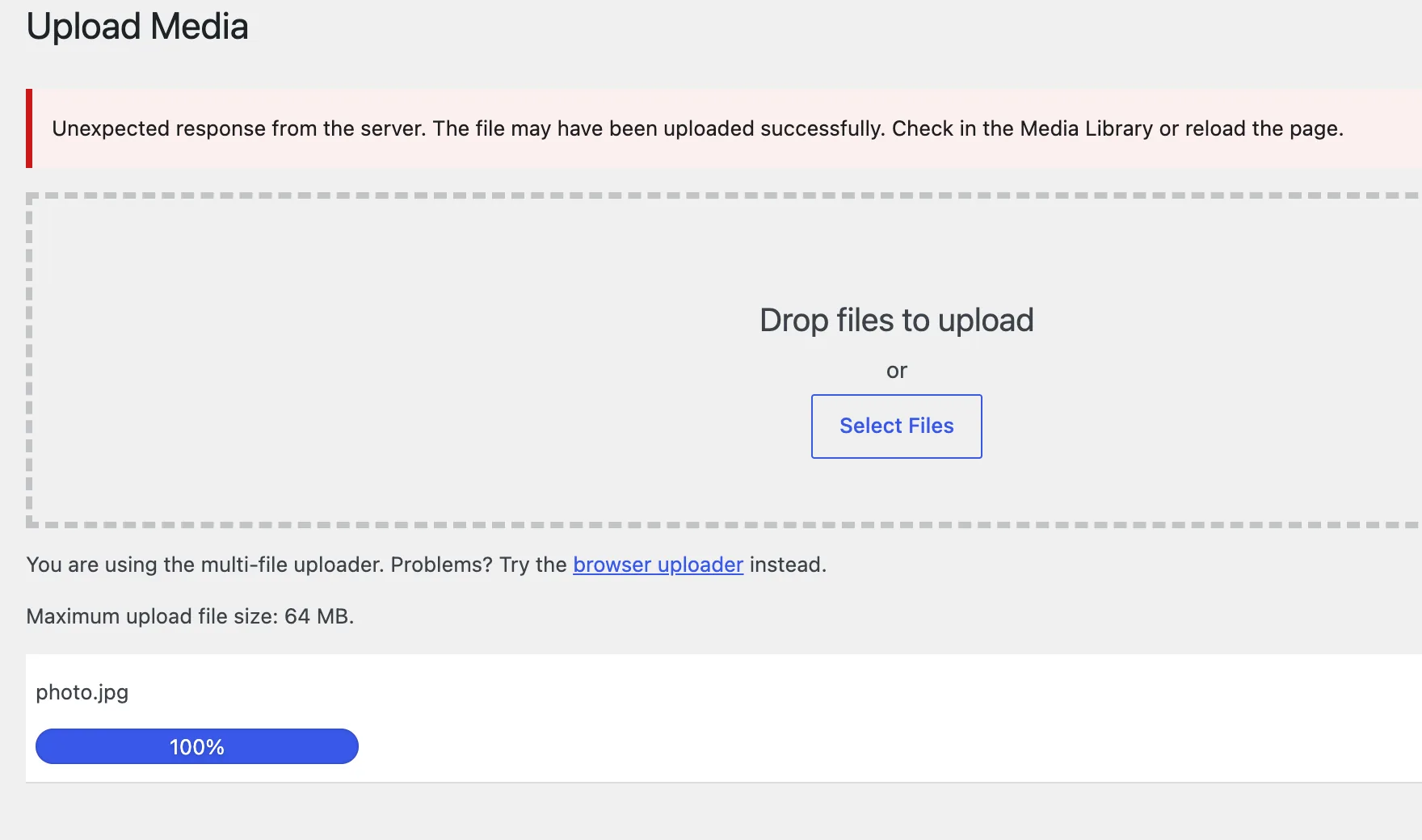
The text comes from the string http_error in wp-includes/script-loader.php. The uploader shows it for any answer it cannot read, so the banner never says 413. The number under the box, "Maximum upload file size: 64 MB", only reflects PHP's limits. WordPress cannot see the web server's.
The block editor shows yet another sentence:
The two tools that see the status are curl and your browser's network panel:
curl -i -F "async-upload=@photo.jpg" https://example.com/wp-admin/async-upload.phpHTTP/1.1 413 Request Entity Too LargeServer: Apache/2.4.69 (Debian)Connection: closeContent-Type: text/html; charset=iso-8859-1Note that Connection: close. The server hangs up on the request. nginx's documentation warns that "browsers cannot correctly display this error", which is why you may see a stuck bar or a generic failure instead of the page.
How it works#
A request passes several gates before WordPress saves the file. The web server is first. It reads the size of the request, compares it with its limit, and answers 413 at once if it is over. WordPress never receives the file (on nginx, PHP does not even start), so nothing in debug.log and nothing in WordPress can show you why.
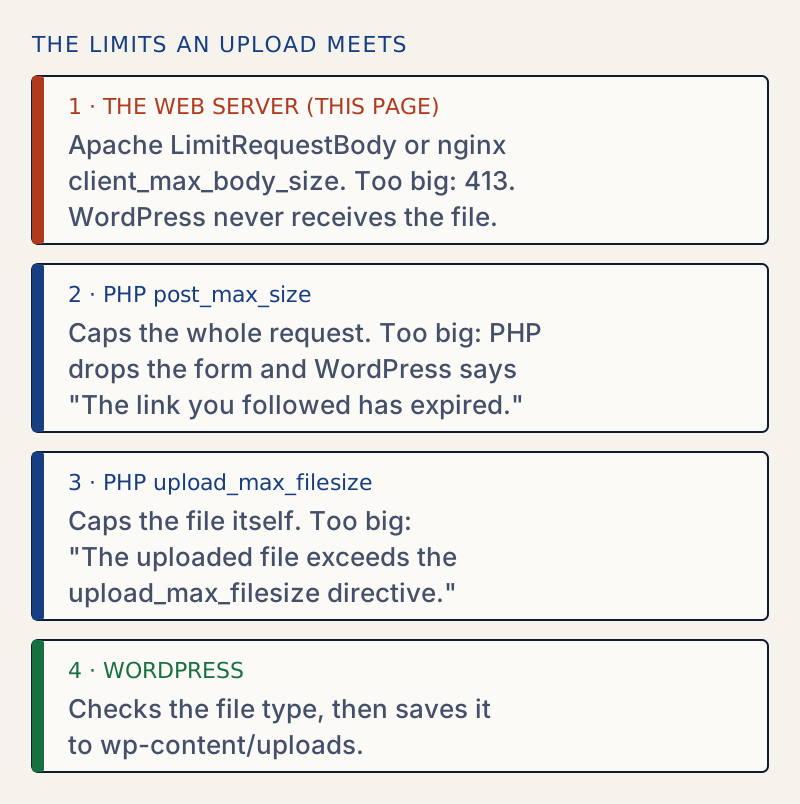
I made each gate refuse the same 2.1 MB photo, one at a time, with the other two set to 64 MB. All requests went to wp-admin/async-upload.php with a valid login and nonce:
| Gate set low (1 MB) | Status | What came back |
|---|---|---|
LimitRequestBody 1048576 | 413 | Apache's "Request Entity Too Large" page |
PHP post_max_size | 403 | WordPress's "The link you followed has expired." |
PHP upload_max_filesize | 200 | {"success":false,"data":{"message":"The uploaded file exceeds the upload_max_filesize directive in php.ini."}} |
| None (all 64 MB) | 200 | {"success":true,...} and the file in the library |
Only the first one is a 413. A 403 or a readable PHP message means you are past the web server. That is the quickest way to tell whether this page is the right one.
Where the limit counts#
The limit is on the size of the whole request, not of your file. A form upload adds a few hundred bytes of header and boundary text. With LimitRequestBody 1048576, I sent plain bodies of three sizes to a page that does not care:
| Body size (bytes) | Status |
|---|---|
| 1,048,000 | 200 |
| 1,048,576 | 200 |
| 1,049,000 | 413 |
So a file just under the limit can still be refused. A static file on the same site, readme.html, also answered 413 to a big POST. The limit applies to the folder, not to WordPress.
Two servers in a row#
Many hosts put nginx in front of Apache. Each one has a limit, and the smaller one wins. I ran an nginx container in front of the lab's Apache, with one 2.1 MB photo:
nginx client_max_body_size | Apache LimitRequestBody | Result | Whose page |
|---|---|---|---|
| 1m | 1 MB | 413 | nginx |
| 64m | 1 MB | 413 | Apache |
| 64m | 64 MB | 200 | none |
| 1m | 64 MB | 413 | nginx |
| 0 | 64 MB | 200 | none |
The second row is the trap. After raising nginx, the 413 stayed, and the Server header still said nginx/1.31.8, because nginx passes Apache's answer through and puts its own name on it. Only the page text, Apache/2.4.69 (Debian) Server at …, showed who refused. When nginx itself refuses, its error log says:
[error] client intended to send too large body: 2081447 bytes, client: 192.168.65.1, server: , request: "POST /wp-login.php HTTP/1.1", host: "localhost:18413"Apache's default is not the cause#
Older guides say Apache has no limit by default. That is true up to Apache 2.4.53. From 2.4.54 the default is 1 GiB. I tested the lab's Apache 2.4.69 with no LimitRequestBody line at all: a 1 GiB request returned 200 and a 1100 MB request returned 413. For a photo or a plugin, you will never reach that. If Apache refuses a small file, someone set a limit, so look for the line.
What does not fix it#
ini_set()orupload_max_sizeinfunctions.php. A 413 happens before PHP can read the file, so no PHP code can change it. Also,upload_max_sizeis not a PHP setting; the real names areupload_max_filesizeandpost_max_size. The sibling page file exceeds the maximum upload size shows thatini_set()returnsfalsefor both anyway.php_valuelines in.htaccessfor a 413 from nginx. nginx does not read.htaccessat all.- Raising only the PHP limits. On the lab,
post_max_sizeandupload_max_filesizeat 64M andLimitRequestBodyat 1 MB still gave 413. - Clearing the browser cache. The response comes from the server and I confirmed the status in the network panel each time.
Other pages that may be the real problem#
If the status is 403 and the page says "The link you followed has expired.", see that page. A 403 with the web server's own page is something else; see 403 Forbidden. A 504 after a long wait is a timeout, not a size limit; see 504 Gateway Timeout. A 500 after you edit .htaccess means a line your server does not understand; see 500 Internal Server Error. To read PHP's two limits at any time, use Tools → Site Health → Info → Media Handling; the Site Health guide explains that screen.
Sources
- Apache core: LimitRequestBody · Default 1073741824 (2.4.54 and later), 0 means unlimited, allowed in .htaccess
- nginx ngx_http_core_module: client_max_body_size · Default 1m, 413 when exceeded, 0 disables the check, and that browsers cannot correctly display the error
- 413 Content Too Large, MDN · The status: the request was larger than limits defined by the server. Former name Payload Too Large
- PHP manual: core php.ini directives · post_max_size and upload_max_filesize
- WordPress core, script-loader.php (uploader strings) · The http_error string the multi-file uploader shows for any bad response
One email when something breaks or changes.
New plugins and re-tested guides, about twice a month. Never a sales pitch.