Why it happens
- One request takes longer than the proxy is willing to wait. nginx waits 60 seconds by default for PHP-FPM to send anything. An import, a backup, a big export or a slow call to another website can pass that.
- The proxy's limit was set low, by you or by your host. A host's limit can be shorter than nginx's default, and you cannot see it in WordPress.
- PHP-FPM has no free worker, or the database is stuck, so even a light request waits. The log line looks the same; the access log shows that normal pages are slow too.
- The 504 is not from your server at all but from a CDN, load balancer or host proxy in front of it. Its limit is separate and cannot be changed in
wp-config.php.
How to fix it
Try the fixes in this order. Each one is independent: stop as soon as the error is gone.
Find out which server sent it
- WordPress never writes a 504 page. The page is plain and unstyled, with no theme and no WordPress text. nginx titles it "504 Gateway Time-out" and names itself under a line:
nginx/1.31.8. Apache says "Gateway Timeout" and ends withApache/2.4.69 (Debian) Server at localhost Port 8962. Many hosts hide that last line. - Open your browser's developer tools, Network tab, click the failed request and look at the
Serverresponse header.nginxorApachemeans your own server. The name of a CDN or other service means the 504 came from that service, and its timeout is the one to look up. - A page with your theme around it and the words "There has been a critical error on this website" is a different problem: PHP failed inside WordPress. See the critical error page.
Read the proxy's error log
- The browser page says nothing about the reason. The log does. On nginx it is usually
/var/log/nginx/error.log. Hosts with a control panel show it under Logs or Error log. - A real timeout on nginx logs:
upstream timed out (110: Operation timed out) while reading response header from upstream, followed by the request, for examplerequest: "GET /?sleep=12 HTTP/1.1". The request in the line is the slow page. - On Apache with PHP-FPM, the error log has:
(70007)The timeout specified has expired: [client ...] AH01075: Error dispatching request to :8962: (polling). - If the line says
Connection refusedorupstream prematurely closed connectioninstead, PHP-FPM is down or crashed. That is a 502, not a timeout. Use the 502 Bad Gateway page.
Find the slow request
- The request in the log line tells you which URL is slow. A URL under
/wp-admin/such asadmin-ajax.php,import.phporupdate.phppoints at an admin job./wp-cron.phpor/wp-json/points at a scheduled task or a REST call. - If every page is slow, not just one, the cause is not one plugin. Look at load on the server, the database, or the number of PHP workers.
- To see how long PHP really takes, add
access.format = "%{%H:%M:%S}t %m %r%Q%q status %s took %{seconds}ds"to the PHP-FPM pool file and restart PHP-FPM. On my test site it loggedGET /index.php?sleep=12 status 200 took 12.242sfor a request the visitor saw as a 504. - To find the plugin, turn plugins off one at a time and repeat the slow action, or turn on the debug log and read the WordPress debug log guide.
Raise the proxy's timeout for the slow page (nginx)
- In the nginx site file, find the
location ~ \.php$block that hasfastcgi_pass. Addfastcgi_read_timeout 60s;or a larger value, for examplefastcgi_read_timeout 300s;. - To keep the short limit for visitors and give only the admin a long one, add a second block above it:
location ~ ^/wp-admin/.*\.php$ { ... fastcgi_read_timeout 300s; }with the sameincludeandfastcgi_passlines. In my test, a front-end request withsleep=8got a 504 after 5.0 seconds under a 5 second limit, and/wp-admin/admin-ajax.php?sleep=8answered after 8.0 seconds. - Check the file and reload:
nginx -tthennginx -s reload. With a 30 second limit, my 12 second request returned status 200 after 12.3 seconds instead of a 504. - The limit is a wait for the next bit of data, not for the whole page. nginx documents it as the time between two successive reads. A page that sends output regularly can run longer than the number.
- Also raise PHP's
max_execution_timeabove your new proxy limit if the job is busy, otherwise PHP stops it first. See below, and maximum execution time exceeded.
Raise the proxy's timeout (Apache with PHP-FPM)
- This only applies when Apache hands PHP to PHP-FPM through
mod_proxy_fcgi. With PHP as an Apache module (mod_php) there is no gateway, so Apache cannot answer 504 for a slow script. I checked: a script that ran pastmax_execution_timeonmod_phpended with a 500 after 3.1 seconds. - In the Apache config, set
ProxyTimeout 300. Its default is the value ofTimeout, which is 300 in the Debian config I used. - My test used
ProxyTimeout 5and got "Gateway Timeout" after 5.0 seconds. WithProxyTimeout 30, the same 12 second request returned 200 after 12.1 seconds. Restart Apache after the change.
On managed hosting, ask for the limit
- On a host where you cannot edit nginx or Apache, the limit is theirs. Open a ticket with the URL, the time of the failure and how long the action takes, and ask what their proxy timeout is and whether it can be raised for that page.
- Do not raise
max_execution_timein the hope it will help. It does not move the proxy's clock.
Make the slow request shorter
- A longer limit hides the problem and holds one PHP worker for longer. If the job is an import or export, split it into smaller files or date ranges.
- If the plugin has a WP-CLI command, run it there. PHP on the command line has no time limit: on my test site
php -iunder CLI showedmax_execution_time => 0, and there is no proxy in the way. - If the slow part is a call to another website, see cURL error 28. That website is the thing to fix or to skip. PHP waits for it and the proxy's clock keeps running.
Check before you try again
- A 504 does not stop PHP. In my test the visitor got a 504 after 5 seconds, and PHP finished the request with status 200 at 12.2 seconds. An import, a save or an update may have completed after you saw the error.
- Before you click again, look at the result: the imported posts, the plugin version, or the saved setting. Running a non-repeatable job twice can import everything twice.
A 504 means a server that passes requests on to PHP waited too long and gave up. PHP is not the one that sent it, and WordPress did not write the page. The fix is in the limit of that server, or in making the request shorter.
What you see#
The browser shows a short, plain page. It has no theme and no WordPress text, so it looks different on each server:

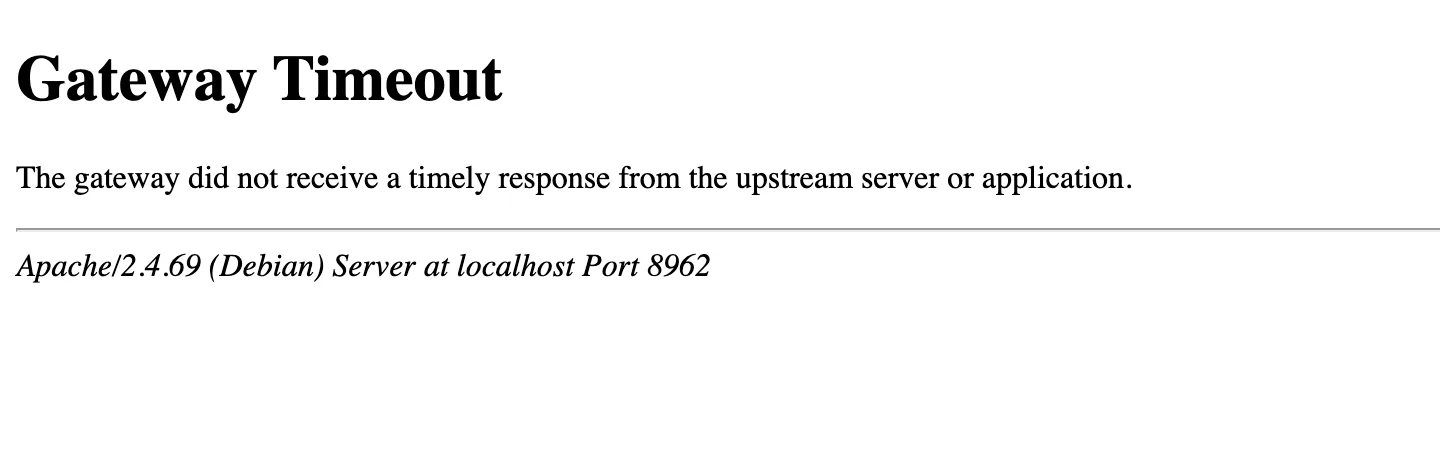
The two servers use different words. Search engines and guides mix them up, so match the page you see to the right row:
| Where it was captured | Status line | Page heading | Log line |
|---|---|---|---|
| nginx 1.31.8 + PHP-FPM | 504 Gateway Time-out | 504 Gateway Time-out | upstream timed out (110: Operation timed out) while reading response header from upstream |
Apache 2.4.69 + PHP-FPM (mod_proxy_fcgi) | 504 Gateway Timeout | Gateway Timeout | (70007)The timeout specified has expired ... AH01075: Error dispatching request ... (polling) |
The nginx log text is Operation timed out, not Connection timed out, in the nginx image I used on Linux. The number 110 is the same code in both wordings.
WordPress's own list of status texts, get_status_header_desc() in wp-includes/functions.php, says "Gateway Timeout" for 504. I searched the 7.1.4 files for 504 and found no place where core sends one. The other hits are the HTTP library's names for a 504 answer that WordPress receives from another site.
How it works#
With nginx or Apache in front of PHP-FPM, the visitor never talks to PHP directly. The web server forwards the request and waits. If PHP sends nothing for longer than the server's limit, the server closes the connection and answers 504 itself.
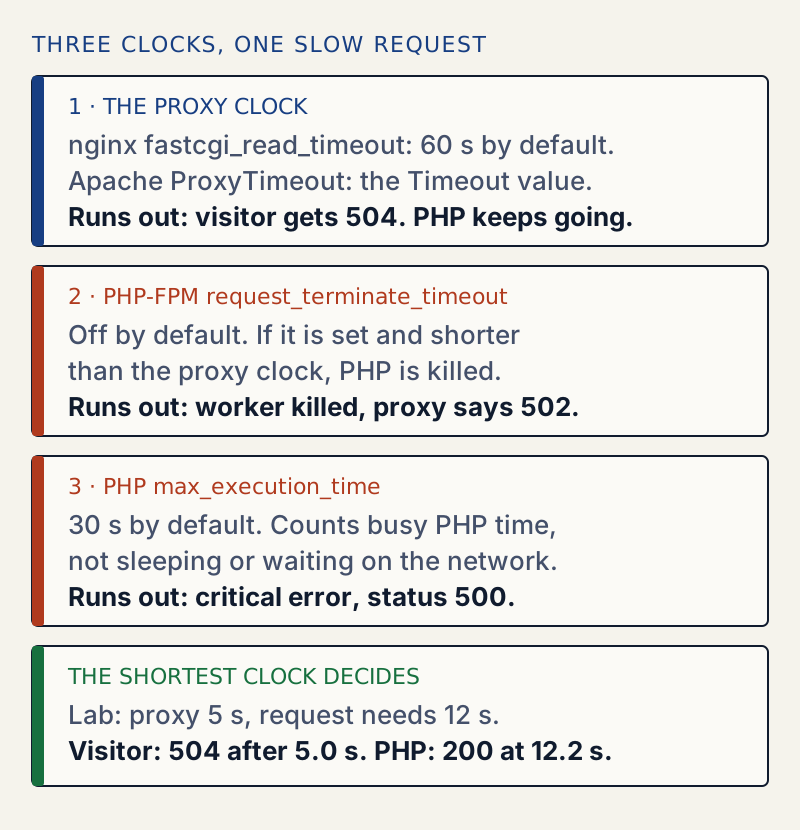
I tested each clock on one site: WordPress 7.1.4, PHP 8.3 with PHP-FPM, nginx in front. A small test plugin made the page slow, either by sleep() or by a busy loop. The proxy limit was 5 seconds:
| Request | PHP limits | What the visitor got | What PHP did |
|---|---|---|---|
| Sleeps 12 s | max_execution_time 30 | 504 after 5.0 s | Finished with 200 after 12.2 s |
| Busy loop 8 s | max_execution_time 60 | 504 after 5.0 s | Finished with 200 after 8.3 s |
| Busy loop 8 s | max_execution_time 3 | 500 after 3.1 s (critical error page) | Maximum execution time of 3 seconds exceeded in the log |
| Sleeps 12 s | max_execution_time 3, proxy 30 s | 200 after 12.3 s | Sleeping does not count |
| Sleeps 8 s | request_terminate_timeout 3 s | 502 after 3.9 s | Worker killed with SIGTERM |
| Sleeps 12 s | request_terminate_timeout 8 s | 504 after 5.0 s | Proxy was faster |
A 504 is therefore a message about waiting, not about work. This is why the usual advice to raise the PHP memory limit or max_execution_time often does nothing: PHP is not the one that gave up. See maximum execution time exceeded for what happens when PHP's own clock runs out first, and 502 Bad Gateway for the killed-worker case.
The proxy's request log shows it#
Here is what my nginx wrote for the first row of the table, and what PHP-FPM wrote about the same request:
2026/10/30 07:29:37 [error] 23#23: *7 upstream timed out (110: Operation timed out) while reading response header from upstream, client: 172.23.0.1, server: , request: "GET /?sleep=12 HTTP/1.1", upstream: "fastcgi://172.23.0.12:9000", host: "localhost:8961"07:29:32 GET /index.php?sleep=12 status 200 took 12.242sPHP started the request at 07:29:32, nginx gave up at 07:29:37, and PHP finished anyway. The visitor was gone, but the work was done.
It also breaks the editor and other background calls#
A request from the block editor or a plugin's screen is a normal request, so a slow one gets the same page. The editor expects JSON, and a 504 page is HTML. I made a slow REST request through the proxy:
curl -s -D - "http://localhost:8961/?rest_route=/wp/v2/types&sleep=8"HTTP/1.1 504 Gateway Time-outContent-Type: text/html...<html><head><title>504 Gateway Time-out</title></head>This is the usual reason behind "Updating failed. The response is not a valid JSON response." See that page to tell it apart from other causes.
What the default limits are#
| Setting | Where | Default |
|---|---|---|
fastcgi_read_timeout | nginx, between two reads from PHP-FPM | 60 s |
ProxyTimeout | Apache mod_proxy, including proxy_fcgi | The Timeout value (300 s in the Debian config I used) |
request_terminate_timeout | PHP-FPM pool | 0, which is off |
max_execution_time | PHP, web requests | 30 s |
I confirmed the nginx default: a config with no fastcgi_read_timeout line gave a 504 after 60.05 seconds for a 70 second request.
If a long update triggers it, updating plugins safely shows how to run updates one at a time.
If it only happens sometimes#
A request that is slow at busy hours and normal at quiet hours usually waits for something shared, not a plugin: no free PHP-FPM worker, a busy database, or a slow outside service. Raising the timeout makes people wait longer for the same slow answer. Check the access log for slow requests of every URL, and ask your host whether PHP workers run out.
Sources
- 504 Gateway Timeout - HTTP status, MDN · what the status means: a gateway got no response in time
- nginx ngx_http_fastcgi_module: fastcgi_read_timeout · 60 second default, measured between two reads
- Apache mod_proxy: ProxyTimeout · default is the Timeout value
- PHP manual: FPM configuration, request_terminate_timeout · kills the worker; off by default
One email when something breaks or changes.
New plugins and re-tested guides, about twice a month. Never a sales pitch.