Why it happens
- PHP-FPM is stopped, crashed or restarting, so nginx finds nothing listening where it sends PHP requests. The nginx log says
connect() failed (111: Connection refused)or(2: No such file or directory). - nginx may not open the PHP-FPM socket because of its owner or mode. The log says
(13: Permission denied). - A PHP worker died while it was answering, for example killed by the system or stopped by PHP-FPM's
request_terminate_timeout. The log saysrecv() failed (104: Connection reset by peer). - PHP sent response headers bigger than nginx's header buffer, often a very large cookie. The log says
upstream sent too big header while reading response header from upstream. - A plugin or theme crashes the PHP process outright (a segmentation fault, not an ordinary PHP error).
How to fix it
Try the fixes in this order. Each one is independent: stop as soon as the error is gone.
Find out which part is broken
- Open a few addresses: your home page,
/wp-login.php, and a picture or stylesheet. With PHP-FPM stopped on my test server, every PHP address returned 502 (/,/wp-login.php,/wp-admin/,/wp-json/), while/readme.htmland an image still returned 200. If static files load and every PHP page fails, PHP-FPM is the problem. If only one URL fails, suspect one plugin or one big response. - Look at the page. A plain white page headed "502 Bad Gateway" with
nginxat the bottom comes from the web server, not from WordPress. WordPress never sends a 502 itself. - Run a command that does not use the web server. WP-CLI runs PHP directly, so
wp core versionworked while the site returned 502. That shows WordPress and the database are fine and the fault is between the web server and PHP.
Read the nginx error log
- The log is usually
/var/log/nginx/error.log. Many hosts show it under Logs in the hosting panel. In Docker, usedocker logson the nginx container. - Find the line with the time you loaded the page, then use the table in this page to match it. The words in brackets after
failedare the reason. - If your host does not let you read the log, send them the time of the error and the page address and ask what their log says. That is all they need.
Start or restart PHP-FPM
- Use this for
Connection refusedorNo such file or directory. On a server you manage, runsudo systemctl restart php8.3-fpm(the service is calledphp8.3-fpmon Debian and Ubuntu and oftenphp-fpmelsewhere; use your PHP version). On managed hosting, use Restart PHP in the panel, or ask support. - I tested this by stopping the PHP-FPM container and starting it again. The site went from 502 to 200 as soon as PHP-FPM was back, with no change to WordPress.
- If PHP-FPM stops again, read its own log. A line like
child 11 exited on signal 9 (SIGKILL)means something killed the worker, often the system running out of memory.
Make the socket path and permissions match
- Use this for
Permission denied, or forNo such file or directorywhen PHP-FPM is running. Compare two lines. In the nginx site file,fastcgi_pass unix:/run/php/php-fpm.sock;. In the PHP-FPM pool file (for example/etc/php/8.3/fpm/pool.d/www.conf),listen = /run/php/php-fpm.sock. The paths must be identical. - The pool's
listen.owner,listen.groupandlisten.modedecide who may connect. The default mode is0660, so the user nginx runs as must be that owner or in that group. In my test, the socket belonged towww-datawith mode0660and nginx runs asnginx, so every PHP request failed with(13: Permission denied). Settinglisten.ownerandlisten.groupto the nginx user fixed it. Many setups uselisten.owner = www-dataandlisten.group = www-dataand run nginx aswww-data, which also works. - Restart PHP-FPM so it recreates the socket, then reload nginx with
sudo nginx -s reload. Check the config first withsudo nginx -t. - One extra thing I hit: a second PHP-FPM pool does not inherit WordPress's database settings if they come from environment variables. Pools clear the environment unless
clear_env = nois set, and my first fixed pool showed "Error establishing a database connection" until I added it. That only matters on setups that pass the database details through the environment.
Raise nginx's header buffer for a too-big header
- Use this for
upstream sent too big header. In the nginxlocation ~ \.php$block, addfastcgi_buffer_size 32k;andfastcgi_buffers 8 16k;, then runsudo nginx -tandsudo nginx -s reload. - I tested it with a 9,000-byte header: with nginx's default buffer it returned 502, and with
fastcgi_buffer_size 32kthe same URL returned 200. The nginx documentation says that if the first part of the response exceeds the buffer, "the response is considered invalid". - Also find out why the header is so big. A plugin that sets a long cookie or many cookies is the usual reason. Fixing that is better than a bigger buffer.
Stop a PHP worker from being cut off
- Use this for
recv() failed (104: Connection reset by peer)together with a PHP-FPM log line that saysexecution timed out ... terminating. - In the pool file,
request_terminate_timeoutkills a worker that runs too long. It is off by default (0). If someone set it low, a slow page (a big import, a backup, an admin screen) is cut off and the visitor gets a 502. I set it to 2 seconds on a page that took 5, and got a 502 after 2.0 seconds. - Raise the value, or fix what is slow. If instead nginx gives up waiting, that is a 504; see 504 Gateway Time-out. Compare with maximum execution time exceeded: that is PHP's own limit and WordPress shows it as an error message. A 502 from this cause means PHP-FPM cut the worker off before PHP could say anything.
Turn off the plugin that crashes PHP
- Use this when the 502 started right after a plugin or theme change, or when it only happens on some pages. With WP-CLI,
wp plugin deactivate PLUGIN-NAMEworks while the site is down, because WP-CLI does not go through PHP-FPM. Without WP-CLI, rename the plugin's folder inwp-content/pluginsby SFTP. - I tested this with a plugin that ends the PHP process on request. With the plugin active the page returned 502. After
wp plugin deactivate lab-crashit returned 200. - Then turn plugins on one at a time to find the guilty one. See how to read the debug log for errors that WordPress can report. A real crash of the PHP process leaves nothing in
debug.log; look in the PHP-FPM log instead.
A 502 Bad Gateway means the web server in front of WordPress asked PHP for the page and did not get a usable answer. The web server writes the reason in its error log, so read that first. The most common cause is PHP-FPM not running; restarting it clears it. WordPress itself never sends a 502.
What you see#
A plain white page with a large "502 Bad Gateway" heading and the web server's name and version under a line. It has no WordPress styling, because WordPress did not run.

curl -i http://localhost:8990/HTTP/1.1 502 Bad GatewayServer: nginx/1.31.8Content-Type: text/htmlContent-Length: 157Note what is missing: there is no X-Powered-By: PHP header. That header only comes from PHP, so its absence tells you PHP never answered.
How a 502 is made#
nginx does not run PHP. It passes each PHP request to PHP-FPM, a separate program, over a socket (a file such as /run/php/php-fpm.sock) or a network port. When that hand-off fails or the reply is not usable, nginx makes the 502 page itself and writes the reason in its error log. This is the "gateway" in the name: the web server is a gateway to PHP, and it got a bad answer. MDN defines it as a server acting as a gateway or proxy that "received an invalid response from the upstream server".
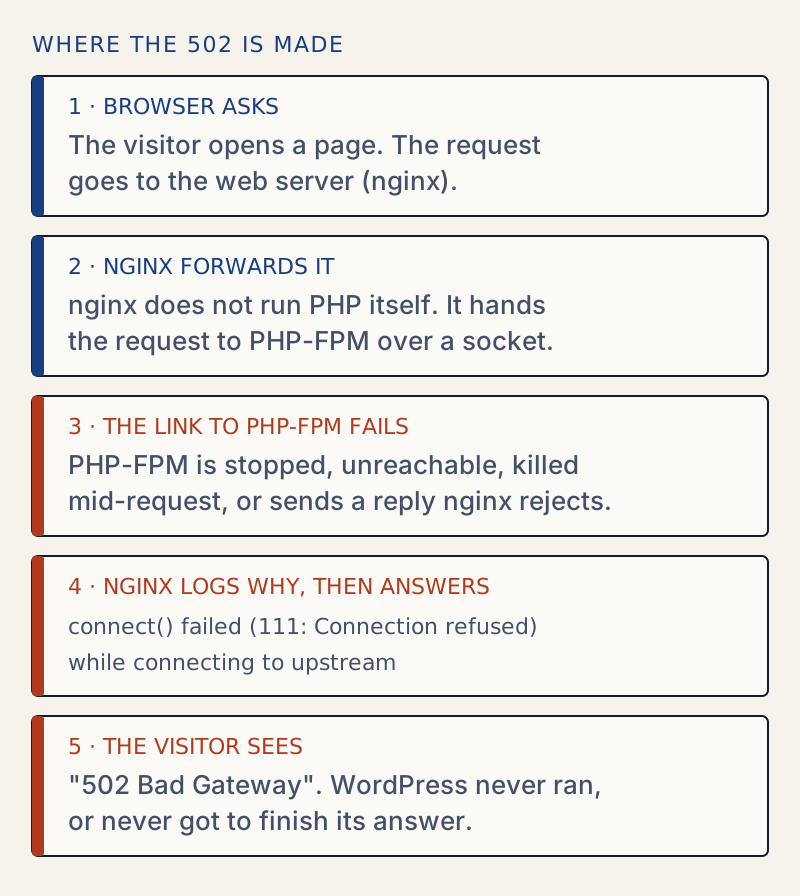
Match the log line to the fix#
I produced each of these on one test server and copied the log line. Server: nginx 1.31.8, PHP-FPM from PHP 8.3.36, WordPress 7.1.4, in Docker.
| What I did | nginx error log says | Fix |
|---|---|---|
| Stopped PHP-FPM (nginx and PHP-FPM sharing one network address) | connect() failed (111: Connection refused) while connecting to upstream ... upstream: "fastcgi://127.0.0.1:9000" | Start PHP-FPM |
| Stopped PHP-FPM, socket setup | connect() to unix:/run/php/php-fpm.sock failed (2: No such file or directory) | Start PHP-FPM, or fix the path |
Socket owned by www-data, mode 0660, nginx running as nginx | connect() to unix:/run/php/php-fpm.sock failed (13: Permission denied) | Set listen.owner and listen.group |
| PHP worker killed during the request | recv() failed (104: Connection reset by peer) while reading response header from upstream | Find what kills it |
| 9,000-byte response header | upstream sent too big header while reading response header from upstream | fastcgi_buffer_size |
request_terminate_timeout = 2, page takes 5 seconds | recv() failed (104: Connection reset by peer) | Raise or remove the timeout |
The first line of the table needs a note. When I stopped a separate PHP-FPM container that nginx reached by its Docker name, the log said (113: Host is unreachable) instead of 111. That is a Docker detail; on a normal server, a stopped PHP-FPM gives 111 or 2.
PHP-FPM writes its own side of the story. For the killed worker:
WARNING: [pool sock] child 11 exited on signal 9 (SIGKILL) after 18.706840 seconds from startAnd for the timeout:
WARNING: [pool sock] child 11, script '/var/www/html/index.php' (request: "GET /index.php?slow=1") execution timed out (2.021939 sec), terminatingWARNING: [pool sock] child 11 exited on signal 15 (SIGTERM) after 6.020629 seconds from start502 or 504: who gave up#
A 502 means nginx got a bad answer or none because the link broke. A 504 means the link was fine but PHP took too long to answer. I tested both on the same page, which takes 5 seconds to run:
| Setting | Result | nginx log |
|---|---|---|
PHP-FPM request_terminate_timeout = 2 | 502 after 2.0 s | recv() failed (104: Connection reset by peer) |
nginx fastcgi_read_timeout 2s | 504 after 2.0 s | upstream timed out (110: Operation timed out) while reading response header from upstream |
The nginx default for fastcgi_read_timeout is 60 seconds. If your log says upstream timed out, you have a 504, not this error: see 504 Gateway Time-out.
A PHP error is not a 502#
I also tried an ordinary PHP fatal error (trigger_error with E_USER_ERROR) on the same nginx server. It returned 500, and the answer came from PHP. A crash that kills the worker returns 502. So a 502 with nothing in debug.log is normal: the process died before it could write anything. For fatal errors that PHP reports, see 500 Internal Server Error.
On Apache the same fault gives other codes#
Apache can also run PHP through PHP-FPM, using SetHandler "proxy:fcgi://..." in mod_proxy_fcgi. I pointed Apache 2.4.69 at the same PHP-FPM and repeated three faults. For these three, none gave a 502:
| Fault | Apache status | Apache error log |
|---|---|---|
| PHP-FPM stopped | 503 | (111)Connection refused: AH00957: FCGI: attempt to connect to ... failed and AH01079: failed to make connection to backend |
| Worker killed during the request | 503 | (104)Connection reset by peer: ... AH01075: Error dispatching request |
| 9,000-byte response header | 500 | (22)Invalid argument: ... AH01075: Error dispatching request |
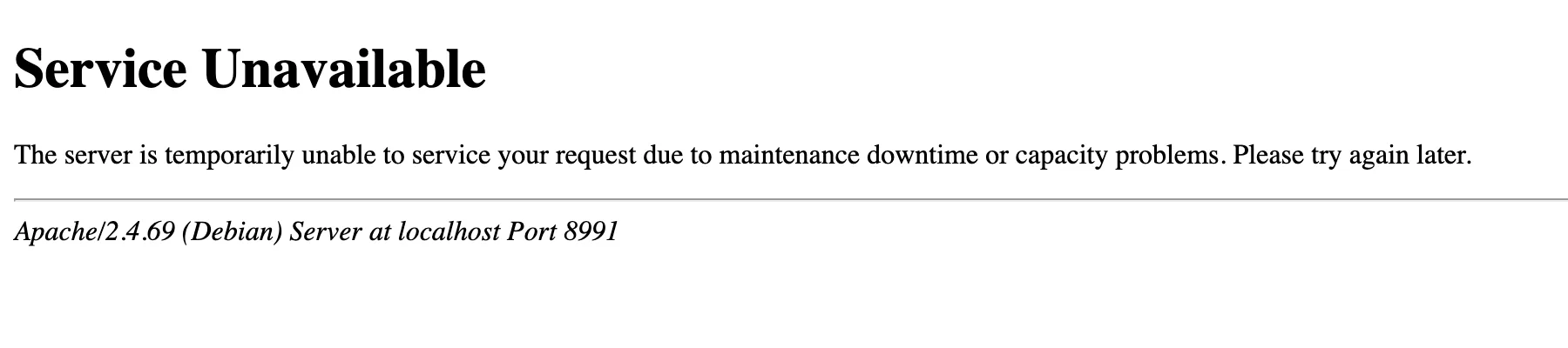
So if your host runs Apache and you see a 502, the 502 may come from something else in front of it, such as a load balancer or a CDN (a service that sits between visitors and your server). I could not test those. The page footer or the Server response header names who answered; that is the quickest way to tell.
503 from the server is not maintenance mode#
The Apache page above says "Service Unavailable", the same status WordPress uses during an update. They are different things:
| Server's 503 (PHP-FPM down) | WordPress maintenance 503 | |
|---|---|---|
| Text | "Service Unavailable ... due to maintenance downtime or capacity problems" | "Briefly unavailable for scheduled maintenance. Check back in a minute." |
X-Powered-By: PHP header | No | Yes |
Retry-After header | No | Retry-After: 600 |
| Cause | PHP-FPM or the backend is down | A .maintenance file in the WordPress folder |
| Fix | Start PHP-FPM | Delete .maintenance; see stuck maintenance mode |
I made the second column by creating a .maintenance file on the nginx server: status 503, Retry-After: 600, and the site returned 200 as soon as I deleted the file. The maintenance 503 comes from wp_maintenance() in wp-includes/load.php. WordPress can send a 503 in a few other places too, but this is the one that matches the text above.
If the server is slow instead of dead, you have a 504 Gateway Time-out.
Things that will not fix it#
Clearing your browser cache or flushing your computer's DNS cache does not change a response that your server produced. Reloading the page is worth one try, because a PHP-FPM restart can cause a brief 502. If it lasts more than a minute, use the log.
Sources
- 502 Bad Gateway - HTTP, MDN · What the status means: a gateway or proxy got an invalid response from the upstream server.
- nginx ngx_http_fastcgi_module · fastcgi_buffer_size, fastcgi_buffers and fastcgi_read_timeout, with their defaults.
- PHP: PHP-FPM configuration · listen.owner, listen.group, listen.mode, request_terminate_timeout and clear_env.
- Apache mod_proxy_fcgi · How Apache is pointed at PHP-FPM with SetHandler proxy:fcgi. It does not list the status codes in the table above; those are from my own test.
- WordPress core: wp_maintenance() in load.php · Where WordPress sends the maintenance-mode 503, with Retry-After: 600.
One email when something breaks or changes.
New plugins and re-tested guides, about twice a month. Never a sales pitch.