Why it happens
- The file is bigger than PHP's
upload_max_filesizesetting, which is 2 MB on many servers. PHP refuses it and tells WordPress, and WordPress prints the message. This is the usual cause when you upload a plugin or theme zip. - The limit was raised in a place the server ignores. A
.user.inifile on Apache with PHP as a module, andini_set()inwp-config.php, both left the limit unchanged on my test site. - The host sets the limit for the whole account, so a value you set yourself cannot go above it.
How to fix it
Try the fixes in this order. Each one is independent: stop as soon as the error is gone.
Read the limit and compare it with your file
- Open Media → Add New. The line under the upload box says "Maximum upload file size: 1 MB." (your number will differ). That is the smaller of
upload_max_filesizeandpost_max_size. - For the two numbers behind it, open Tools → Site Health → Info → Media Handling. "Max size of an uploaded file" is
upload_max_filesize. "Max size of post data allowed" ispost_max_size. - Check the size of your file on your computer. On my test site the limit was 1 MB and the zip was 2,000,601 bytes, so it failed.
Raise both limits in your host's panel
- Look in your hosting panel for PHP settings, PHP options or MultiPHP INI Editor. This route works on every kind of server.
- Set
upload_max_filesizeandpost_max_sizeto the same value, a little above your biggest file. For example 64M for both. Keeppost_max_sizeat least as high asupload_max_filesize: the file travels inside the whole request. - I set both to 8M in the server's php.ini and restarted it. Media → Add New then said "Maximum upload file size: 8 MB." and the 2 MB plugin zip installed.
- If your host does not show these settings, ask the host to raise them.
Apache with PHP as a module: use .htaccess
- Add these two lines at the top of the
.htaccessfile in the WordPress folder, above the# BEGIN WordPressblock:php_value upload_max_filesize 64Mandphp_value post_max_size 64M. - On my test site (Apache with
mod_php) the page said "Maximum upload file size: 8 MB." on the next load, for 8M values, and the zip installed. - If you are not sure how PHP runs, Tools → Site Health → Info → Server shows "PHP SAPI".
apache2handlermeans a module. On other setups, such asfpm-fcgi,php_valuelines can cause a 500 error. I did not test that case. If it happens, remove the lines. See 500 Internal Server Error.
PHP-FPM or CGI: use a .user.ini file
- Create
.user.iniin the WordPress folder withupload_max_filesize = 64Mandpost_max_size = 64M. PHP's manual listsupload_max_filesizeas a setting these files can change. - PHP rereads the file only every 5 minutes by default (
user_ini.cache_ttl), so wait before you test. I could not test this on FPM. - Do not use it on Apache with PHP as a module. There I created the file with 8M and 8M and the limit stayed at 1 MB.
Skip the upload form
- Unzip the plugin or theme on your computer, upload the folder to
wp-content/pluginsorwp-content/themesover SFTP, and activate it from the dashboard. - With WP-CLI,
wp plugin install /path/to/plugin.zipandwp theme install /path/to/theme.zipignore the form limit. At a 1 MB limit I installed the 2 MB zip this way: "Plugin installed successfully." - For pictures,
wp media import /path/photo.jpgalso ignores it.
Do not bother with wp-config.php
- Many guides tell you to add
ini_set( 'upload_max_filesize', '64M' );towp-config.php. It does nothing for this setting. The PHP manual saysupload_max_filesizecannot be changed at runtime, and on my test site the limit stayed at 1 MB and the same error appeared. - Some guides also use the name
upload_max_size. That is not a PHP setting.
The file you uploaded is bigger than PHP's upload_max_filesize setting. WordPress did not choose the limit and cannot change it. PHP turned the file away, and WordPress printed PHP's reason. Raise the limit, or install the file without the upload form.
What you see#
On Plugins → Add Plugin → Upload Plugin and Appearance → Themes → Add Theme → Upload Theme, the whole page is replaced by one line in a white box. There is no heading and no back link.

I tried the file at a 1 MB limit on every upload screen I could find. Only some of them show this message:
| Screen | What I saw |
|---|---|
| Plugin zip upload | This message, alone on the page. HTTP status 500. |
| Theme zip upload | The same, status 500. |
| Media → Add New, "browser uploader" link | The same plain page, titled "WordPress › Error", status 500. |
Classic media-upload.php, browser uploader | The message appears inside the page, above the uploader. Status 200. |
| Tools → Import → WordPress | "Sorry, there has been an error." and under it this message. Status 200. |
| Media → Add New, normal drag and drop | Not this message. See below. |

The normal media uploader checks the file size in your browser first. At the same 1 MB limit it said "photo.jpg exceeds the maximum upload size for this site." and sent nothing. For that message, see file exceeds the maximum upload size for this site. You only get the PHP text there if something skips the browser check. Posting straight to async-upload.php returned {"success":false,"data":{"message":"The uploaded file exceeds the upload_max_filesize directive in php.ini.","filename":"photo.jpg"}}. A multipart POST to /wp/v2/media returned rest_upload_unknown_error with the same text and status 500.
How the message is made#
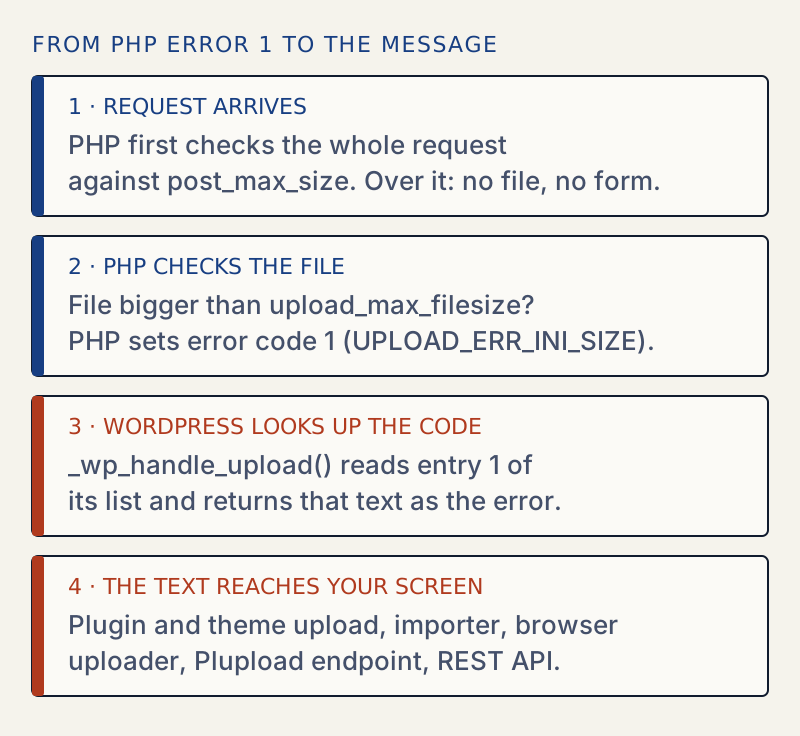
PHP checks the file before WordPress runs. If the file is over upload_max_filesize, PHP stores error code 1 (UPLOAD_ERR_INI_SIZE) in $_FILES and keeps no file. WordPress's _wp_handle_upload() holds a list of texts, one for each PHP error code. It looks up entry 1, and that is this sentence.
The text names php.ini, but the value may come from the host panel, .htaccess or another file. Change it wherever it is set. A related text in the same list, "The uploaded file exceeds the MAX_FILE_SIZE directive that was specified in the HTML form.", belongs to a hidden form field and is not this problem.
When the whole-request limit is the smaller one#
The other limit works differently. post_max_size caps the whole request. If a request is over it, PHP drops the entire request, so WordPress gets no file, no form fields and no error code. PHP's manual says $_POST and $_FILES are then empty. I reset the lab to upload_max_filesize = 8M and post_max_size = 1M and sent the same files:
| Screen | What I saw |
|---|---|
| Plugin zip upload | "The link you followed has expired. Please try again." Status 403. See the link you followed has expired. |
| Browser uploader on Media → Add New | The page reloaded with no message at all and nothing was uploaded. |
| Importer | "File is empty. Please upload something more substantial. This error could also be caused by uploads being disabled in your php.ini file or by post_max_size being defined as smaller than upload_max_filesize in php.ini." |
async-upload.php | Status 403 and the page "An error occurred." |
The Apache log held the real reason: PHP Warning: POST Content-Length of 1500500 bytes exceeds the limit of 1048576 bytes. So if you see the "link has expired" or "File is empty" message after a big upload, raise post_max_size. If you see this page's message, raise upload_max_filesize. Raise both to be safe.
One upload that ignores the limit#
A raw upload to the REST API, with the file as the request body and a Content-Disposition header, never goes through PHP's upload handling. At upload_max_filesize = 1M I sent a 1.27 MB JPEG that way and got 201 Created. Only post_max_size applies. This is why a mobile app or a script can succeed where the dashboard form fails.
Where to set it#
| Where | Result on Apache with PHP as a module |
|---|---|
| Host panel or the server's php.ini | Worked |
.htaccess with php_value | Worked |
.user.ini | Ignored, limit stayed at 1 MB |
ini_set() in wp-config.php | Ignored, same error |
| WP-CLI, SFTP | Not subject to the limit |
I did not test PHP-FPM. The PHP manual describes .user.ini as a way to change per-directory settings, and these are the files that apply on FPM and CGI.
If the web server refuses the file before PHP sees it, you get a 413 page instead; see 413 Request Entity Too Large. For more on the limits chain and the number WordPress shows, see file exceeds the maximum upload size for this site. To see the values on your site, read WordPress Site Health explained.
Sources
- PHP manual: Error Messages Explained (file uploads) · UPLOAD_ERR_* codes in $_FILES[...]['error']
- PHP manual: Core php.ini directives · upload_max_filesize and post_max_size are INI_PERDIR; an oversized POST leaves $_POST and $_FILES empty
- WordPress source: wp-admin/includes/file.php · _wp_handle_upload() holds the list of upload error strings
- wp_handle_upload() reference
- wp_max_upload_size() reference · the smaller of the two PHP limits
One email when something breaks or changes.
New plugins and re-tested guides, about twice a month. Never a sales pitch.