Why it happens
- The site sits behind a proxy, CDN or load balancer that handles HTTPS, and WordPress does not know the visitor used HTTPS. WordPress redirects to HTTPS, the proxy sends the request on as HTTP, and the cycle repeats.
- The WordPress Address or Site Address in Settings → General uses a different scheme or host from the one visitors use, for example
httpagainsthttps, orwwwagainst the bare domain. - A redirect rule in
.htaccess, the server config, a CDN or a hosting panel fights with WordPress, such as one forcingwwwwhile WordPress removes it. - A plugin that forces HTTPS, redirects URLs or restricts the login conflicts with the server or with another plugin.
- A stale or corrupt cookie keeps a request in a login redirect. This is the least likely cause, but it is the one browsers suggest.
How to fix it
Try the fixes in this order. Each one is independent: stop as soon as the error is gone.
Trace the redirects
- In a terminal, run
curl -skL --max-redirs 6 -D - -o /dev/null https://your-site.example/wp-admin/ | grep -i -E '^HTTP|^location'. This prints each status line and eachLocationheader. - Read the pattern. If the same
Locationaddress repeats, that address redirects to itself. If two addresses alternate, two rules disagree, such ashttpandhttpsorwwwand non-www. - Try several paths:
/,/wp-login.phpand/wp-admin/. When only the login and dashboard loop and the home page loads, the cause is usually HTTPS detection behind a proxy. That is what I reproduced. - Note which hostnames and schemes appear in the chain. They point at the setting or the rule at fault.
Teach WordPress about HTTPS behind a proxy
- Use this fix when your host, CDN or load balancer terminates HTTPS and passes plain HTTP to the web server, and the chain above loops on the same HTTPS address.
- Confirm the proxy sends a header that says the visitor used HTTPS. The common one is
X-Forwarded-Proto: https. Your host or CDN documentation says which header it sets. - Open
wp-config.php, keep a copy of it, and add the shortifblock shown under "The snippet for the proxy case" below. It goes directly aboverequire_once ABSPATH . 'wp-settings.php';, which is under the stop-editing line. - Reload
/wp-admin/. On my test site this ended a loop betweenhttps://localhost:8895/wp-admin/and itself. The login page then loaded. - The snippet does nothing if the proxy does not send the header. I tested that too: without the header, the same loop returned. In that case, ask your host which header carries the scheme, or turn on that option in the CDN.
Make the two site addresses match the real address
- Open Settings → General and compare WordPress Address (URL) and Site Address (URL) with the address in your browser bar. If you cannot reach the dashboard, use WP-CLI.
- Run
wp option get homeandwp option get siteurl, and write down both values before you change anything so you can put them back. A wrongsiteurllocks you out of wp-admin. If you are unsure, use the temporaryWP_HOMEandWP_SITEURLlines below instead of changing the options. - Both should use the scheme (
https) and host (with or withoutwww) that visitors use. - Set them with
wp option update home 'https://your-site.example'andwp option update siteurl 'https://your-site.example'. - Check
wp-config.phpforWP_HOMEorWP_SITEURL. If set, they override the database values, so changing the options has no effect until you fix or remove them. - Without WP-CLI, add
define( 'WP_HOME', 'https://your-site.example' );anddefine( 'WP_SITEURL', 'https://your-site.example' );towp-config.phpuntil you can reach the dashboard, then set the options and remove the lines.
Remove a conflicting redirect
- Look at
.htaccessin the WordPress root. Search for lines that start withRewriteCond %{HTTPS}orRewriteRuleand send visitors tohttps://or towww. - If the proxy handles HTTPS, a rule that tests only
%{HTTPS}always sees the plain-HTTP connection and always redirects. It needs to look at the forwarded header as well. I did not test this rule on a real proxy. - Check your CDN and hosting panel for a redirect setting, such as "Force HTTPS" or "Redirect www to non-www". Switch off all but one layer that forces HTTPS.
- Make sure the rule that redirects
wwwgoes in the same direction as WordPress's own addresses.
Switch off redirecting plugins
- With WP-CLI, run
wp plugin deactivate plugin-name --skip-pluginsfor a redirect, SSL, security or caching plugin. Without it, rename the plugin's folder over SFTP. - Reload
/wp-admin/. If it loads, reactivate the plugin and open its settings to turn off its HTTPS or redirect option, or fix the address it uses. - Clear any page cache or CDN cache. A cached redirect keeps looping after you fix the cause.
Clear cookies for the site
- Open the site in a private window. If it loads there, the cookie was the problem.
- In your browser's settings, delete cookies for the site only, then reload.
- If the private window loops as well, cookies are not the cause. Go back to the trace.
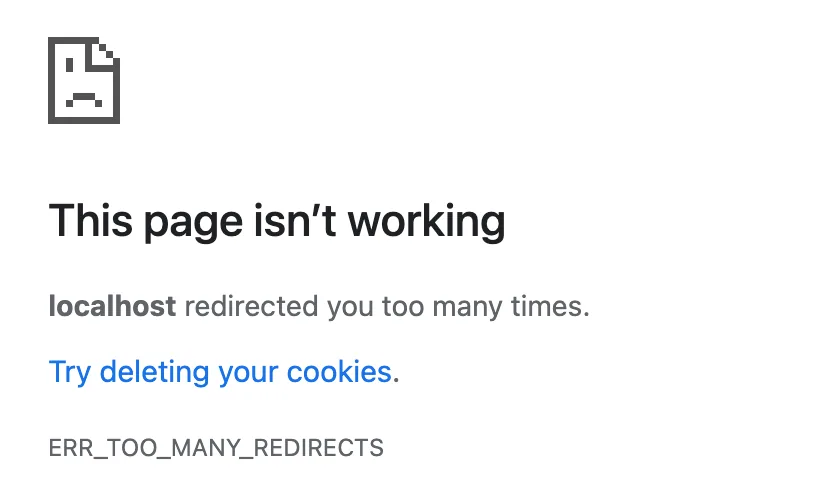
A redirect tells the browser to go to a different address. This error means the browser followed a long chain and never reached a page that answers. Chrome gives up after 20 redirects and shows its own message, quoted above. Firefox says "The page isn't redirecting properly", and Safari says it "can't open the page because too many redirects occurred".
The loop is almost always between two things that each insist on a different version of the address. Most of the work is finding which two.
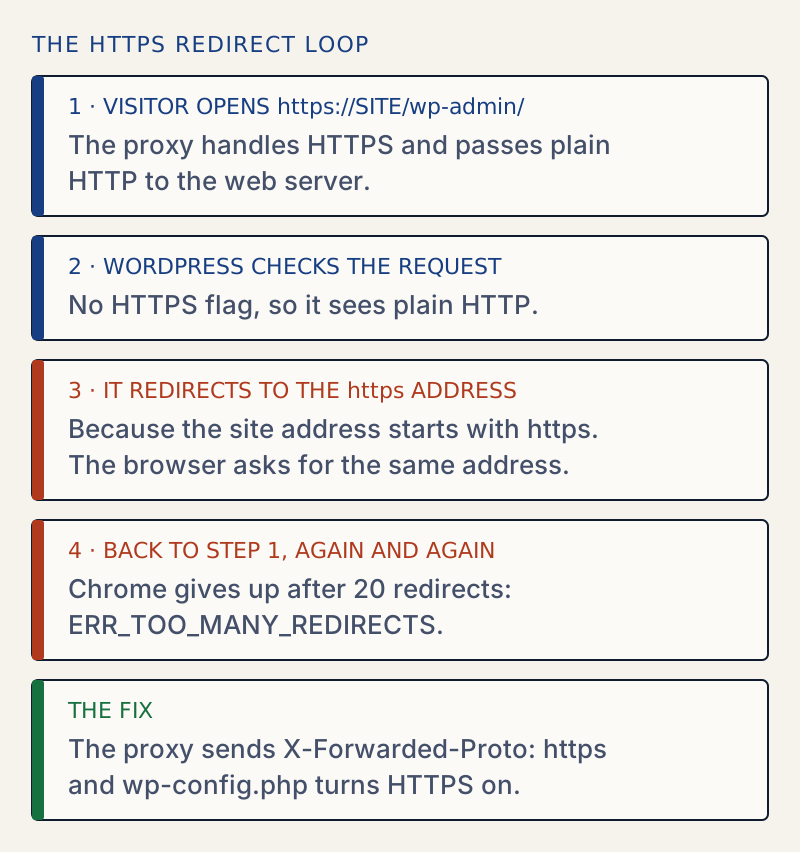
The loop has four steps, and the proxy is the one that hides the HTTPS from WordPress.
The snippet for the proxy case#
Add this to wp-config.php, above require_once ABSPATH . 'wp-settings.php';:
if ( isset( $_SERVER['HTTP_X_FORWARDED_PROTO'] ) && false !== strpos( $_SERVER['HTTP_X_FORWARDED_PROTO'], 'https' ) ) { $_SERVER['HTTPS'] = 'on';}WordPress decides whether a request is secure by looking at $_SERVER['HTTPS'], which the web server sets. Behind a proxy, the web server sees plain HTTP, so WordPress concludes that the request is not secure. If the site address starts with https, it redirects to HTTPS, the proxy forwards that request as HTTP again, and the loop begins. The snippet tells WordPress to trust the proxy's header. It is my own code, tested on the test site below, not a snippet copied from the WordPress docs. Each proxy in a chain can append to X-Forwarded-Proto, so the value may be a list such as https,http. A strict comparison with 'https' would miss that, which is why the snippet checks whether the value contains https. Only trust a value set by your own proxy.
How I reproduced it#
I put a small HTTPS proxy in front of a WordPress 7.1.3 test site. It accepted HTTPS connections and passed plain HTTP to the site, as many hosts and CDNs do. I set both site addresses to the proxy's https address. Then:
| Request | Result without the fix |
|---|---|
| Home page and posts | Loaded normally |
/wp-admin/ and /wp-login.php | A 302 to the same HTTPS address, over and over, until curl stopped at its limit |
Curl shows the loop. This is the output on my test site, shortened to three pairs of lines. The address localhost:8895 is my lab address; use your own domain.
curl -skL --max-redirs 6 -D - -o /dev/null https://localhost:8895/wp-admin/ | grep -i -E '^HTTP|^location'HTTP/1.1 302 Foundlocation: https://localhost:8895/wp-admin/HTTP/1.1 302 Foundlocation: https://localhost:8895/wp-admin/HTTP/1.1 302 Foundlocation: https://localhost:8895/wp-admin/The real output repeated the same two lines seven times before curl stopped. The address never changes, which is the sign of a loop on one address and not a fight between two.
Making the proxy send X-Forwarded-Proto: https and adding the snippet brought the login page back. The snippet alone, with the proxy not sending the header, left the loop in place.
I did not reproduce the Cloudflare "Flexible" SSL case or a server-wide .htaccess loop on a real CDN. The cause is the same in kind, an origin that thinks it is on HTTP while the visitor is on HTTPS, and the trace shows it.
Why clearing cookies is not the first step#
Cookies appear in the browser's advice because a stale login cookie can send a request around the login screen. That is the rare case. In the loop above, cookies played no part: curl, which starts with none, saw the same loop. Test a private window first. It takes ten seconds and rules cookies in or out.
If the loop comes from rules in .htaccess, the .htaccess generator builds a clean file with the WordPress block intact. Mixed http and https links are a separate problem; see mixed content.
After it is fixed#
Open the home page, /wp-login.php, a post and an image over HTTPS. Check that http:// addresses go to https:// once and stop. A page that loads over HTTPS with a warning about insecure content has old http links in its content. That is a separate cleanup from this error.
If you cannot tell what changed, see how to find and undo changed settings. A site address that does not match the editor's origin also causes the JSON response error.
Sources
- MDN: HTTP redirections · How a browser follows Location headers
- MDN: 302 Found · What a 302 means: a temporary move to the Location address
- MDN: X-Forwarded-Proto · The header a proxy adds to say which scheme the visitor used
- WordPress core: is_ssl() · Reads $_SERVER['HTTPS'] to decide whether a request is secure
- WordPress: editing wp-config.php · The WP_HOME and WP_SITEURL constants
- WordPress: changing the site URL · Moving a site: what the Site Address and WordPress Address settings are and how to change them
One email when something breaks or changes.
New plugins and re-tested guides, about twice a month. Never a sales pitch.