Why it happens
- PHP could not use the folder set as
upload_tmp_dirin php.ini, and it could not use the system temporary folder (usually/tmp) either. Typical reasons: the folder was deleted, it has the wrong owner or mode, or a host change left a path from the old server. - A system temporary folder that PHP cannot write to causes this when
upload_tmp_diris unusable too (not set, or pointing at a folder that does not exist). On my test site I needed both to be broken. - The second message, "Failed to write file to disk.", means PHP found a folder but could not write the file into it. The usual reasons are a full disk or a full hosting quota. I could not reproduce this one in my lab, so it comes from the PHP manual only.
How to fix it
Try the fixes in this order. Each one is independent: stop as soon as the error is gone.
Find out which folders PHP can really use
- Ask PHP as the website, not as yourself. WP-CLI and SSH can show a different PHP setup than your site does.
- Create a file called
tmpcheck.phpin your site folder with the check shown under "Check what PHP can use" further down this page, open it in a browser, and delete it straight away. - Read the two lines it prints. If both say
writable: no, that is this error.(not set)forupload_tmp_diris normal. Then only the system temporary folder matters.
Make the system temporary folder writable
- On a server you manage,
/tmpshould be owned by root with mode1777, which means everyone may write and nobody may delete other people's files. Check withls -ld /tmp. It should printdrwxrwxrwt. - Fix it with
sudo chmod 1777 /tmp. I set/tmpto 755 to cause the error, set it back to 1777, and the same upload worked with no other change. - On shared hosting you cannot change
/tmp. Go to the next fix, or ask your host.
Point upload_tmp_dir at a folder PHP can write in
- Make a folder outside the web root, owned by PHP's user. For example:
sudo mkdir /var/www/phptmp && sudo chown www-data:www-data /var/www/phptmp && sudo chmod 700 /var/www/phptmp. Use your PHP user in place ofwww-data. - Add
upload_tmp_dir = /var/www/phptmpto php.ini, or in a file next to it in the PHPconf.dfolder, then restart Apache or PHP-FPM. On my test site, with/tmpstill locked, this alone made the upload work. - On shared hosting, look for PHP settings, MultiPHP INI Editor or Select PHP version → Options in your hosting panel. Some hosts show
upload_tmp_dirthere. If yours does not, ask them to set it. upload_tmp_dircannot be set withini_set(). I tried it and it returnedfalse. The PHP manual lists it asINI_SYSTEM, which means php.ini or server config only. A.user.inifile will not work either.
Do not use WP_TEMP_DIR for this
- Many guides say to add
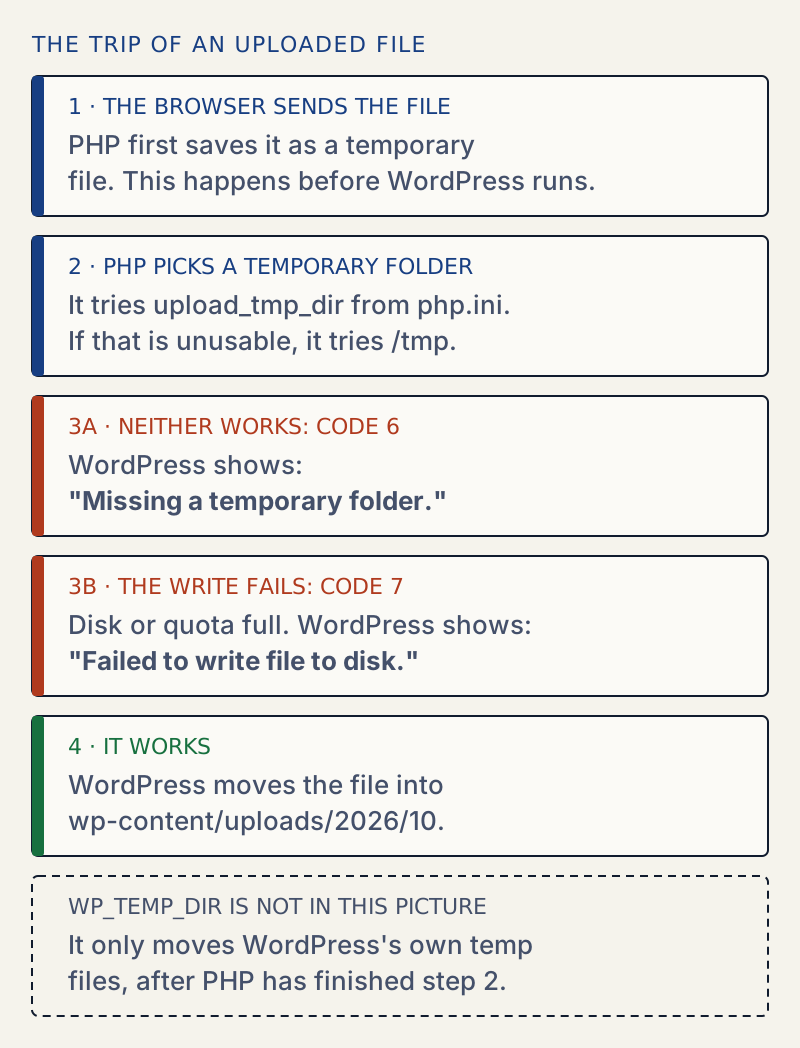
define( 'WP_TEMP_DIR', ... )towp-config.php. It does not fix this message. WordPress is not in charge of the folder: PHP saves the upload before WordPress starts. - I added
WP_TEMP_DIRpointing at a folder while PHP's temporary folders were broken.get_temp_dir()returned the new folder, and the upload still failed with "Missing a temporary folder." Remove the line again unless you need it for something else.
If the message says Failed to write file to disk
- PHP found a temporary folder and started writing, then the write failed. The usual reasons are no space left on the disk, or no space left in your hosting account (the quota).
- Check free space and quota in your hosting panel, or run
df -h /tmpanddf -hfor the folder inupload_tmp_diron a server you manage. Also check inodes withdf -i. - I could not make this message happen in my lab, so I cannot show you the fix working. Free some space, or ask your host to raise the quota, then upload again.
Ask the host when the folders look right
- If the check above shows writable folders and the error still comes,
open_basedirmay be hiding the system temporary folder from PHP. The PHP manual says that whenopen_basediris on, the default temporary folder must be allowed for uploads to work. - Send them the exact message, the date, and the output of the check from the first fix.
PHP could not store your upload anywhere before WordPress even saw it. Make the system temporary folder (/tmp) writable, or set upload_tmp_dir in php.ini to a folder PHP can write in. Adding WP_TEMP_DIR to wp-config.php, which many guides suggest, does not help, and below I show why.
What you see#
The message appears under the file name on Media → Add Media File, in the media library window, and in the block editor when you add an image. A Plupload upload (the normal drag and drop one) shows it like this:
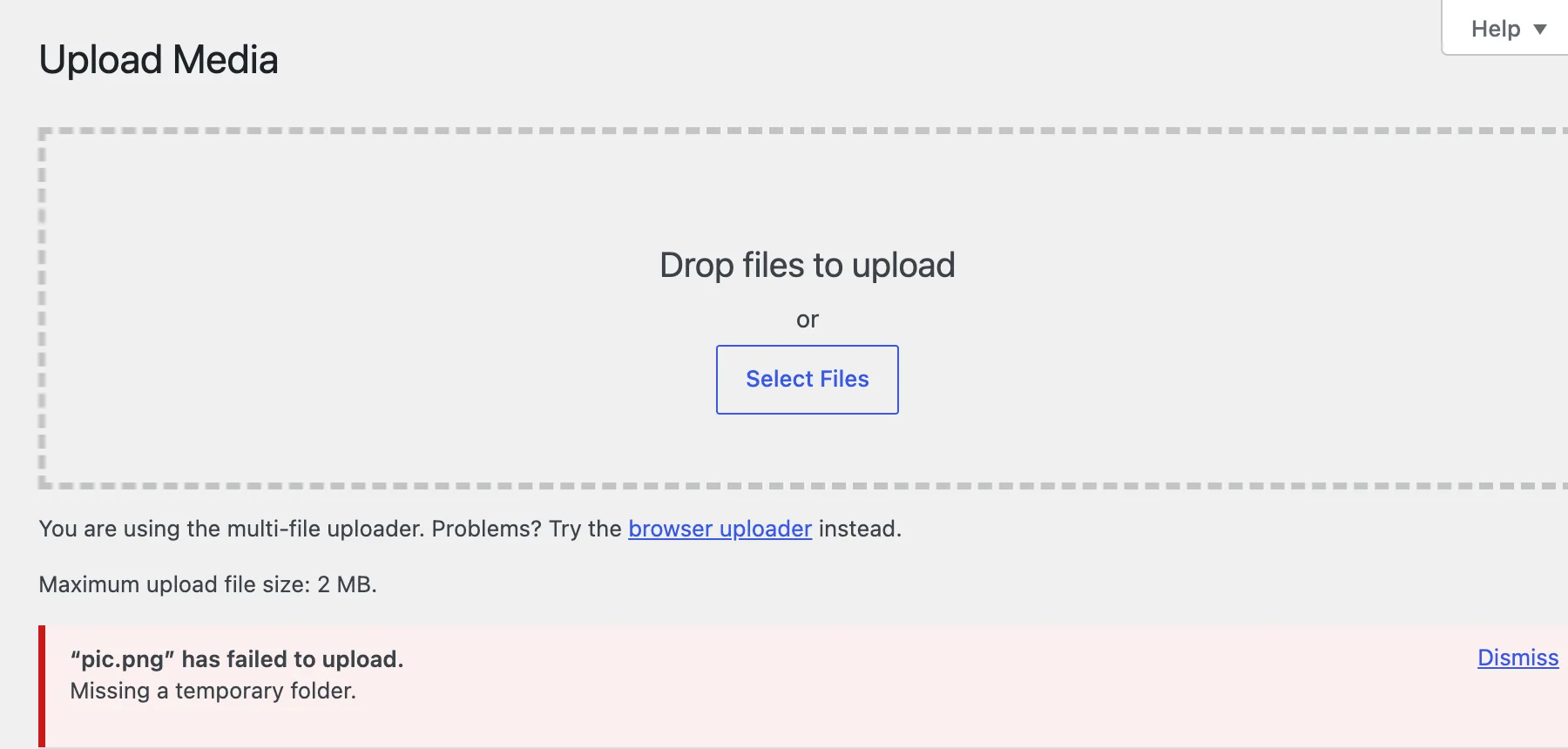
The same text comes back from the REST API, which the block editor uses. The upload request answers with status 500:
{"code":"rest_upload_unknown_error","message":"Missing a temporary folder.","data":{"status":500}}How it works#
PHP handles an upload before any WordPress code runs. It writes the file to a temporary folder and tells the script where it is. WordPress then checks PHP's error code and, if the code is above zero, turns it into a sentence. In wp_handle_upload() the list holds more entries than the ones below. These are the ones that matter here:
UPLOAD_ERR_INI_SIZE = 1 -> The uploaded file exceeds the upload_max_filesize directive in php.ini.UPLOAD_ERR_PARTIAL = 3 -> The uploaded file was only partially uploaded.UPLOAD_ERR_NO_FILE = 4 -> No file was uploaded.UPLOAD_ERR_NO_TMP_DIR = 6 -> Missing a temporary folder.UPLOAD_ERR_CANT_WRITE = 7 -> Failed to write file to disk.UPLOAD_ERR_EXTENSION = 8 -> File upload stopped by extension.I made that table by calling wp_handle_upload() on WordPress 7.1.4 with each error code. For 7 this shows what WordPress prints, not a real disk failure.
A wrong upload_tmp_dir alone is not enough#
I expected a missing upload_tmp_dir to cause the error. It did not. I set upload_tmp_dir=/nonexistent/tmp in php.ini, restarted Apache, and uploads kept working. PHP logged a notice and used the system temporary folder instead:
PHP Notice: PHP Request Startup: file created in the system's temporary directory in Unknown on line 0The PHP manual says the same: if the folder in upload_tmp_dir is not writable, PHP falls back to the system default. A folder that exists but belongs to root, with mode 755, behaved the same way.
I got the error only when both folders were unusable: upload_tmp_dir=/nonexistent/tmp and /tmp owned by root with mode 755. Then PHP logged:
PHP Warning: File upload error - unable to create a temporary file in Unknown on line 0upload_tmp_dir | System temp folder (/tmp) | Result on my test site |
|---|---|---|
| Not set | Writable | Upload works |
| Folder does not exist | Writable | Upload works, notice in the PHP log |
| Folder exists, PHP cannot write | Writable | Upload works, notice in the PHP log |
| Folder does not exist | Not writable | "Missing a temporary folder." |
| Folder PHP can write in | Not writable | Upload works |
So if you see this error, the system temporary folder is broken as well, even when upload_tmp_dir is the setting you recognise. Fix either one.
Why WP_TEMP_DIR does not fix it#
get_temp_dir() is WordPress's own answer to "where may I put a temporary file?". WordPress uses it for downloads, such as plugin zips and update packages. The lookup order in WordPress 7.1.4 is WP_TEMP_DIR if defined, then sys_get_temp_dir(), then upload_tmp_dir, then wp-content/, then /tmp/. It is a different folder, in a different program, at a different time. It never changes where PHP puts an upload.
I tested both halves with /tmp locked and upload_tmp_dir broken:
wp config set WP_TEMP_DIR /var/www/tmpwp --type=constantwp eval 'echo get_temp_dir();'/var/www/tmpwp/The upload from Media → Add Media File still answered "Missing a temporary folder." The other half, installing a plugin with /tmp locked and no WP_TEMP_DIR, worked, because get_temp_dir() fell back to wp-content/:
wp eval 'echo get_temp_dir(), " / ", sys_get_temp_dir();'wp plugin install hello-dolly --force/var/www/html/wp-content/ / /tmpSuccess: Installed 1 of 1 plugins.So a locked /tmp breaks uploads only. Plugin and theme installs from the dashboard keep working. That is a useful clue when you decide whether this is your problem.
Failed to write file to disk#
The second message belongs to the same step. PHP found a folder, but the write failed. The PHP manual describes it as UPLOAD_ERR_CANT_WRITE, value 7, "Failed to write file to disk." The usual reasons are a full disk or a full account quota. This part is quoted from the PHP manual and not reproduced: my lab cannot fill a disk or mount a small one.
Making the folder read-only did not cause this message. It gave "Missing a temporary folder.", because PHP could not even create the file.
Check what PHP can use#
This is the file from the first fix. Run it through the website, not WP-CLI, and delete it afterwards:
<?phpheader( 'Content-Type: text/plain' );$dirs = array( 'upload_tmp_dir (php.ini)' => ini_get( 'upload_tmp_dir' ), 'system temp folder' => sys_get_temp_dir() );foreach ( $dirs as $label => $dir ) { printf( "%-26s %-18s exists: %-3s writable: %s\n", $label, $dir ?: '(not set)', is_dir( $dir ) ? 'yes' : 'no', is_writable( $dir ) ? 'yes' : 'no' );}On my broken test site it printed:
upload_tmp_dir (php.ini) /nonexistent/tmp exists: no writable: nosystem temp folder /tmp exists: yes writable: noDoes Site Health show it?#
No. I searched wp-admin and wp-includes in 7.1.4 for upload_tmp_dir and the temp folder checks. Site Health has one writable-folder test, for wp-content/upgrade-temp-backup, and nothing for PHP's temporary folder. See Site Health explained for what it does cover.
Related errors#
If the temporary folder is fine, a failed upload usually ends in another message. For files that are too large, see the file exceeds the maximum upload size for this site. For a file PHP stops for size, see the uploaded file exceeds the upload_max_filesize directive. For a folder that exists but cannot be written, see the uploaded file could not be moved to wp-content/uploads.
Sources
- PHP manual: Error Messages Explained (file uploads) · the list of upload error codes
- PHP manual: Predefined constants, UPLOAD_ERR_NO_TMP_DIR and UPLOAD_ERR_CANT_WRITE · codes 6 and 7 and their wording
- PHP manual: php.ini core directives, upload_tmp_dir · INI_SYSTEM; falls back to the system default; open_basedir note
- WordPress core source: wp_handle_upload() in wp-admin/includes/file.php · the function wp_handle_upload() maps PHP's error code to the message text (read in 7.1.4)
- get_temp_dir() · WordPress's own temporary folder and WP_TEMP_DIR
One email when something breaks or changes.
New plugins and re-tested guides, about twice a month. Never a sales pitch.