Why it happens
- The month folder (for example
uploads/2026/10) belongs to another user than the one PHP runs as. This usually happens when something run asrootmade the folder first: a WP-CLI command, a cron job, a restore or an SFTP upload as another account. - The folder has the right owner, but its mode takes away the owner's right to write, for example 555.
- The Store uploads in this folder setting under Settings → Media points to a folder that exists on this server but that PHP cannot write in. The message then names that folder, for example
oldmedia/2026/10.
How to fix it
Try the fixes in this order. Each one is independent: stop as soon as the error is gone.
Read the path in the message
- The path is the folder WordPress tried to put the file in.
wp-content/uploads/2026/10is the folder for October 2026. - A message that ends with
wp-content/uploads.and no year or month means Organize my uploads into month- and year-based folders is off, so the uploads folder itself is the one that refuses. - A path that does not start with
wp-content(for exampleoldmedia/2026/10) means the Upload Path setting is in use. Go to the last fix on this list.
Test write access as PHP's user, not as yourself
- Over SSH, find PHP's user. On Apache or nginx with PHP-FPM it is often
www-data,apacheornginx. On shared hosting it is usually your own account. The owner of any file WordPress created itself, such as a picture from last month, shows it. - Run
ls -ld wp-content/uploads wp-content/uploads/2026 wp-content/uploads/2026/10. The third column is the owner. - Try to write as that user:
sudo -u www-data touch wp-content/uploads/2026/10/.write-test. On my test site it printed "touch: cannot touch 'wp-content/uploads/2026/10/.write-test': Permission denied". When it works, remove the test file withrm. - To list everything in uploads that PHP's user does not own, run
cd wp-content/uploads && find . ! -user www-data -exec ls -ld {} +. To list folders the owner cannot write in, runfind . -type d ! -perm -u+w -exec ls -ld {} +.
Give the folder back to PHP's user
- With root or sudo, run
chown -R www-data:www-data wp-content/uploadswith your PHP user in place ofwww-data. This also fixes files that an earlier command left owned byroot. - Then set the usual modes:
find wp-content/uploads -type d -exec chmod 755 {} +andfind wp-content/uploads -type f -exec chmod 644 {} +. - On shared hosting you cannot run
chown. Use the file manager to check that the folder's mode is 755, or ask the host to reset the owner of your files to your account. - Upload the file again. On my test site, after these commands the same file uploaded from Media → Add Media File with no error.
If the owner is right, fix the mode
- A folder owned by PHP's user with mode 555 fails the same way.
chmod 755 wp-content/uploads/2026/10fixes it. I tested this: after the change awp media importof the same file succeeded. - Folders need the write bit for the owner (
rwx). Without it, the owner cannot add files.
Do not use chmod 777
- 777 lets every user on the server write. It also hides the real cause. On my test site a root-owned month folder set to 777 let the upload through, and the new files were created with mode 666, which anyone on the server can edit.
- WordPress's own guide on file permissions says to avoid 777 and to start from the stricter modes. Fix the owner instead.
Clear an old Upload Path
- Go to Settings → Media. The field Store uploads in this folder only appears when it has been changed from the default. Empty it so WordPress uses
wp-content/uploads, then click Save Changes. Empty Full URL path to files as well, unless you serve media from another address on purpose. - With WP-CLI:
wp option update upload_path ''andwp option update upload_url_path ''. On my test site, with both emptied and the right owner on the real folder, the upload worked again. - If the old path does not exist on this server at all, the message is the other one, "Unable to create directory". See could not create directory.
WordPress found this month's folder in wp-content/uploads, but PHP is not allowed to put a file in it. The folder exists, so WordPress did not try to make it, and the move at the end failed. The fix is to make the folder belong to the user PHP runs as, with mode 755.
What you see#
The message appears under the file name on Media → Add Media File, in the media library uploader, and in WP-CLI. The folder in the message is the month of the upload:
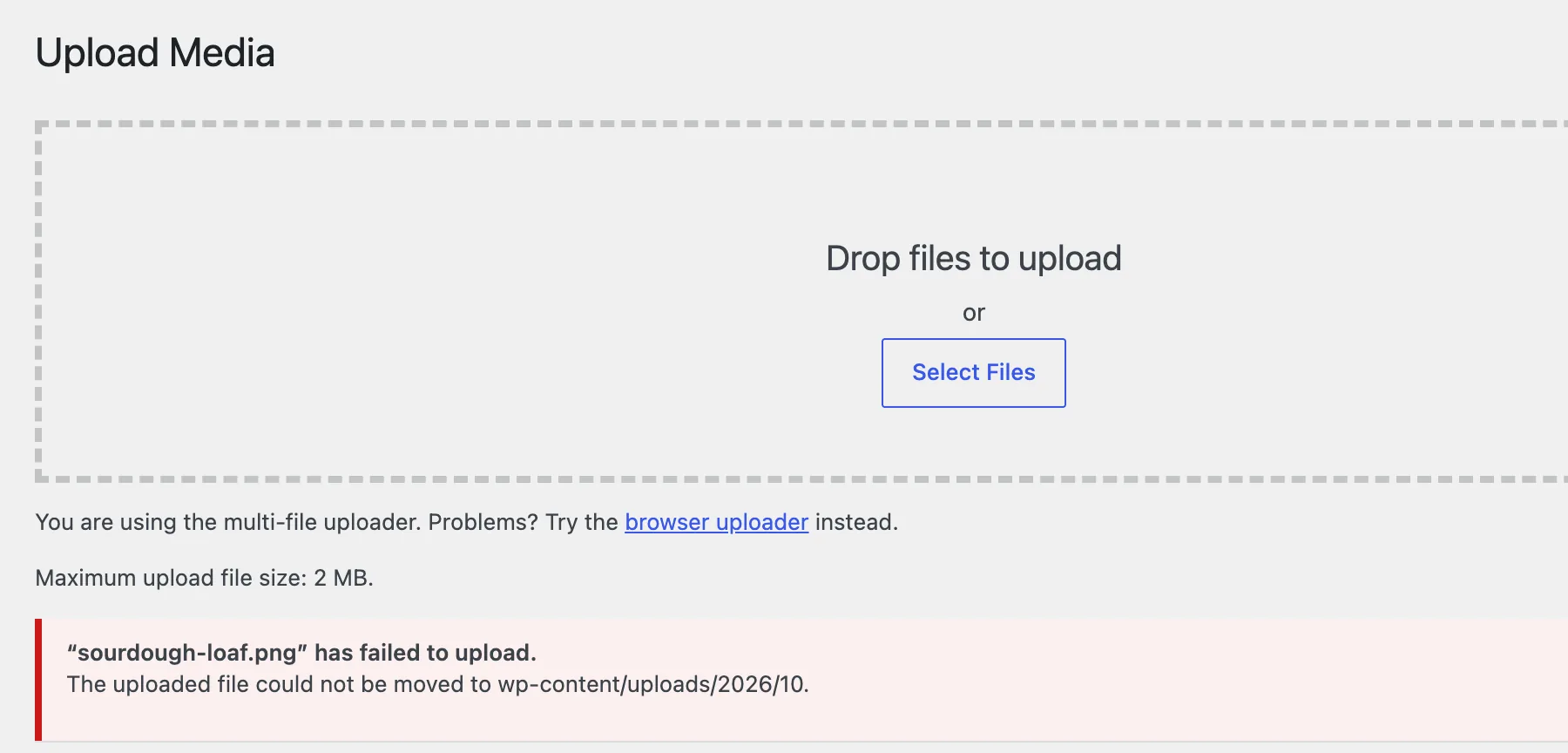
WP-CLI prints the same text:
Warning: Unable to import file '/tmp/sourdough-loaf.png'. Reason: The uploaded file could not be moved to wp-content/uploads/2026/10.Error: No items imported.How it works#
WordPress does two things in order, and each has its own message.
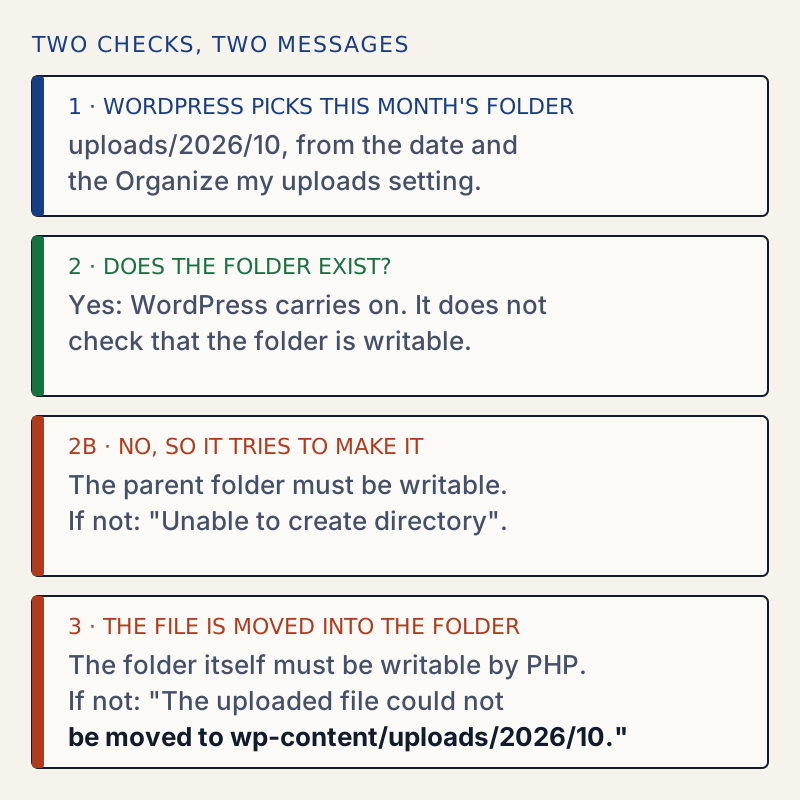
First, wp_upload_dir() calls wp_mkdir_p() for the month folder. That function returns true as soon as the path exists as a folder. It never asks whether PHP can write there. Only when the folder is missing does it try to make one, and a refusal gives "Unable to create directory". That message has its own page: could not create directory.
Second, WordPress moves the file. A browser upload (wp_handle_upload()) uses PHP's move_uploaded_file(). A sideload (wp_handle_sideload(), used by WP-CLI and the REST API) uses copy() and then unlink(). When the move returns false, WordPress shows this message, the same text for both. The calls are written with @, so PHP's own warning is hidden. I switched on WP_DEBUG_LOG and repeated the failed import, and debug.log was never created. The message is all you get.
So the two messages point at different folders:
| Message | The month folder | What refused |
|---|---|---|
| Unable to create directory ... Is its parent directory writable by the server? | Does not exist | The parent (uploads or uploads/2026) is not writable |
| The uploaded file could not be moved to wp-content/uploads/2026/10. | Exists | The month folder itself is not writable |
Why it often starts on the first of a month#
With month folders on, WordPress makes a new folder for each month, owned by whoever creates it. If a WP-CLI command, a cron job or a restore runs as root and makes uploads/2026/11, that folder belongs to root. Uploads work all October and fail on the first of November, when the first browser upload meets that folder. I reproduced this without waiting for November. I ran wp --allow-root as root to make uploads/2026/11, then called WordPress's sideload function as www-data for that month:
{"error":"The uploaded file could not be moved to wp-content\/uploads\/2026\/11."}After chown www-data:www-data wp-content/uploads/2026/11, the same call returned the new file's path and URL.
Site Health does not catch it#
Tools → Site Health → Info → Filesystem Permissions checks only the top-level uploads folder, not the year and month folders inside it. With the month folder owned by root, Site Health still said Writable:
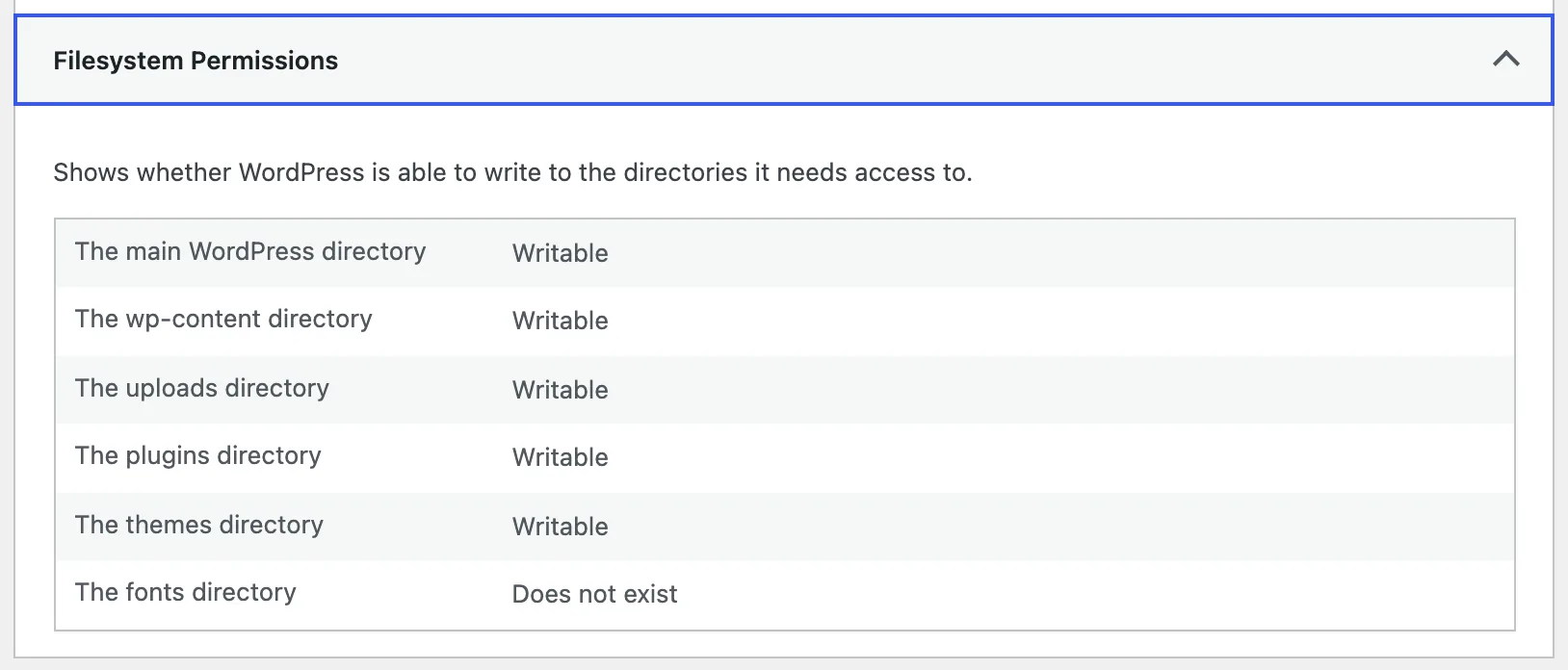
Owner, mode and the write test#
Folders I tried on the same site, all with the same file:
| Month folder | Result |
|---|---|
root:root mode 755 | Fails with this message |
www-data:www-data mode 555 | Fails with this message |
root:root mode 777 | Works, but new files get mode 666 |
www-data:www-data mode 755 | Works, new files get mode 644 |
Ownership comes first. With mode 755 only the owner can write, so 755 helps only when the owner is PHP's user. The same site, checked from the shell:
drwxr-xr-x 2 root root 4096 Oct 30 07:26 ./2026/10cd wp-content/uploadschown -R www-data:www-data .find . -type d -exec chmod 755 {} +find . -type f -exec chmod 644 {} +drwxr-xr-x 2 www-data www-data 4096 Oct 30 07:26 2026/10Edge cases I tested#
- Month folders off. With Organize my uploads into month- and year-based folders unticked and
uploadsowned byroot, the message ended inwp-content/uploads.with no year or month. Givinguploadsback towww-datafixed it. - Upload Path in use. With
upload_pathset to/srv/oldmedia, which existed on the server and belonged toroot, the message read "...could not be moved to oldmedia/2026/10." WordPress shows only the last part of a path that is outside its own folder. Withupload_pathset to a path that did not exist, the message was "Unable to create directory uploads/2026/10", the other error. - Leftover files. A
wp media importthat I ran asrootleft three files owned byrootin the month folder. Folder and files then needed fixing together, whichchown -Rdoes. Thefind . ! -user www-datacommand above found them.
If it keeps coming back#
Something keeps creating folders as the wrong user. Run WP-CLI as the site's user (sudo -u www-data wp ...) and check what your backup or restore tool runs as. Do not run wp as root. For the 755 and 644 values on a whole site, see the 500 error page. Image-resizing failures after a successful move are a different error: the server cannot process the image. If PHP cannot even hold the file while it arrives, the message is missing a temporary folder. If WordPress says the file is too big before it gets this far, see file exceeds the maximum upload size. After moving a site, check the settings that came across.
Sources
- WordPress core 7.1.4 source: wp_handle_upload() and wp_handle_sideload() in wp-admin/includes/file.php · builds the message when the move fails
- WordPress core 7.1.4 source: wp_mkdir_p() and wp_upload_dir() in wp-includes/functions.php · returns true when the folder already exists
- PHP manual: move_uploaded_file() · returns false and raises a warning when the move cannot happen
- WordPress developer guide: Changing file permissions · ownership, 755 and 644, and why to avoid 777
One email when something breaks or changes.
New plugins and re-tested guides, about twice a month. Never a sales pitch.