Why it happens
- A plugin adds something to the editor, such as a sidebar panel, a settings box or a change to every block, and its script throws an error while the editor draws the screen. This is the most common cause.
- A script receives data it did not expect, such as a post field that holds an object where a string should be, so a function like
replace()fails.
How to fix it
Try the fixes in this order. Each one is independent: stop as soon as the error is gone.
Read the console to see which file crashed
- Press F12 (Cmd+Option+J on a Mac in Chrome) and open the Console tab. Reload the editor. The first red line is the error, such as
TypeError: Cannot read properties of null (reading 'a'). - Look at the first line under it that starts with
atand shows a web address. The folder name after/wp-content/plugins/is the plugin, and after/wp-content/themes/is the theme. In my test it was/wp-content/plugins/awc-crash/crash.js. - If every line points at
wp-includes/js/dist/files only, the crash is in WordPress code or in data it was given. Go to the last fix below. - The Copy error button on the error screen copies this same stack to your clipboard. Paste it into a note or a support ticket. It is the one thing a plugin author needs.
Turn off the plugin it named
- Open Plugins → Installed Plugins and click Deactivate under the plugin from the console. Reload the editor. In my test the error screen was gone on the next load.
- If you cannot open the Plugins screen, run
wp plugin deactivate plugin-folder, or rename the plugin's folder inwp-content/plugins/over SFTP. With the folder renamed, the editor loaded normally. - Update the plugin first if an update is waiting, then try again. If it still crashes, send the author the stack from Copy error and the plugin version.
Find the culprit when the stack is unclear
- Make a note of the active plugins with
wp plugin list --status=active. Deactivate half of them, reload the editor, and see if the error stays. Repeat on the half that still crashes. wp plugin deactivate --allturns everything off in one step. It prints "Success: Deactivated 3 of 3 plugins." on my test site. Turn plugins back on withwp plugin activate name.- On a live site, do this on a staging copy. Deactivating a plugin can switch off features visitors use.
Get your unsaved text back
- Reload the editor in the same browser tab. The editor keeps a backup of the post in the tab's session storage every 15 seconds. When it differs from the saved post, a yellow notice reads "The backup of this post in your browser is different from the version below."
- Click Restore the backup. In my test the text I typed after load came back.
- Do not rely on Copy contents on this screen. In my tests it copied an empty string, even after I had typed text (see below). The backup in the same tab is the dependable route.
- If you closed the tab, the backup is gone. The saved version and its revisions are still there: open Revisions in the Post panel, or Posts → All Posts and then the post.
When no plugin file is named
- A stack with only
wp-includes/js/dist/files means the crash is inside WordPress code, often because a plugin or filter handed it data of the wrong type. I made the title an object and gotTypeError: e.replace is not a functionand this same screen. Turn plugins off in halves, as in the fix above. - If the editor shows "Updating failed" or "Publishing failed" instead, that is a different problem: see the not a valid JSON response page.
- Turn on the debug log and note PHP errors from the same moment. See how to use the WordPress debug log.
This message means a script crashed while the block editor was drawing the screen. The editor catches the crash and replaces everything with one line and two buttons. The cause is almost always a plugin that adds to the editor. The fastest way to find it is the browser console: the first line of the error names the file.
What you see#
The edit screen shows the sentence "The editor has encountered an unexpected error." and two buttons, Copy contents and Copy error. Nothing else. There is no Attempt Recovery button on WordPress 7.1.4. I read the 7.1.4 editor code (wp-includes/js/dist/editor.js) and those two labels are the only ones in the error screen.

The page is not blank around it. The WordPress menu and the top bar are still there, because they are not part of the editor. Reloading does not help, because the same script crashes again.
How the crash gets caught#
The editor is built with React. React lets a part of the screen act as an error boundary: if anything below it crashes while drawing, the boundary shows a replacement and the rest keeps working. The block editor has three of them, from the smallest to the biggest.
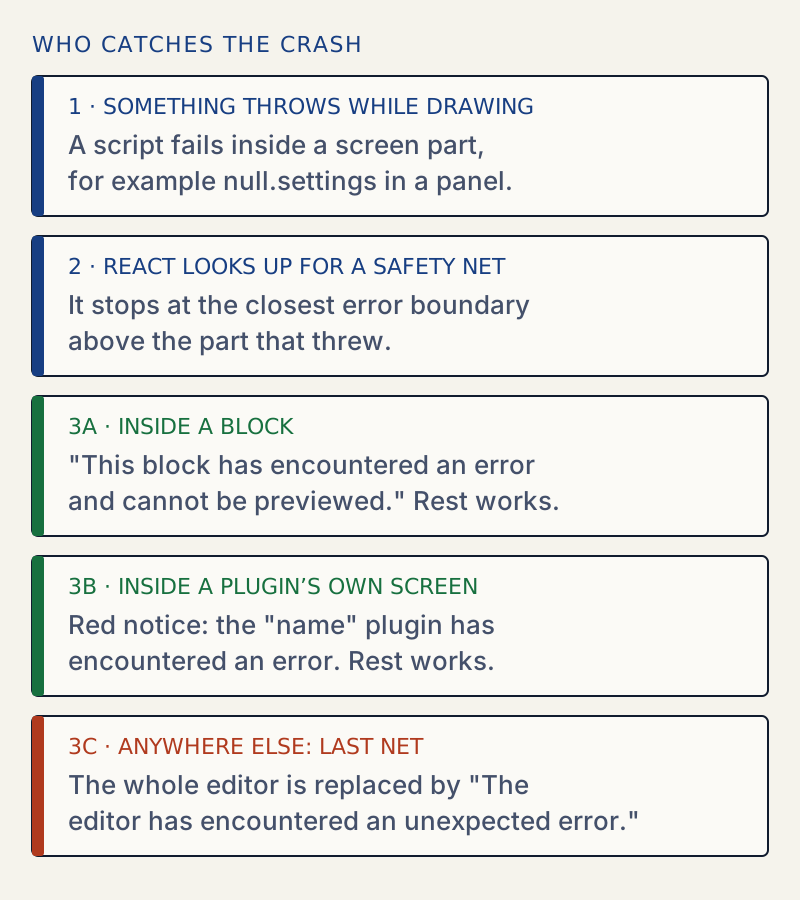
I made each of the three happen on the test site with a small plugin:
| Where the script crashed | What the editor showed | Rest of the editor |
|---|---|---|
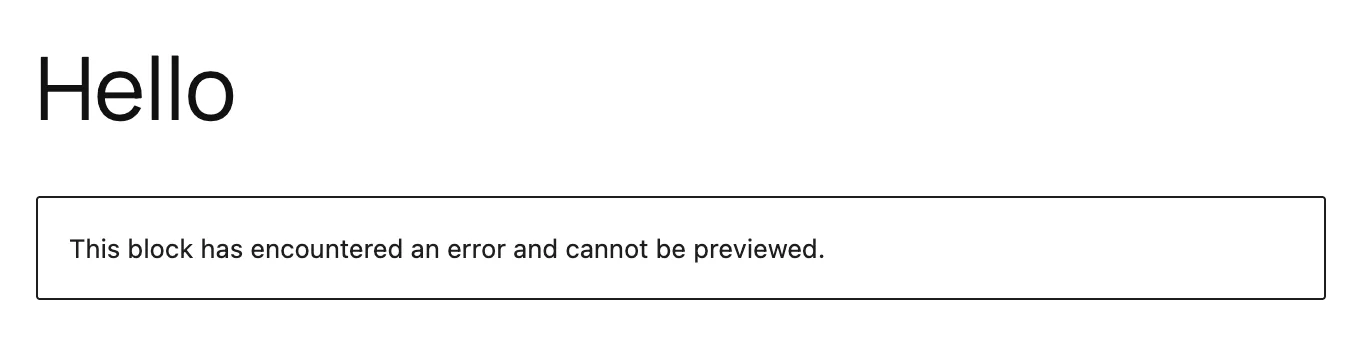
A filter on editor.BlockEdit that threw for paragraph blocks | "This block has encountered an error and cannot be previewed." in place of the block | Works |
A plugin's own registerPlugin render function | Red notice: The "awc-crash" plugin has encountered an error and cannot be rendered. | Works |
A panel added to Status & visibility with PluginPostStatusInfo | "The editor has encountered an unexpected error." | Replaced |
A filter on editor.BlockListBlock that threw | The same message | Replaced |
A post title that became an object (e.replace is not a function) | The same message | Replaced |
The second row is the one that surprises people. A plugin whose own screen crashes is caught by the plugin area, which names the plugin in the notice:

The panel in the third row is different. Its content is drawn in the sidebar, outside the plugin area, so a crash there reaches the last boundary and takes the whole editor.
A block that crashes inside its own preview is caught at the block, and you see this instead:
What the console shows#
React logs the error before the boundary replaces the screen. This is the start of what Copy error puts on the clipboard in my test:
TypeError: Cannot read properties of null (reading 'a') at http://localhost:8907/wp-content/plugins/awc-crash/crash.js?ver=1:38:152 at mf (http://localhost:8907/wp-includes/js/dist/vendor/react-dom.min.js?ver=18.3.1.1:105:412) at Qk (http://localhost:8907/wp-includes/js/dist/vendor/react-dom.min.js?ver=18.3.1.1:250:214)The first line says what went wrong. The first address after it that is not react-dom is the file that threw. Here it is in the awc-crash plugin folder. The remaining lines are React's own and are the same for every crash.
Two things I tried did not trigger the screen. A script that only logs with console.error(), and an error thrown from a timer, both appeared in the console and the editor kept working. React boundaries only catch errors that happen while drawing the screen. So a console error on its own is not a sign of this problem.
The Copy contents button does not rescue your text#
The button is shown on the post editor only (the code passes canCopyContent there). I clicked it on a crashed post, after typing a sentence that was not saved. The clipboard held an empty string. The cause is in the editor code: it reads the post text from the editor's store, and by the time the screen shows, the part of the editor that holds the blocks has already been removed. Copy error worked every time.
What did work was the browser backup. The editor writes the post into the tab's session storage every 15 seconds. After I removed the plugin and reloaded, the yellow notice appeared, and Restore the backup brought back the sentence I had typed. That backup lives only in that tab. Closing the tab ends it.
Anything saved earlier is on the server. A crash does not change the saved post.
The site editor#
The Site Editor (Appearance → Editor) puts the same boundary around its sidebar and preview. From the code, it shows the same sentence and Copy error only, because canCopyContent is not set there. I did not trigger a crash in the Site Editor, so this part comes from reading the code and not from a test.
If it keeps coming back#
A crash that returns after you reactivate a plugin is a bug in that plugin, or a clash between two of them. Report it with the stack from Copy error. WordPress also fires an action, editor.ErrorBoundary.errorLogged, with the error when the screen shows. A site can hook it to send crashes to its own log.
For errors that show a different message when you save, see Updating failed, the response is not a valid JSON response. If one block shows a yellow warning and the rest of the editor works, see this block contains unexpected or invalid content. A plugin that crashes the editor right after an update is the case updating plugins safely is written for.
Sources
- Gutenberg: editor ErrorBoundary component (trunk) · the message, the two buttons, canCopyContent, the errorLogged action
- Gutenberg: PluginArea component (trunk) · wraps each registered plugin so one crash does not take down the editor
- React: Component, catching rendering errors with an error boundary · boundaries catch errors in rendering, not in event handlers or timers
- WordPress developer handbook: plugin sidebar tutorial · registerPlugin and PluginSidebar
- WordPress advanced administration: debugging in WordPress · WP_DEBUG and the debug log
One email when something breaks or changes.
New plugins and re-tested guides, about twice a month. Never a sales pitch.