Why it happens
- You uploaded the wrong file. Theme marketplaces often give you a bundle with the real theme zip, documentation and licence files inside. WordPress unpacks the bundle and finds no
style.css. This is the usual cause. - The theme folder is one level too deep, such as
download/my-theme/style.css. WordPress looks inside the single top folder, heredownload/, and finds nostyle.cssthere. - The zip has two or more folders at the top, such as the theme and a
docsfolder. WordPress then looks at the very top of the zip, not inside either folder. - The file is not a theme. A plugin zip, or a design for another platform, has no
style.csseither. - The file is named differently.
Style.css,styles.cssormain.cssdo not count. On Linux servers the name must be exactlystyle.css. - For a theme that is already installed: something deleted or renamed its
style.css, usually a failed update, a cleanup script or a manual change over FTP. The page then shows Stylesheet is missing. in the Broken Themes list.
How to fix it
Try the fixes in this order. Each one is independent: stop as soon as the error is gone.
Look inside the zip first
- On your computer, run
unzip -l your-theme.zip, or open the zip. It lists the files without unpacking them. - A good theme zip shows one folder, and
style.cssdirectly inside it:my-theme/style.css. - If you see another
.zip, or two folders beforestyle.css, or nostyle.cssat all, use the matching fix below.
Upload the inner theme zip
- Unzip the bundle you downloaded. Look for a smaller
.zipnamed like the theme. Vendors often put it in a folder calledinstallable,themeorTheme Files. - In Appearance → Themes → Add Theme → Upload Theme, choose that inner zip and click Install Now.
- I tested a zip that held only another zip. WordPress gave the message in this page. The inner zip installed.
Zip the theme folder again
- Unzip the file. Open the folders until you reach the one that has
style.cssin it. That is the theme folder. - Zip that folder, not the one above it. On a Mac, right-click it and choose Compress. On Windows, right-click it and choose Send to → Compressed (zipped) folder. In a terminal:
zip -r my-theme.zip my-theme. - Check it with
unzip -l my-theme.zip.my-theme/style.cssshould be listed. - If the zip also had a
docsorlicencefolder, leave it out of the new zip. I tested this: with the extra folder the install failed, without it the theme installed. - A zip with
style.cssandindex.phpdirectly at the top, with no folder, also installed. WordPress made a folder namedloose-plus random letters. Use a named folder instead.
Use the other uploader if it is a plugin
- Plugin zips go in Plugins → Add Plugin → Upload Plugin. A plugin zip sent to the theme uploader gives this message. I tested it.
- If you are not sure what the file is, run
unzip -land look for a PHP file that starts with aPlugin Name:comment. That is a plugin.
Rename the file to exactly style.css
- In the unzipped folder, check that the file is called
style.css, all lower case. A theme withStyle.csswas refused on my Linux lab site; a Linux server tellsStyle.cssandstyle.cssapart. - If
style.cssis deeper, such asmy-theme/assets/style.css, move it to the top ofmy-theme/. WordPress does not look in sub-folders. I tested that too. - Zip the folder again and upload it.
Put a missing style.css back on an installed theme
- Open Appearance → Themes. If the Broken Themes list at the bottom says Stylesheet is missing., the theme folder is still there, but
style.cssis not. - Restore it from a backup, or install the theme again. If the theme came from wordpress.org, Appearance → Themes → Add Theme installs a fresh copy.
- If the theme is not one you need, click Delete in that row.
- I tested the restore: I put
style.cssback, and WordPress no longer listed the theme as broken.
Add the Template line to a child theme
- A row that reads Template is missing. means a theme has a
style.cssbut noindex.phpand notemplates/index.html. If it is meant to be a child theme, open itsstyle.cssand add a lineTemplate: parent-folder-namein the top comment. - The value is the folder name of the parent theme, for example
twentytwentyfive, not its display name. The parent must be installed. - If the row reads The parent theme is missing. Please install the "…" parent theme., install the parent. I tested both: the first row went away with the Template line, the second when the named parent was installed.
- A theme that is meant to stand alone needs a template file:
index.phpfor a classic theme, ortemplates/index.htmlfor a block theme.
The message means WordPress unpacked your zip and found no file called style.css in the place it looks. Nearly always you uploaded the wrong zip, or the theme sits one folder too deep. Look inside the zip with unzip -l, find the folder that holds style.css, and upload that.
What you see#
On Appearance → Themes → Add Theme → Upload Theme, the page that unpacks the zip stops here:
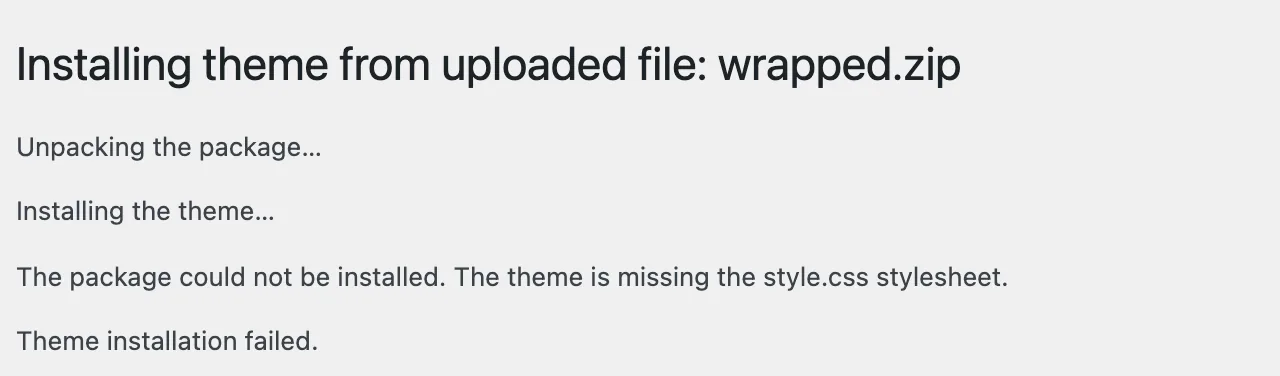
WP-CLI shows the same text, with the code tags left in:
wp theme install wrapped.zipTheme installation failed.Warning: The package could not be installed. "The theme is missing the <code>style.css</code> stylesheet."Warning: The '/tmp/zips/wrapped.zip' theme could not be found.Error: No themes installed.The same words also have a second life. If a theme that is already on the site loses its style.css, Appearance → Themes shows a Broken Themes list with different wording. See "The Broken Themes list" below.
Where WordPress looks#
After unpacking, Theme_Upgrader::check_package() picks one folder to look in. If the zip holds exactly one folder at the top, it looks inside that folder. In every other case it looks at the top of the unpacked zip. It does not look any deeper.
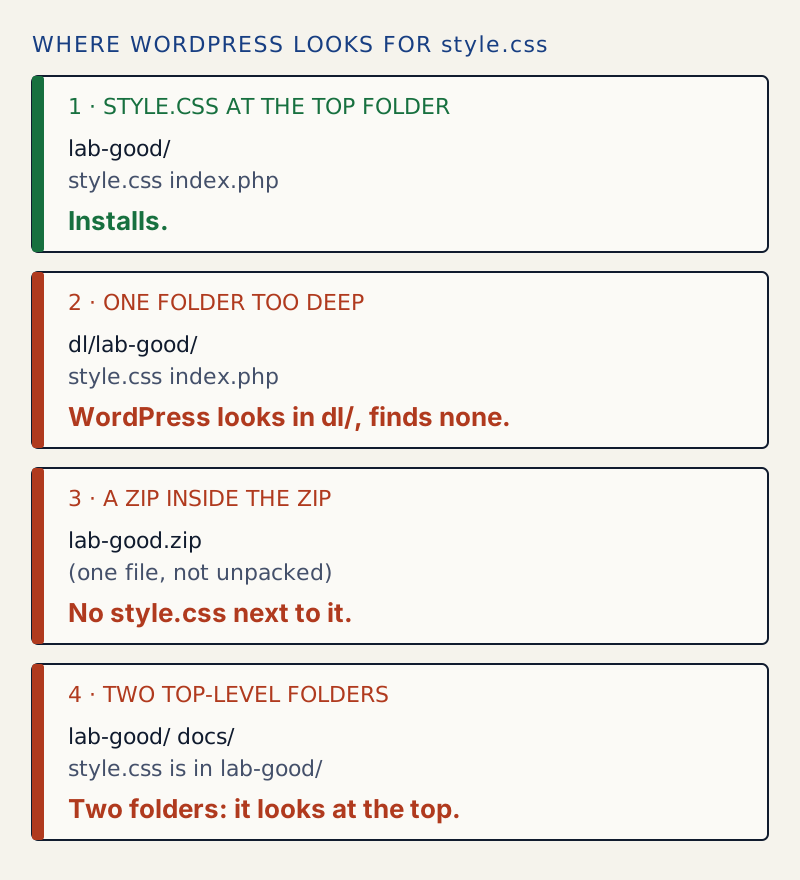
This is why the file listing matters. unzip -l on the failing zip from the screenshot:
unzip -l wrapped.zipArchive: wrapped.zip Length Date Time Name--------- ---------- ----- ---- 0 10-30-2026 18:28 dl/ 0 10-30-2026 18:28 dl/lab-good/ 15 10-30-2026 18:28 dl/lab-good/index.php 40 10-30-2026 18:28 dl/lab-good/style.css--------- ------- 55 4 filesThe only top folder is dl/, and dl/ has no style.css. Zipping dl/lab-good as lab-fixed.zip gave a listing starting with lab-fixed/, and it installed with "Theme installed successfully."
The check runs in this order, and each one stops the install with its own message:
| Check | What it needs | Message |
|---|---|---|
| 1 | style.css in the folder it picked | The theme is missing the style.css stylesheet. |
| 2 | A Theme Name: line in it | The style.css stylesheet does not contain a valid theme header. |
| 3 | index.php, templates/index.html or block-templates/index.html, unless it has a Template: line | Template is missing. Standalone themes need to have a templates/index.html or index.php template file. Child themes need to have a Template header in the style.css stylesheet. |
| 4 | The site meets Requires PHP: and Requires at least: | The PHP version on your server is …, however the uploaded theme requires …. |
Checks 2 to 4 start with the same words as this page, "The package could not be installed.", so people often search for the whole sentence. I produced 2 and 3 on WordPress 7.1.4 by uploading a style.css that was only body{} and a theme with a style.css and nothing else. Check 4 I read in the code but did not run.
Every zip I tried#
All run on WordPress 7.1.4 with wp theme install:
| Zip contents | Result |
|---|---|
lab-good/style.css, lab-good/index.php | Installed |
style.css and index.php at the top, no folder | Installed, in a folder named loose- plus random letters |
Block theme: style.css, templates/index.html | Installed |
Child theme: style.css with Template: lab-good and nothing else | Installed (it said the parent was not found, and still installed) |
dl/lab-good/style.css | The theme is missing the style.css stylesheet. |
lab-good/ and docs/ at the top | The theme is missing the style.css stylesheet. |
A zip holding only lab-good.zip | The theme is missing the style.css stylesheet. |
| A plugin zip | The theme is missing the style.css stylesheet. |
Style.css (capital S) | The theme is missing the style.css stylesheet. |
lab-sub/assets/style.css | The theme is missing the style.css stylesheet. |
Block theme files with theme.json and templates/index.html but no style.css | The theme is missing the style.css stylesheet. |
style.css with no Theme Name: | The style.css stylesheet does not contain a valid theme header. |
style.css only, no Template: line | Template is missing. … |
A file that is not a zip (HTML saved as .zip) | The package could not be installed. "PCLZIP_ERR_BAD_FORMAT (-10) : Unable to find End of Central Dir Record signature" |
The block theme row matters. Block themes need no index.php, but they still need style.css. The header in it is how WordPress learns the theme's name.
The Broken Themes list#
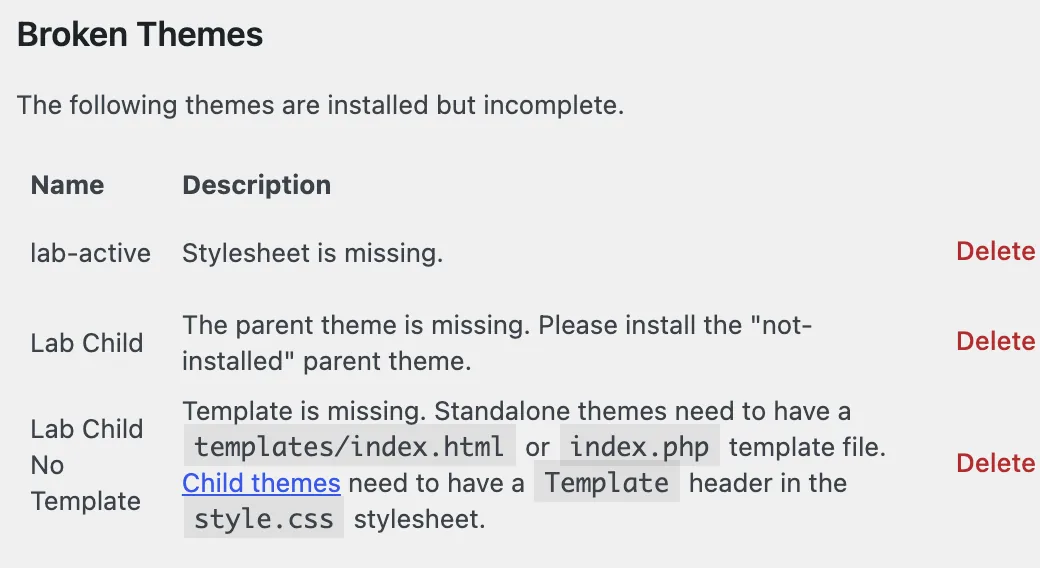
A theme that is already installed can break too. The list at the bottom of Appearance → Themes says "The following themes are installed but incomplete." I produced all three rows with the messages WordPress 7.1.4 uses:
| Row text | What WordPress found | Fix |
|---|---|---|
| Stylesheet is missing. | The theme folder, but no style.css in it | Restore style.css, or reinstall the theme |
| Template is missing. … | A style.css, but no index.php or templates/index.html, and no Template: line | Add the Template: line (child theme), or add the template file |
| The parent theme is missing. Please install the "…" parent theme. | A child theme whose Template: names a folder that is not there | Install the parent with exactly that folder name |
Two things I found that other pages get wrong.
A folder with no style.css does not show up at all, unless it is the active theme. WordPress builds the theme list by looking for style.css. I renamed style.css in a theme that was not active: it vanished from wp theme list and from the Themes screen, with no Broken Themes row. A "Stylesheet is missing." row appears only for the theme named in the site's settings.
A broken active theme is replaced on the next visit to Appearance → Themes. In my test I renamed style.css in the active theme. The front end kept answering with status 200, because it was a block theme and its styles came from theme.json. When I opened Appearance → Themes, WordPress showed "The active theme is broken. Reverting to the default theme." and the site's stylesheet setting changed to twentytwentyfive. The validate_current_theme() function does this when the active theme has no style.css or no index file. Restoring the file afterwards did not switch the theme back. I activated it again myself. Note that this is a change to a live site made by simply opening an admin page, so fix the file before you click around.
If it keeps happening#
If the zip is right on your computer but still fails, the download is the likely problem: run unzip -t on it, and download it again. A file that is not a zip at all gives the "PCLZIP_ERR_BAD_FORMAT" text from the last table row; see incompatible archive: the package could not be installed. If the zip is right and WordPress then cannot write the files, that is a different message: see could not create directory. If the theme already exists, see destination folder already exists.
Before you replace or delete a theme on a live site, make a backup. The routine is in how to update plugins safely; it works the same for themes.
Sources
- Main stylesheet (style.css) - Theme Handbook · style.css is required in the theme's root folder; Theme Name is the header.
- Child Themes - Theme Handbook · The Template header must match the parent's folder name.
- class-theme-upgrader.php (Theme_Upgrader::check_package) - wordpress-develop · The three install checks: style.css exists, it has a Theme Name, the theme has an index file.
- class-wp-theme.php - wordpress-develop · Where Stylesheet is missing., Template is missing. and the parent theme message come from.
- validate_current_theme() - wordpress-develop · Why a broken active theme is replaced by the default theme.
One email when something breaks or changes.
New plugins and re-tested guides, about twice a month. Never a sales pitch.