Why it happens
- A theme or plugin reads a property, such as
$post->ID, from a value that is empty. On a 404 page or an empty search, WordPress has no current post, so the global$postisnull. - A WordPress function found nothing and returned
nullorfalse.get_post(),get_page_by_path()andget_term()returnnull.get_user_by(),get_userdata()andget_term_by()returnfalse. The code never checks. - The host moved the site to PHP 8.0 or newer. PHP 7.4 reported the same mistake as a notice, which WordPress hides when
WP_DEBUGis off. PHP 8 reports it as a warning. - The server shows errors on the page (
display_errorsis on), orWP_DEBUGandWP_DEBUG_DISPLAYare on, so a message that used to stay in a log now reaches visitors.
How to fix it
Try the fixes in this order. Each one is independent: stop as soon as the error is gone.
Read the path to find who owns the code
- Look at the folder after
wp-content/.themes/my-theme/is a theme,plugins/name/is a plugin, andmu-plugins/holds must-use plugins that cannot be deactivated from the Plugins screen. A path inwp-includes/orwp-admin/would be WordPress core. - The property name in quotes ("ID" above) and the line number are for the author. You do not need to open the file.
- Note which pages show it. If it only appears on 404 pages or empty search results, the code assumes a post that is not there.
Update, or replace, the theme or plugin
- Go to Dashboard → Updates and update the theme or plugin named in the path. A new version usually checks the value first.
- If there is no update, send the author the exact message and tell them which page shows it. A report that says "on a 404 page" is easy to act on.
- If it is no longer maintained, pick a replacement. A warning is not urgent, but code that was never updated for PHP 8 may have bigger problems.
- To check that it is the source, deactivate the plugin (Plugins → Installed Plugins → Deactivate, or
wp plugin deactivate demo-bug) or switch theme (Appearance → Themes). On my test site the message was gone on the 404 page after each of these.
Stop visitors from seeing it: log, do not display
- In
wp-config.php, above the line "That's all, stop editing", setdefine( 'WP_DEBUG', true );,define( 'WP_DEBUG_DISPLAY', false );anddefine( 'WP_DEBUG_LOG', true );. The warning then goes towp-content/debug.logand not onto the page. I tested this: the 404 page was clean and the log held one line. - Turning
WP_DEBUGoff is not enough if your host hasdisplay_errorson. I tested that: withWP_DEBUGoff and the server'sdisplay_errorson, the warning was still on the page. Ask the host to turndisplay_errorsoff. - This hides the message. The code still has the bug. Turn
WP_DEBUGoff again when you are done and keepdebug.logprivate (the WordPress site check tests whether it can be downloaded). See the WordPress debug log guide.
If you wrote the code: check the value first
- For the global post, test the type:
if ( $post instanceof WP_Post ) { echo $post->ID; }. I used this infooter.php: the post page printed its ID, and the 404 and the empty search printed "none" with no warning. - To get the ID of the current post, call
get_the_ID()and test the result:$id = get_the_ID(); if ( $id ) { ... }. WordPress returnsfalsewhen there is no post. For the page being viewed,get_queried_object_id()returns0instead of failing. isset( $post->ID )also works and prints nothing fornull,falseor a missing property.- On PHP 8.0 and newer,
$post?->IDreturnsnullinstead of warning. It does not work on PHP 7.4 (a parse error) and it does not help when the value isfalse:get_user_by( 'login', 'nobody' )?->IDstill warned. Checkfalsewithif ( $user ). - Do not put
@in front of the line or lowererror_reporting. Both leave the bug in place.
The message means that some code tried to read a property, such as $post->ID, from something that holds nothing. It is a warning, not a fatal error: PHP carries on, the page loads, and the value comes out empty. The path in the message names the theme or plugin that wrote the code. The usual trigger is a page with no post, such as a 404 or an empty search, where the code assumed there was one. The fix belongs to the author, so update or replace it. You can stop visitors seeing the message by writing errors to a log instead of the page.
What you see#
The message is plain text with no styling. PHP prints it where the code runs, so it often lands in the footer or at the top of the page.
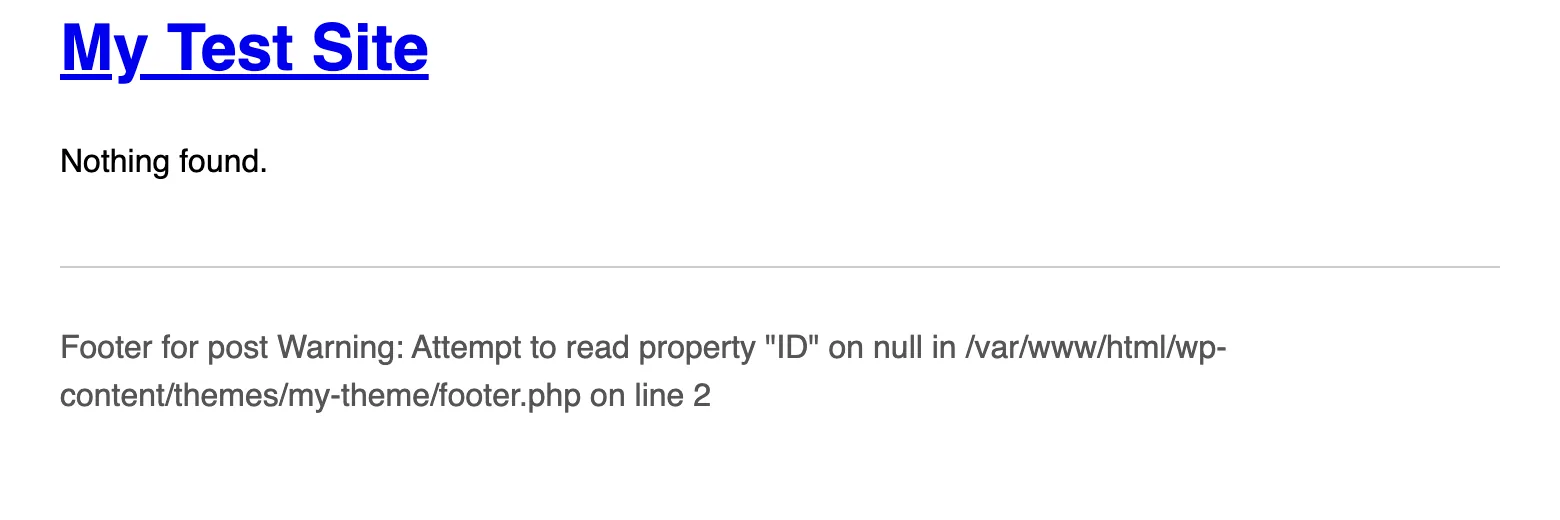
I made it with a small classic theme. This is its whole footer.php:
<footer><p>Footer for post <?php echo $post->ID; ?></p><?php wp_footer(); ?></footer></body></html>I loaded four URLs with the same theme:
/hello-test/ [200] Footer for post 4/ [200] Footer for post 1/?s=zzz [200] Footer for post Warning: Attempt to read property "ID" on null in /var/www/html/wp-content/themes/my-theme/footer.php on line 2/nope-404/ [404] Footer for post Warning: Attempt to read property "ID" on null in /var/www/html/wp-content/themes/my-theme/footer.php on line 2The message shows on the pages that have no post. The page with a post is fine, and so is the home page. That is why theme authors miss it: it only shows on the pages they did not test.
How it works#
PHP does not complain when you ask an object for a property. It complains when the thing is not an object. null and false are not objects, so null->ID has nothing to read. PHP 8 says so with a warning and gives null for the result.
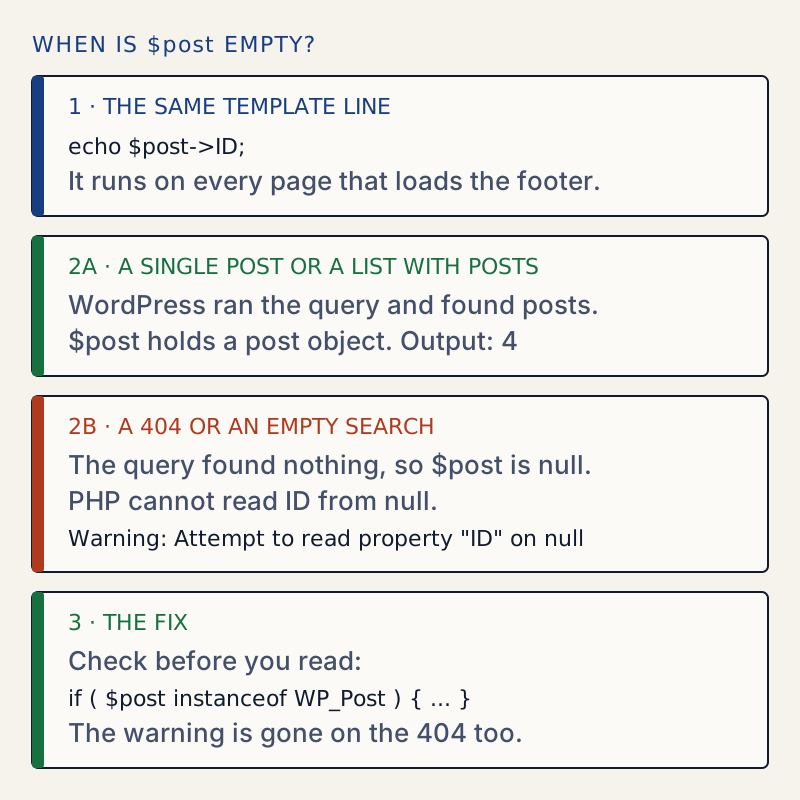
WordPress sets the global $post when it starts to build a page. In WP::register_globals() the line is $GLOBALS['post'] = $wp_query->post ?? null;. The query's first result goes in, and if the query found nothing, null goes in. A 404 and a search with no results have no posts, so $post is null on both.
The silent version of the same mistake#
When there are posts, $post is set but not always to the post you want. On the home page, the footer of my classic theme printed 1, which is the last post in the list. A block theme I tested the same code with printed 7, the first. Both are real posts, so no warning appears, and the code uses the wrong ID. Code that needs the post being viewed should check is_singular() first.
Where null and false come from#
The message ends in the type of the value. I called each of these on the lab site with a missing item and tried to read a property from the result:
| Call | Returns | Message |
|---|---|---|
get_post( 999999 ) | null | Attempt to read property "post_title" on null |
get_page_by_path( 'nope' ) | null | ... "ID" on null |
get_queried_object() on a page with no queried object | null | ... "ID" on null |
get_term( 999999, 'category' ) | null | ... "name" on null |
global $post before WordPress has set it | not set | ... "ID" on null |
get_user_by( 'login', 'nobody' ) | false | Attempt to read property "ID" on false |
get_userdata( 9999 ) | false | ... "user_email" on false |
get_term_by( 'slug', 'nope', 'category' ) | false | ... "name" on false |
wp_get_attachment_metadata( 999 ) | false | ... "file" on false |
get_option( 'missing' ) | false | ... "foo" on false |
get_post_meta( 4, 'missing', true ) | empty string | ... "foo" on string |
get_posts(...)[0] with no results | no item | Undefined array key 0, then ... "ID" on null |
Searches for "attempt to read property on bool" are the same problem. PHP 8.0 wrote bool where PHP 8.3 writes false. get_the_ID() does not fail like these. Its code is return ! empty( $post ) ? $post->ID : false;, so it gives false when there is no post.
What PHP 7.4 said#
The same mistake had a different message on the old PHP. I ran one file on three PHP versions:
$a = null; $b = false; $c = "str";echo $a->ID, $b->ID, $c->ID;| PHP | Message for null, false and a string |
|---|---|
| 7.4 | Notice: Trying to get property 'ID' of non-object |
| 8.0 | Warning: Attempt to read property "ID" on null (and on bool, on string) |
| 8.3 | Warning: Attempt to read property "ID" on null (and on false, on string) |
PHP's 8.0 notes list "attempting to read a property of a non-object" as a notice that became a warning. So code that ran quietly for years starts to talk after a PHP upgrade. Search for "trying to get property of non-object" and you will find the PHP 7 form of this page.
Why you may see it only sometimes#
PHP raises the warning. Whether it reaches the page depends on settings. I tested each on the 404 page:
| WP_DEBUG | WP_DEBUG_DISPLAY | WP_DEBUG_LOG | Host display_errors | Result |
|---|---|---|---|---|
| off | n/a | n/a | off | Nothing on the page |
| off | n/a | n/a | on | On the page |
| on | on | any | any | On the page |
| on | off | on | off | Not on the page. One line in wp-content/debug.log |
[30-Oct-2026 12:02:52 UTC] PHP Warning: Attempt to read property "ID" on null in /var/www/html/wp-content/themes/my-theme/footer.php on line 2Unlike a deprecation, a warning is not dropped when WP_DEBUG is off. If the host shows errors, visitors see it. For the array version of the same idea, see the undefined array key page. For a property that was never declared, see the dynamic property page.
Each developer fix, tested#
I put each fix in place of the broken line and loaded a post, the home page, an empty search and a 404:
| Code | Post | Empty search and 404 |
|---|---|---|
if ( $post instanceof WP_Post ) | ID | Nothing, no warning |
$id = get_the_ID(); if ( $id ) | ID | Nothing, no warning |
isset( $post->ID ) | ID | Nothing, no warning |
get_queried_object_id() | ID | 0 on all three, no warning |
$post?->ID | ID | Empty, no warning |
$user?->ID when $user is false | n/a | Warning, "on false" |
if ( $user ) before $user->ID | n/a | No warning |
The nullsafe operator only short-circuits on null, as PHP's manual says. It is fine for a value that may be missing. It is the wrong tool for functions that return false.
If the page goes blank#
A warning never stops a page by itself. A blank page or a critical error message is a different problem: see the white screen of death.
Sources
- PHP manual: Backward incompatible changes in PHP 8.0 · Attempting to read a property of a non-object changed from a notice to a warning.
- PHP RFC: Reclassifying engine warnings · The row "Trying to get property of non-object" moved from Notice to Warning, in the vote that passed 54 to 3.
- PHP manual: Classes and objects, nullsafe methods and properties · The ?-> operator, PHP 8.0 and later, returns null only when the object is null.
- WordPress reference: get_post() · Returns null on failure, and falls back to the global post when no ID is given.
- WordPress core: WP::register_globals() in wp-includes/class-wp.php · Sets the global post to the query's first post, or null when there is none.
One email when something breaks or changes.
New plugins and re-tested guides, about twice a month. Never a sales pitch.