Why it happens
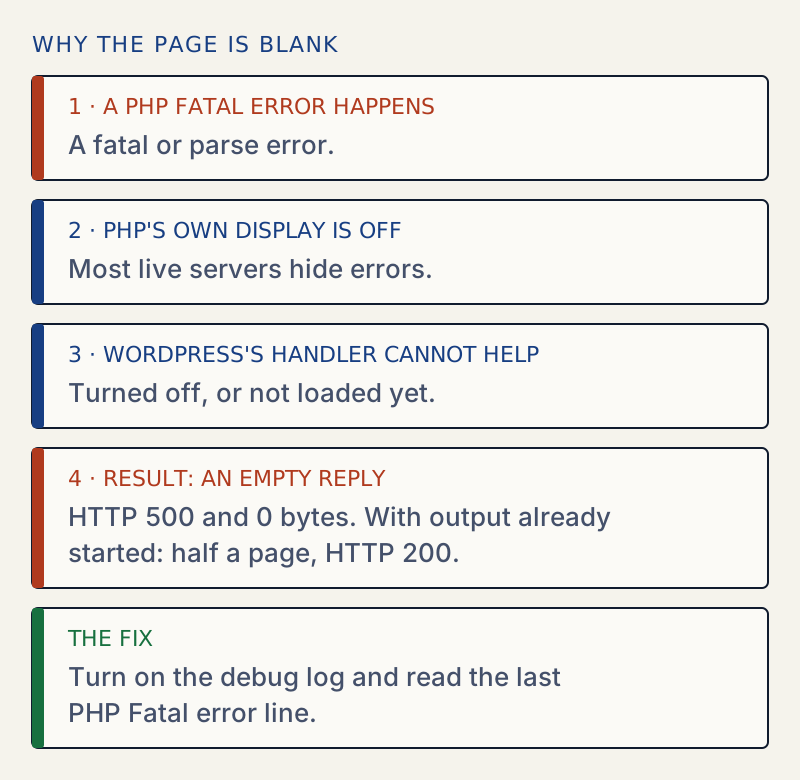
- A PHP fatal error happened while PHP's own error display was off and WordPress's fatal error handler was off or not yet loaded. Nothing prints, so the page is empty.
WP_DISABLE_FATAL_ERROR_HANDLERis set to true inwp-config.php, often left there by a developer or a host.- A syntax error in
wp-config.phpstops PHP before WordPress starts, so WordPress's handler cannot report it. - A theme or plugin calls
exitordiewithout printing anything, or ends its output early. - Output already started when the error happened, so WordPress cannot send its error page. You then see half a page, or only the top of it.
- PHP ran out of memory or time in a place where nothing could be printed.
How to fix it
Try the fixes in this order. Each one is independent: stop as soon as the error is gone.
Check the status code and the size of the reply
- In a terminal, run
curl -i https://your-site.example/. Look at the first line and atContent-Length. - 500 and an empty body means PHP hit a fatal error and nothing was displayed. Go to the debug log fix.
- 200 and an empty body means something ended the request on purpose or silently, such as
exitin a plugin or theme. Go to the isolate fix. - 200 and only part of the page means output began and then PHP failed. The error is in whatever runs after the last visible element. Go to the debug log fix.
- If only
/wp-admin/is blank and the front end works, the cause is a plugin that loads only in the admin.
Turn on the debug log
- Open
wp-config.phpover SFTP or your host's file manager and keep a copy of the original. - Above the line that says to stop editing, set
define( 'WP_DEBUG', true );,define( 'WP_DEBUG_LOG', true );anddefine( 'WP_DEBUG_DISPLAY', false );. - Reload the blank page, then open
wp-content/debug.logand read the lastPHP Fatal errororPHP Parse errorline. It names the file and line. - If
debug.logis not created, the error happens before WordPress loads, or the folder is not writable. Look in your host's PHP error log, which is usually in the hosting control panel. - If the error is in a plugin or theme, follow the steps in the critical error guide. If it says
Allowed memory size, see the memory limit guide. If it saysParse error, see parse error: syntax error.
Turn WordPress's own error handler back on
- Search
wp-config.phpforWP_DISABLE_FATAL_ERROR_HANDLER. If it is set totrue, remove the line or set it tofalse. - Reload the page. A plugin or theme fatal error now shows "There has been a critical error on this website" and, for plugins and themes, sends a recovery mode email.
- With WP-CLI,
wp config delete WP_DISABLE_FATAL_ERROR_HANDLERremoves it.
Isolate a silent plugin or theme
- With WP-CLI, note the active plugins with
wp plugin list --status=active, then runwp plugin deactivate --all --skip-plugins. Reload the page. - Without WP-CLI, rename
wp-content/pluginstoplugins.offover SFTP. WordPress skips plugins whose files are missing, so the site loads without any of them. Do not open Settings or Plugins in wp-admin while the folder is renamed: the Plugins screen permanently deactivates every active plugin whose file it cannot find. - If the page returns, rename the folder back to
plugins, then rename single plugin folders inside it to find the culprit. - With WP-CLI,
wp plugin deactivate --all --skip-pluginsdoes the same without renaming folders. - If plugins are not the cause, switch the theme:
wp theme activate twentytwentyfive --skip-themes. - If a mu-plugin or
wp-content/object-cache.phporadvanced-cache.phpis present, those load before plugins. Rename them one at a time too.
Check wp-config.php for a syntax error
- If you edited
wp-config.phpjust before the page went blank, restore the copy you made. - Run
php -l wp-config.phpover SSH. It printsNo syntax errors detectedor the line number of the mistake. - Check that the file starts with
<?phpon the very first line, with no space or blank line before it.
A white screen means the server answered, but the page had nothing in it. On a current WordPress it is rarer than it used to be. Since WordPress 5.2, a fatal error in a plugin or theme normally shows "There has been a critical error on this website" instead of a blank page. When you still get a blank page, one of a small number of things is hiding the message.
Why it is blank and not an error message#
Two layers could have shown the error, and each can be off. A third thing can stop both:
- PHP's own error display. Most live servers turn it off, so visitors do not see file paths.
- WordPress's fatal error handler. It prints the critical error page. It can be disabled, and it does not exist yet if PHP stops before WordPress finishes loading.
- The page itself. If output has already begun, WordPress cannot start a new page on top of it.
I reproduced each case on a WordPress 7.1.4 test site:
| Setup | Result |
|---|---|
| Fatal error in a plugin, handler on | The critical error message, HTTP 500 |
Same error with WP_DISABLE_FATAL_ERROR_HANDLER set to true and error display off | Empty reply, HTTP 500, 0 bytes |
Syntax error in wp-config.php, PHP error display off | Empty reply, HTTP 500, 0 bytes |
| Same syntax error with PHP error display on | The raw Parse error: line, with HTTP 200 |
A must-use plugin that calls exit and prints nothing | Empty reply, HTTP 200, 0 bytes |
| A must-use plugin that prints a line and then hits a fatal error | Half a page, HTTP 200, no error message |
The last row matters: the status code is 200 and a bit of the page is there, so nothing looks broken to a monitor, even though the rest of the page is missing.

Reading the log#
The debug log is the only reliable way to see what happened. The debug log guide shows how to switch it on and read it, and the wp-config.php generator writes the safe lines for you. A good entry looks like this:
PHP Fatal error: Uncaught Error: Call to undefined function some_function() in /var/www/html/wp-content/plugins/some-plugin/some-plugin.php:5The part after in is the file and line. Everything under /wp-content/plugins/ belongs to a plugin, and the folder name after plugins/ is the plugin. Everything under /wp-content/themes/ belongs to a theme.
If the dashboard still works#
If /wp-admin/ loads while the front end is blank, the cause is in the theme, or in a plugin that only runs on the front end. Switch to a default theme from Appearance → Themes, then deactivate plugins one at a time.
If the log stays empty#
An empty log after a blank page usually means one of these:
- The error happens before WordPress loads, such as a syntax error in
wp-config.php(see parse error: syntax error). Your host's PHP error log has it. wp-contentis not writable by the web server, so the log cannot be created.- The blank page comes from a cache, not from PHP. Clear any page cache and try a URL with a query string, such as
?nocache=1. - The web server stopped the request before PHP. That is a different problem. See the 500 Internal Server Error.
To avoid the next one, read how to update plugins safely. If settings changed on the way to the fix, see how to find and undo changed settings.
Sources
- WordPress: debugging · WP_DEBUG, WP_DEBUG_LOG and WP_DEBUG_DISPLAY
- WordPress: fatal error recovery mode in 5.2 · The handler that replaced the blank page, and the constant that turns it off
- WordPress core: error-protection.php · wp_is_fatal_error_handler_enabled() reads WP_DISABLE_FATAL_ERROR_HANDLER
- PHP: display_errors · Why most live servers print nothing
- MDN: 500 Internal Server Error · What HTTP 500 means
One email when something breaks or changes.
New plugins and re-tested guides, about twice a month. Never a sales pitch.