Why it happens
- A plugin or theme reads an item from an array, such as a setting or a form field, that does not exist. PHP 8.0 and later reports this as a warning. PHP 7.4 reported it as a notice, which WordPress hides when
WP_DEBUGis off. - The host moved the site to PHP 8.0 or newer. The code is the same as before, but the message is new.
- A setting was never saved, was deleted, or came from an older version of the plugin, so the array lacks a key the code takes for granted.
- The server shows errors on the page (
display_errorsis on), orWP_DEBUGandWP_DEBUG_DISPLAYare on, so a message that used to stay in a log now reaches visitors.
How to fix it
Try the fixes in this order. Each one is independent: stop as soon as the error is gone.
Read the path to find who owns the code
- Look at the folder after
wp-content/.plugins/demo-bug/is a plugin called demo-bug,themes/name/is a theme, andmu-plugins/holds must-use plugins that cannot be deactivated from the Plugins screen. A path insidewp-includes/orwp-admin/is WordPress core. - The number after "on line" is for the author. You do not need to open the file.
- The key in quotes ("size" above) is the item the code could not find. It tells the author what to fix. It is not a setting you can add.
Update, or replace, the plugin or theme
- Go to Dashboard → Updates and update the plugin or theme named in the path. A new version usually checks for the key first.
- If there is no update, search the plugin's support forum for the key name and tell the author the file and line. A report with the exact message is easy to act on.
- If the plugin is no longer maintained, pick a replacement. A warning is not urgent, so you can take your time choosing.
- To check that the plugin is the source, deactivate it (Plugins → Installed Plugins → Deactivate, or
wp plugin deactivate demo-bug). If the message is gone, that plugin was the source.
Stop visitors from seeing it: log, do not display
- Turn off
display_errors. This is the PHP setting that prints messages on the page. Look for it in your host's control panel, under PHP settings or PHP options, or ask the host to turn it off. PHP's own manual says to log errors instead of displaying them on production sites. - If
WP_DEBUGandWP_DEBUG_DISPLAYare on inwp-config.php, setdefine( 'WP_DEBUG_DISPLAY', false );or setWP_DEBUGtofalse. - To keep a copy of the warning for the plugin author, add this above the line "That's all, stop editing":
define( 'WP_DEBUG', true );,define( 'WP_DEBUG_DISPLAY', false );anddefine( 'WP_DEBUG_LOG', true );. Messages then go towp-content/debug.logand not onto the page. This is temporary:WP_DEBUGalso logs every notice and deprecation, so the file grows, and WordPress advises against it on live sites. - This hides the message. It does not fix the code. The plugin still has the bug.
- When you have what you need, set
WP_DEBUGback tofalse, and make suredebug.logcannot be downloaded; the WordPress site check checks that for you. See the WordPress debug log guide.
If you wrote the code: check the key first
- Use the null coalescing operator to give a default:
$settings['size'] ?? 'medium'. PHP 7.0 and later accept it. It prints no warning when the key is missing, and also when the value isnull. - Or test first:
isset( $settings['size'] )is false for a missing key and for anullvalue.array_key_exists( 'size', $settings )is true for a key that holdsnull. Use the one that matches what you mean. With?? 'medium'in the test plugin below, the page printed "Size: medium", with no warning on the page and nothing in the log. - Do not put
@in front of the line. It hides the message and leaves the bug.
The message means that some code asked an array for an item that is not in it. It is a warning, not a fatal error: PHP carries on, the page loads, and the missing value is treated as empty. The file path in the message tells you which plugin or theme wrote the code. The fix belongs to its author, so update or replace it. You can stop visitors seeing the message by writing errors to a log instead of the page, but that hides the problem and does not fix it.
What you see#
The message sits in the page with no styling, usually at the very top or bottom, or above the admin menu. It is plain text because PHP prints it before WordPress adds any markup.
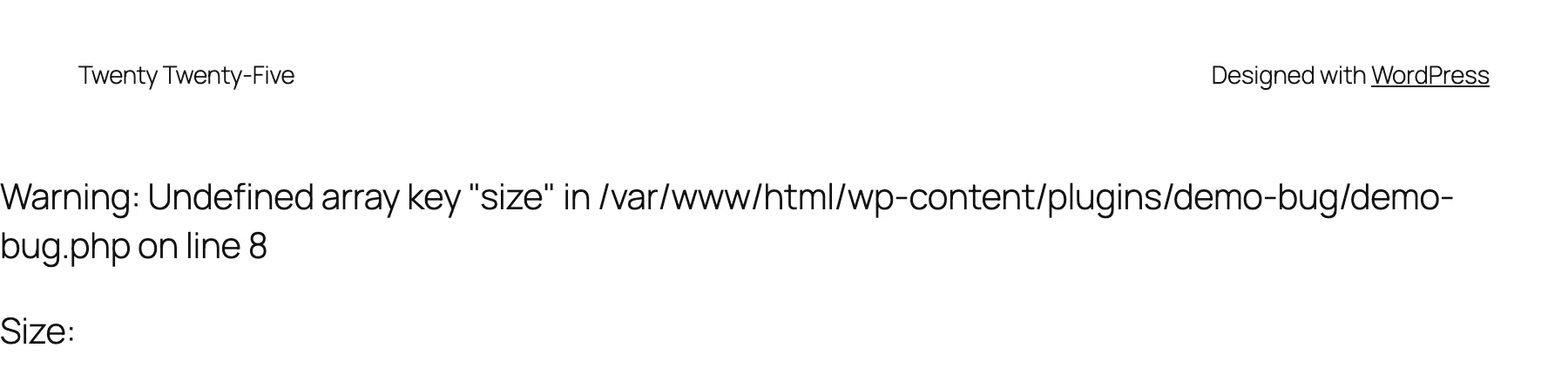
The status code is 200. Visitors get the full page plus the message. This is the one-file test plugin:
<?php/** * Plugin Name: Demo bug */add_action( 'wp_footer', function () { $settings = array( 'color' => 'blue' ); echo '<p>Size: ' . $settings['size'] . '</p>';} );Read the message in four parts#
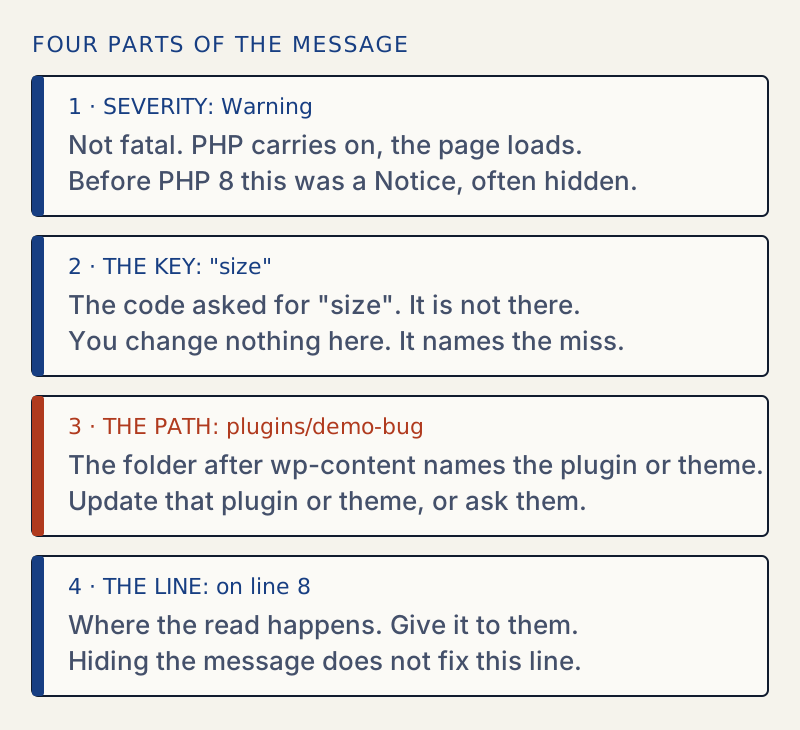
An integer key reads Undefined array key 5, with no quotes. Both are the same warning. I ran the same three lines on PHP 7.4 and PHP 8.3 to compare what the owner sees:
| Code | PHP 7.4 | PHP 8.3 |
|---|---|---|
$a['size'] | Notice: Undefined index: size | Warning: Undefined array key "size" |
$l[5] | Notice: Undefined offset: 5 | Warning: Undefined array key 5 |
$n['x'] where $n is null | Notice: Trying to access array offset on value of type null | Warning: Trying to access array offset on null |
Search results for "undefined index" are the same problem under its old name.
Why it appeared after a PHP upgrade#
PHP 8.0 changed reading an undefined key from a notice to a warning (the RFC passed by 42 votes to 21). That matters because of what WordPress shows when WP_DEBUG is off. In wp_debug_mode(), the off branch sets error_reporting to a list that includes E_WARNING and leaves out E_NOTICE. So on PHP 7.4 the notice was silent, and on PHP 8 the same code produces a warning that is not.
Whether it reaches the page then depends on PHP's display_errors setting. I tested each combination on the lab site:
| WP_DEBUG | Where the warning went |
|---|---|
off, host display_errors off | Not on the page. Written to the server's error log only. |
off, host display_errors on | On the page. WordPress does not turn display off when WP_DEBUG is off. |
on, WP_DEBUG_DISPLAY true | On the page. |
on, WP_DEBUG_DISPLAY false, WP_DEBUG_LOG true | Not on the page. One line per request in wp-content/debug.log. |
This sample comes from an earlier run, where the same test file sat in mu-plugins/, so its path and line differ from the screenshot above.
[30-Oct-2026 07:09:56 UTC] PHP Warning: Undefined array key "size" in /var/www/html/wp-content/mu-plugins/demo-bug.php on line 7This is why many owners think they were hacked. Nothing in the site changed except the PHP version. The path in the message also shows your server's folder layout, which is one reason PHP's manual says not to display errors on production sites.
I also checked WordPress 7.1.4 itself. With WP_DEBUG and display on, I loaded the home page, a search, a page, the login screen and ten admin screens (Dashboard, Plugins, Settings, Posts, Updates, Site Health, Themes, Users, Media and Permalinks). None printed a warning. A warning on a clean install points to a plugin, a theme or the PHP configuration, not WordPress core.
When the message does real damage#
The warning itself is harmless, but where it prints is not. Output that starts early stops WordPress from sending headers. I tested two cases.
A save that does not redirect. I put an undefined key in the admin_init hook and saved Settings → General. The setting saved, but WordPress could not send its redirect, so the browser stayed on a page of text:
Warning: Undefined array key "mode" in /var/www/html/wp-content/plugins/demo-bug/demo-bug.php on line 12Warning: Cannot modify header information - headers already sent by (output started at /var/www/html/wp-content/plugins/demo-bug/demo-bug.php:12) in /var/www/html/wp-includes/functions.php on line 7310With the plugin deactivated, the same save returned 302 to options-general.php?settings-updated=true.
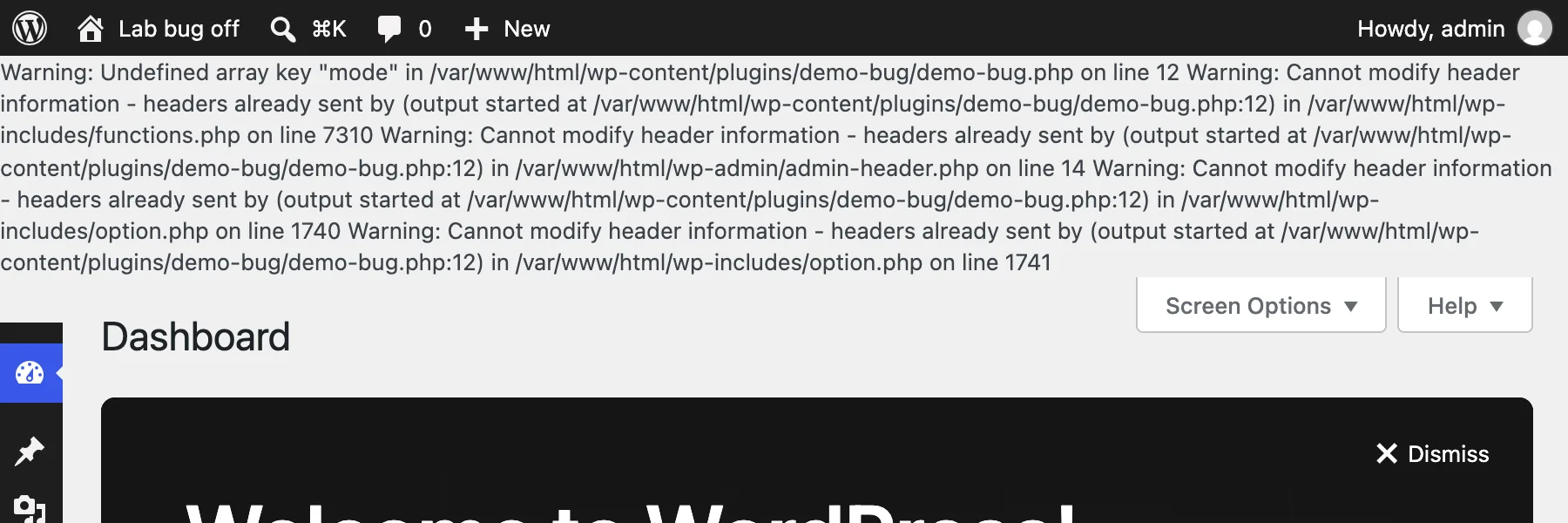
The second message is explained on the headers already sent page. Fix the first warning and the rest go away.
Broken data replies. I put an undefined key in the rest_api_init hook and fetched a REST route with a plain request that did not ask for JSON. With display on, the reply started with the warning lines and a JSON parser rejected it. When I sent the same request with the header Accept: application/json, which is what the block editor sends, WordPress turned display_errors off for it (wp_debug_mode() does this when wp_is_json_request() is true) and the reply was clean JSON. So a REST warning alone does not break the editor. A warning printed on every request, for example from a hook that runs early, or a client that does not ask for JSON, can still corrupt a reply.
What does not work#
- Turning
WP_DEBUGoff while the host shows errors. As the table shows, the warning stays on the page if the host'sdisplay_errorsis on. - Adding
@in front of the line. I tried it: the message vanished from the page and nothing reached the log either. The bug is still there, and now nobody can see it.
If the page goes blank#
A warning never stops a page by itself. A blank page, a fatal error or a critical error message is a different problem: see the white screen of death. For a value that is null instead of a missing key, see attempt to read property on null.
Sources
- PHP manual: Backward incompatible changes in PHP 8.0 · Reading an undefined array key became a warning. Default error_reporting became E_ALL.
- PHP RFC: Reclassifying engine warnings · The vote that moved undefined array key from notice to warning, implemented in PHP 8.0.
- PHP manual: Runtime configuration for error handling · display_errors and log_errors, and the advice to log on production sites.
- Debugging in WordPress · WP_DEBUG, WP_DEBUG_LOG and WP_DEBUG_DISPLAY, and the advice against using them on live sites.
- WordPress core: wp_debug_mode() in wp-includes/load.php · Function wp_debug_mode(), version 7.1.4. What WordPress does with error_reporting and display_errors for each combination of the constants.
One email when something breaks or changes.
New plugins and re-tested guides, about twice a month. Never a sales pitch.