Why it happens
- The
mysqliPHP extension is not installed on the server. This happens on a fresh server where only the bare PHP package was installed, or after a PHP version switch to a build that has its own, shorter extension list. - The extension is installed but switched off. Its
extension=mysqliline was removed or commented out ofphp.inior one of the files in the PHPconf.dfolder. - PHP cannot find the extension file.
extension_dirpoints at the wrong folder, so PHP logs "Unable to load dynamic library" at start-up and carries on without it. - You fixed the wrong copy of PHP. The command line (
php -m) and the web server often use different PHP builds and different ini files. - The extension was enabled, but PHP was not restarted. Apache with mod_php and PHP-FPM read their ini files only when they start.
How to fix it
Try the fixes in this order. Each one is independent: stop as soon as the error is gone.
Ask PHP what the website sees, not what the terminal sees
- Do not trust
php -malone. It shows the command-line PHP, which can be a different build from the one that serves your site. It also printsmysqlndas a separate line, andmysqlndis notmysqli. - Create a file called
check-k39.phpin the WordPress folder (use a random name) containing<?php var_dump( function_exists( 'mysqli_connect' ), php_ini_loaded_file() ); echo PHP_SAPI;and open it in your browser.function_exists( 'mysqli_connect' )is the exact test WordPress makes. bool(false)confirms the cause. The second value is thephp.inithe web server really uses. Edit that file, not the onephp --inishows in the terminal if they differ. Deletecheck-k39.phpwhen done.- On managed hosting you may not be able to run files like this. Use the panel steps below.
Turn on mysqli in your hosting panel
- Open your host's control panel and find the page for PHP versions or PHP extensions. The name differs from host to host.
- Pick the PHP version your site uses, tick
mysqli, and save. - Reload the site. If it still fails, check whether the panel says PHP needs a restart.
- If
mysqliis not in the list, or the box is greyed out, ask your host to turn it on for your PHP version.
Install and enable mysqli on your own server
- On Debian or Ubuntu, install the database package for your PHP version, for example
sudo apt install php8.3-mysql. On Red Hat family systems the package isphp-mysqlnd. Both providemysqli. - Check that it is on:
php -m | grep -x mysqlishould printmysqli. If you build PHP from source, add--with-mysqli. - If the package is installed but off, make sure a line
extension=mysqliexists inphp.inior in a file in theconf.dfolder, with no;in front. On Windows the line isextension=php_mysqli.dll. - Restart what runs PHP. For Apache with mod_php,
sudo systemctl restart apache2. For PHP-FPM,sudo systemctl restart php8.3-fpm. Match the version number to yours. Changing the ini file alone does nothing until then.
Fix a wrong extension_dir
- Look in the web server's PHP error log for "PHP Startup: Unable to load dynamic library 'mysqli'". The message names the folders PHP tried.
- Compare that folder with the real place of
mysqli.so(orphp_mysqli.dll). On Linux,find / -name mysqli.so 2>/dev/nullfinds it. - Set
extension_dirto the real folder, or remove the line to go back to PHP's default. Restart PHP. - Do not write
extension=mysql. That extension was removed in PHP 7 and WordPress does not use it. PHP will log the same kind of warning and the error stays.
Do not stop at pdo_mysql or an old PHP
- PDO_MySQL (
pdo_mysql) is not a substitute. WordPress callsmysqlifunctions directly, so enablingpdo_mysqlalone leaves the error. - WordPress 7.1 needs PHP 7.4 or newer. If PHP is older than that, you get a different message first: "Your server is running PHP version … but WordPress 7.1.4 requires at least 7.4."
WordPress cannot run without PHP's mysqli extension, the part of PHP that talks to MySQL and MariaDB. If PHP has no mysqli, WordPress stops on every page load, in the admin and on the front end, before it tries to reach the database. Turn mysqli on for the PHP that serves your site, restart PHP, and the site comes back. Your content was never touched.
What you see#
Every URL answers with a plain white box on a grey page, the tab title "Requirements Not Met", and HTTP status 500. There is no login screen and no theme.
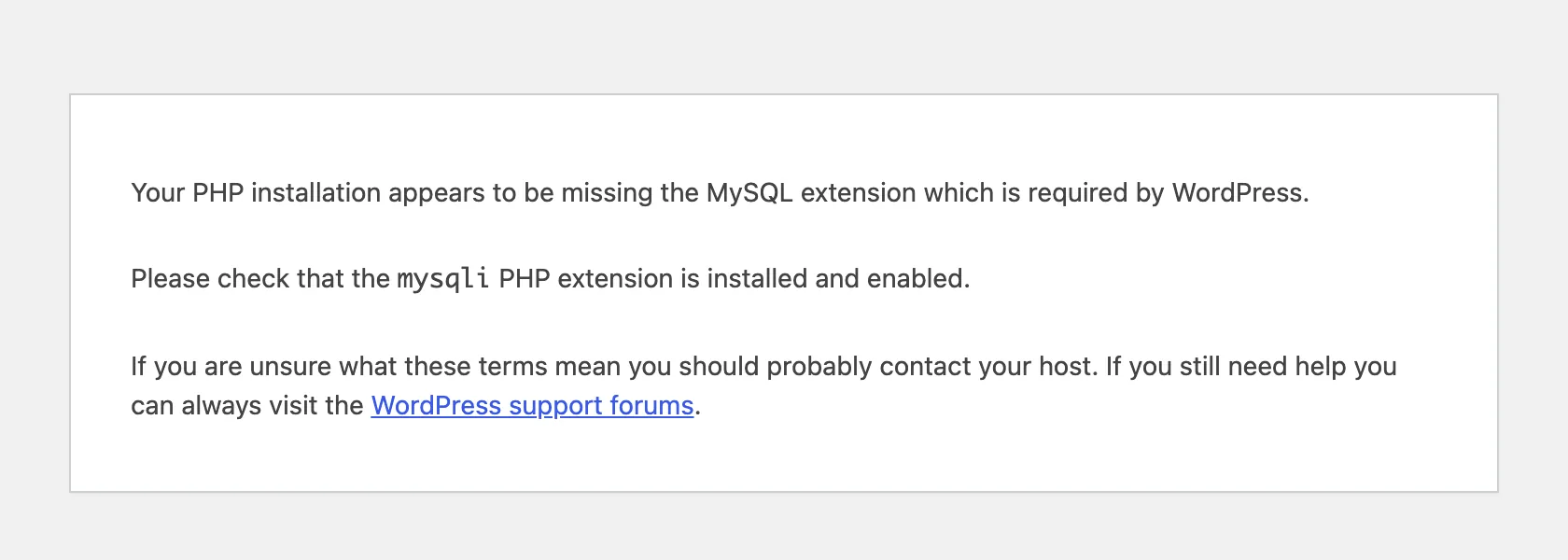
The message says "MySQL extension", but the second line names the real one, mysqli. WP-CLI stops with the same text:
wp option get siteurlError: Your PHP installation appears to be missing the MySQL extension which is required by WordPress.Please check that the `mysqli` PHP extension is installed and enabled.If you are unsure what these terms mean you should probably contact your host. If you still need help you can always visit the WordPress support forums. Your PHP installation appears to be missing the MySQL extension which is required by WordPress.How the check works#
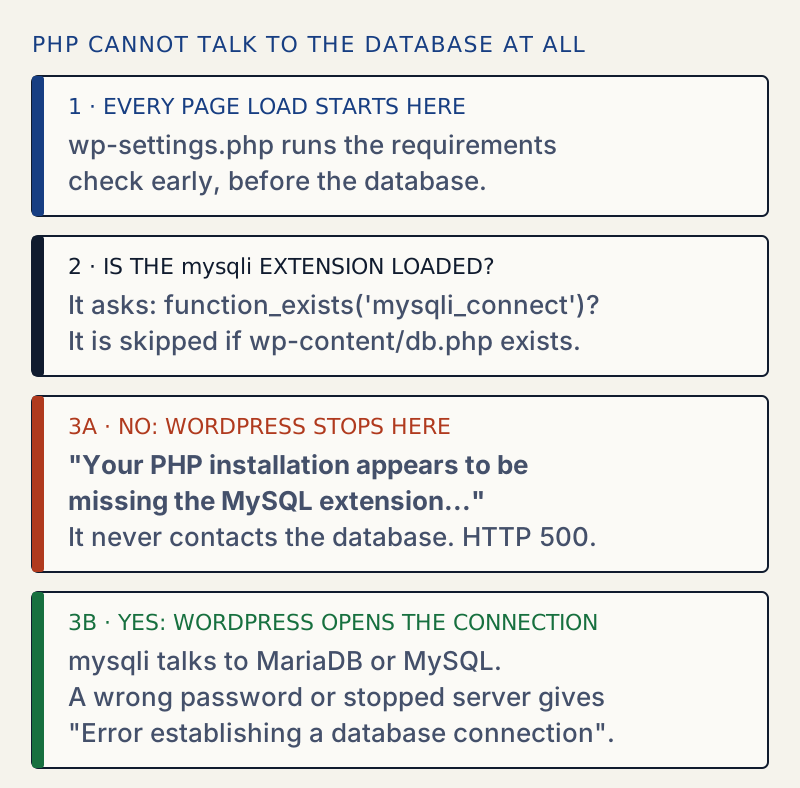
In WordPress 7.1.4, wp-settings.php calls wp_check_php_mysql_versions() almost first, right after it loads version.php and load.php. The function does three checks in order:
| Order | Check | If it fails |
|---|---|---|
| 1 | PHP is at least 7.4 | "Your server is running PHP version … but WordPress … requires at least …" |
| 2 | The json and hash extensions are loaded | "WordPress 7.1.4 requires the json PHP extension." |
| 3 | function_exists( 'mysqli_connect' ), unless wp-content/db.php exists | This page's message, titled "Requirements Not Met" |
All three stop with status 500. Only the third is about the database. It does not test a connection or read wp-config.php. It asks one question: does PHP have the mysqli functions?
Not the database connection error#
The two messages look alike but mean different things. Both were produced on the same test site:
| Missing MySQL extension | Error establishing a database connection | |
|---|---|---|
| Tab title | Requirements Not Met | WordPress › Error |
| Heading | none | "Error establishing a database connection" |
| Cause | PHP has no mysqli | PHP has mysqli, but the login, host or server failed |
Credentials in wp-config.php | not read yet | wrong or unreachable |
| Fix | enable mysqli in PHP | see error establishing a database connection |
Changing the database password does nothing for this error, and enabling mysqli does nothing for a wrong password.
Traps#
php -m shows mysqlnd when mysqli is gone. With mysqli turned off, php -m | grep -i mysql still prints mysqlnd, the driver library underneath. A search for "mysql" looks fine while mysqli is missing. Search for the whole word mysqli.
Turning it on is not enough; PHP has to restart. After putting the ini line back without restarting Apache, the site still answered 500. A test page on the web showed mysqli: NOT loaded while the terminal's PHP already showed loaded. After the restart the site returned 200.
A new file with extension=mysqli works as well as the packaged one. Removing the packaged ini file and adding a new file with only extension=mysqli worked after a restart. It does not matter which file holds the line, only that PHP reads it.
A wrong extension_dir fails quietly. With extension_dir=/nope the site stayed broken, and the PHP error log had one start-up warning:
PHP Warning: PHP Startup: Unable to load dynamic library 'mysqli' (tried: /nope/mysqli (/nope/mysqli: cannot open shared object file: No such file or directory), /nope/mysqli.so (/nope/mysqli.so: cannot open shared object file: No such file or directory)) in Unknown on line 0extension=mysql (the old name) gave the same warning and the same 500. Neither changes what visitors see, so the log is the only place the real reason shows up.
The db.php exception#
WordPress skips this check when the file wp-content/db.php exists, because a database drop-in may use another driver. This is why an unusual setup might not show this message. It is not a workaround. With an empty db.php on a site without mysqli, the check was skipped and the page died instead with a PHP fatal error: Call to undefined function mysqli_report() in class-wpdb.php. Remove a db.php you do not recognise only after reading it, since a real caching or database plugin may have put it there.
If your host says it is enabled#
Ask which PHP version and handler (PHP-FPM, LiteSpeed, mod_php) serve your domain, and whether mysqli is on for that exact version.
If the page changes to a different message, see error establishing a database connection. If the site is still down after this, the white screen of death page covers the next steps, and the Site Health guide shows how to read your PHP setup once the admin works again.
Sources
- WordPress core: wp_check_php_mysql_versions() in wp-includes/load.php (tag 7.1.4) · the function that prints this message; it tests function_exists( 'mysqli_connect' ) and skips the test when wp-content/db.php exists
- WordPress core: wp-settings.php (tag 7.1.4) · calls wp_check_php_mysql_versions() right after version.php and load.php
- PHP manual: Installing/Configuring mysqli · mysqli installation and --with-mysqli. The package names (php8.3-mysql, php-mysqlnd), the 500 status and the "Unable to load dynamic library" warning come from a test on a lab site.
One email when something breaks or changes.
New plugins and re-tested guides, about twice a month. Never a sales pitch.