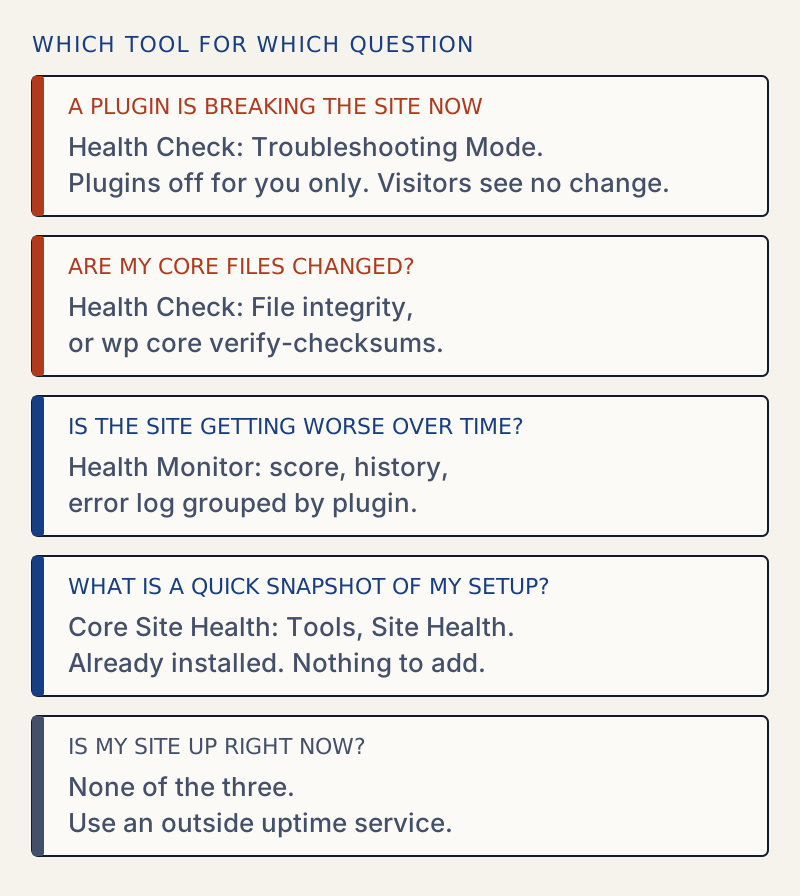
These are three different tools. Core Site Health (Tools → Site Health) is a snapshot of your setup. The Health Check & Troubleshooting plugin is a support tool: it turns plugins off for you alone so you can find a conflict, and it checks core files. WellTend Health Monitor watches in the background and keeps history. They overlap very little, so use core for a quick look, Health Check when something breaks, and Health Monitor if you want trends.
I installed Health Check 1.7.1 and WellTend Health Monitor 0.1.0 on a fresh WordPress 7.1.4 test site and did the same jobs with each. WellTend Health Monitor is made by AllWPCare, the publisher of this site. It is not on wordpress.org yet: on 2026-10-30 the wordpress.org plugin API answered "Plugin not found" for its slug, and the plugin page redirected to a search. You install it from a zip.
What core Site Health does#
Site Health is already in WordPress. It has two tabs: Status (critical issues, recommended improvements, passed tests) and Info (a copyable dump of your setup). Core added these two pages in WordPress 5.2. Once a week WordPress runs the tests in the background (the wp_site_health_scheduled_check event in WP_Site_Health) and stores only the issue counts.
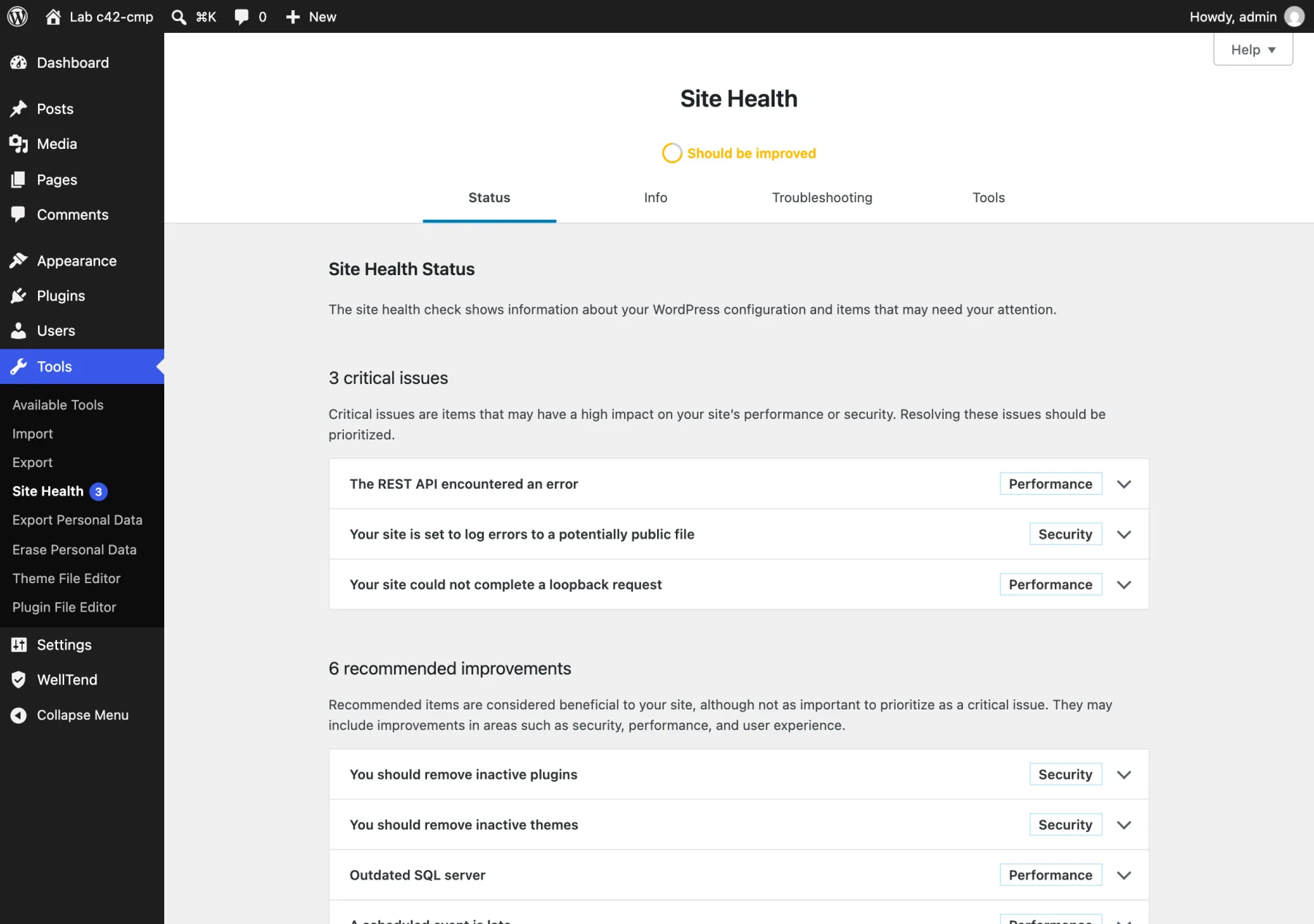
It is a good first look. It also forgets: it shows the result of now, keeps no history of earlier scores, does not read the PHP error log and does not email you. (Two of the three critical items above come from how the lab is built: the test site cannot call its own address, and I turned on the debug log. See WordPress Site Health explained for what each test means.)
What Health Check adds#
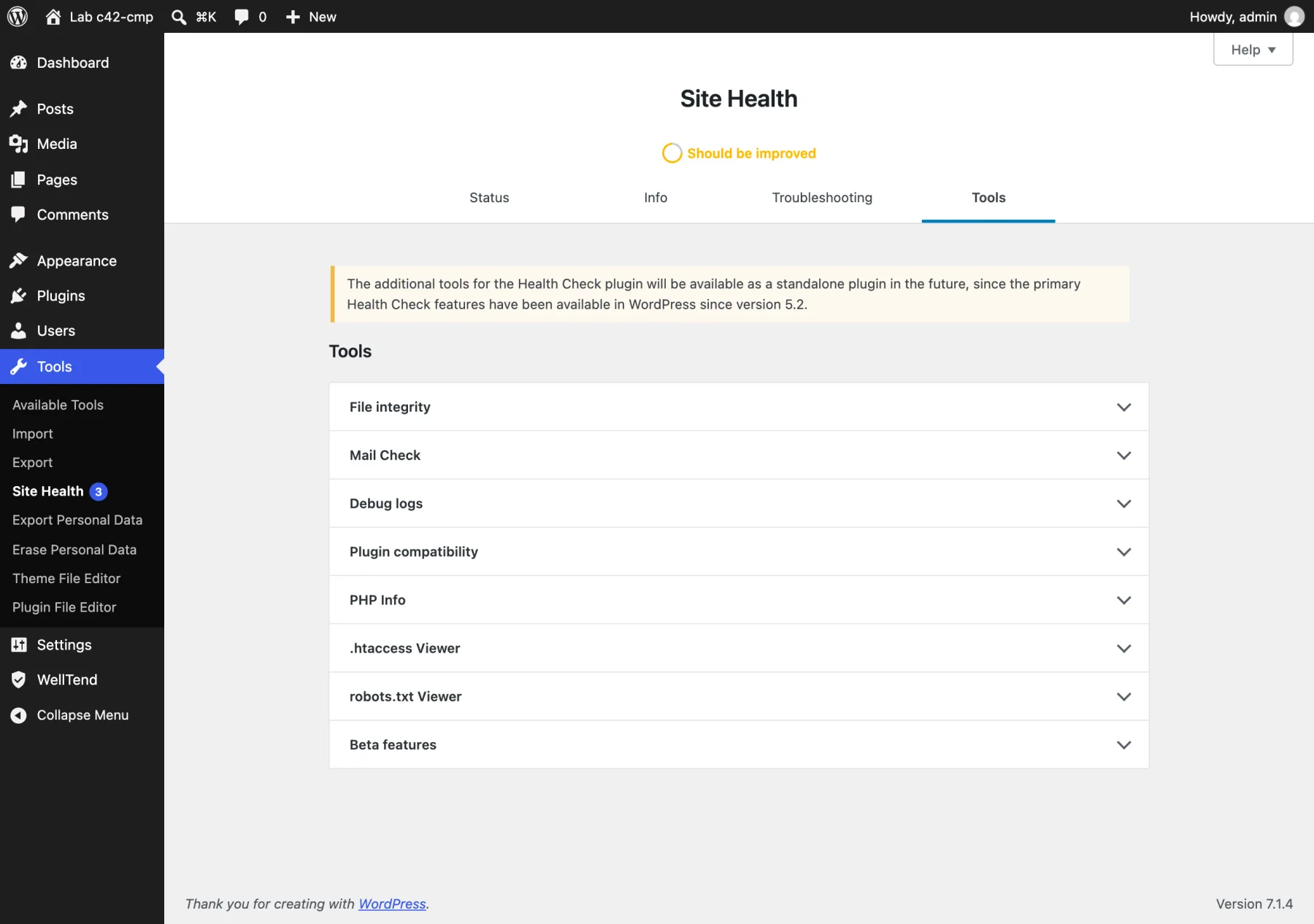
Health Check & Troubleshooting adds two tabs to that same screen: Troubleshooting and Tools. Its own Status and Info tabs are core's now.
Numbers on 2026-10-30, from the wordpress.org plugin page and API: version 1.7.1, 200,000+ active installs, rating 72 out of 100 from 181 ratings, last updated 2024-07-25, "tested up to" 6.6.11. wordpress.org warns that it has not been tested with the latest three major WordPress releases. It still ran on 7.1.4 in my test, and I did not see it break. It is not abandoned, but it has had no release for about two years. Both the Tools and Troubleshooting tabs carry a notice that they "will be available as a standalone plugin in the future".
Troubleshooting Mode#
This is the reason to keep Health Check around. When you start it, only your browser session gets a clean WordPress: all plugins look switched off and the theme is swapped. Everyone else sees the site as normal.
I tested it with a deliberately noisy plugin called Fancy Slider that adds a <div id="fancy"> to every page:
| Check | Result |
|---|---|
| Plugins screen, mode on | 0 of 6 plugins shown as active |
| Front page as the admin, mode on | no Fancy Slider output |
| Front page as a logged-out visitor, mode on | Fancy Slider output still there |
| After Disable Troubleshooting Mode in the admin bar | output back for the admin; cookie removed |
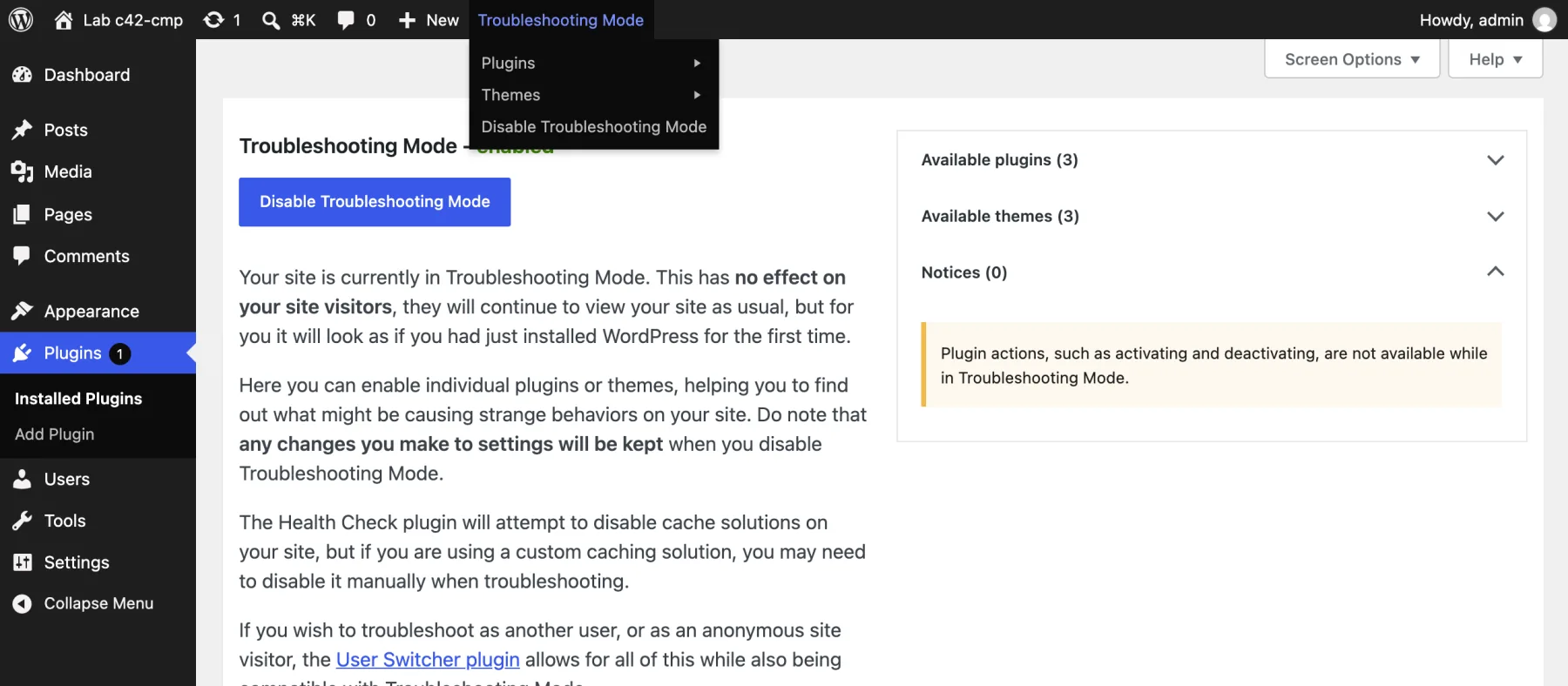
How it works: starting the mode sets a session cookie named wp-health-check-disable-plugins and copies a small must-use plugin into wp-content/mu-plugins/. That file filters the list of active plugins for requests that carry your cookie. I saw the file appear when I started the mode. It was still there after I turned the mode off, so delete it with the plugin if you want a clean folder. Health Check's own screen says must-use plugins are not disabled in the mode.
The workflow: turn the mode on, enable plugins one at a time from the admin bar, and reload the page that was broken. The plugin whose activation brings the problem back is your culprit.
File integrity#
I added a line to license.txt and ran File integrity. It compared the files against checksums from WordPress.org and reported Content changed, with a "View Diff" link.
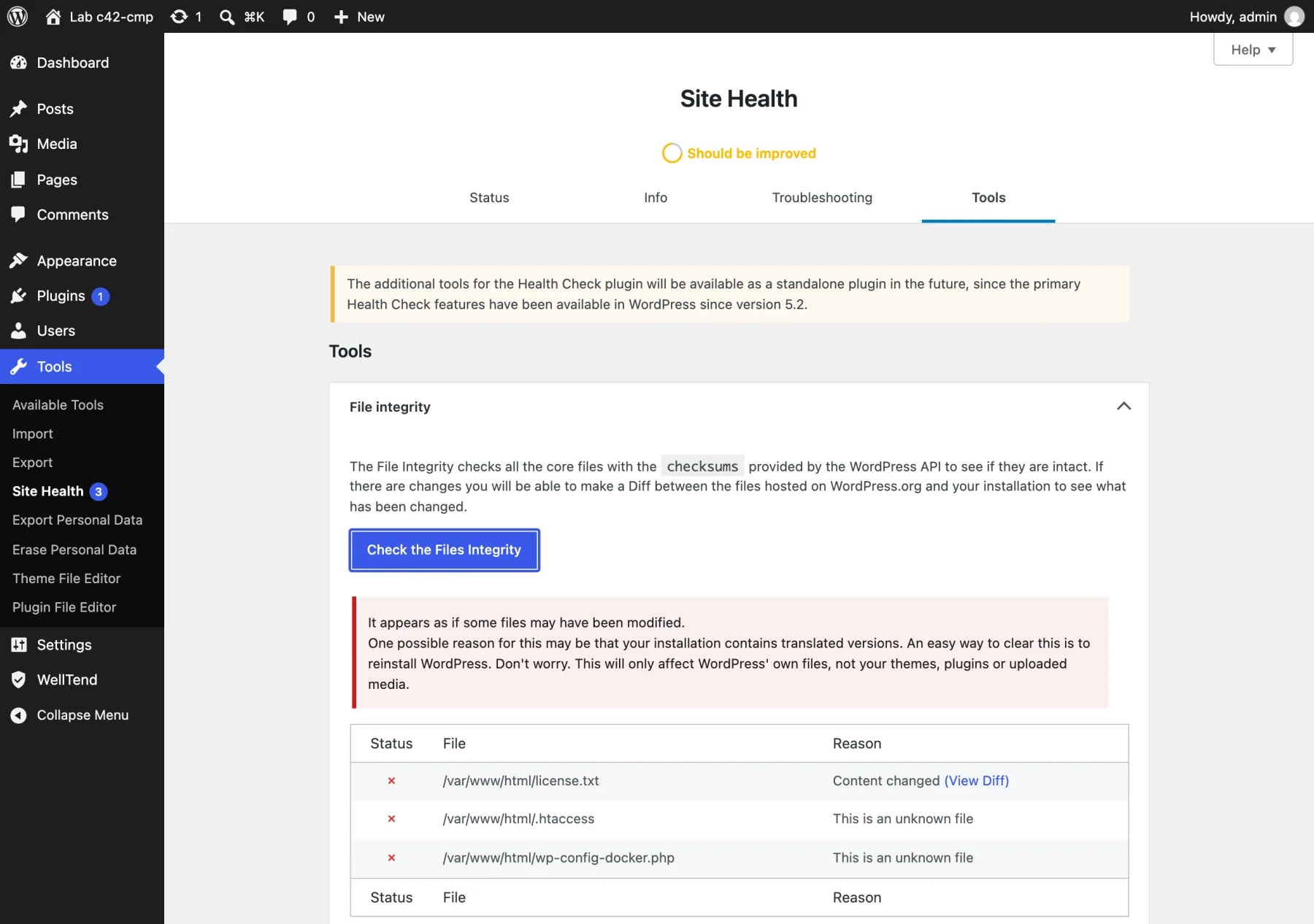
Core can do the same from the command line with wp core verify-checksums. On a fresh lab site with one line added to license.txt it printed:
Warning: File doesn't verify against checksum: license.txtWarning: File should not exist: wp-config-docker.phpError: WordPress installation doesn't verify against checksums.What Health Check does not do#
It runs only when you open a tool. It has no schedule, no history, no score over time, no email and no error-log view beyond its Debug logs tool, which shows debug.log text when WP_DEBUG_LOG is on. In its source the only scheduling code clears an old health-check-scheduled-site-status-check event, which core now handles.
One thing I noticed: with WP_DEBUG on, Health Check 1.7.1 on WordPress 7.1.4 writes a notice to the log, "Translation loading for the health-check domain was triggered too early". It is harmless, but it shows up in your log while the plugin is active.
What WellTend Health Monitor adds#
Health Monitor is a monitoring screen, not a repair tool. It runs checks in the background (an hourly tick and a daily pass, nothing on page loads), gives one score, and keeps history. It runs core's Site Health tests too and keeps their results.
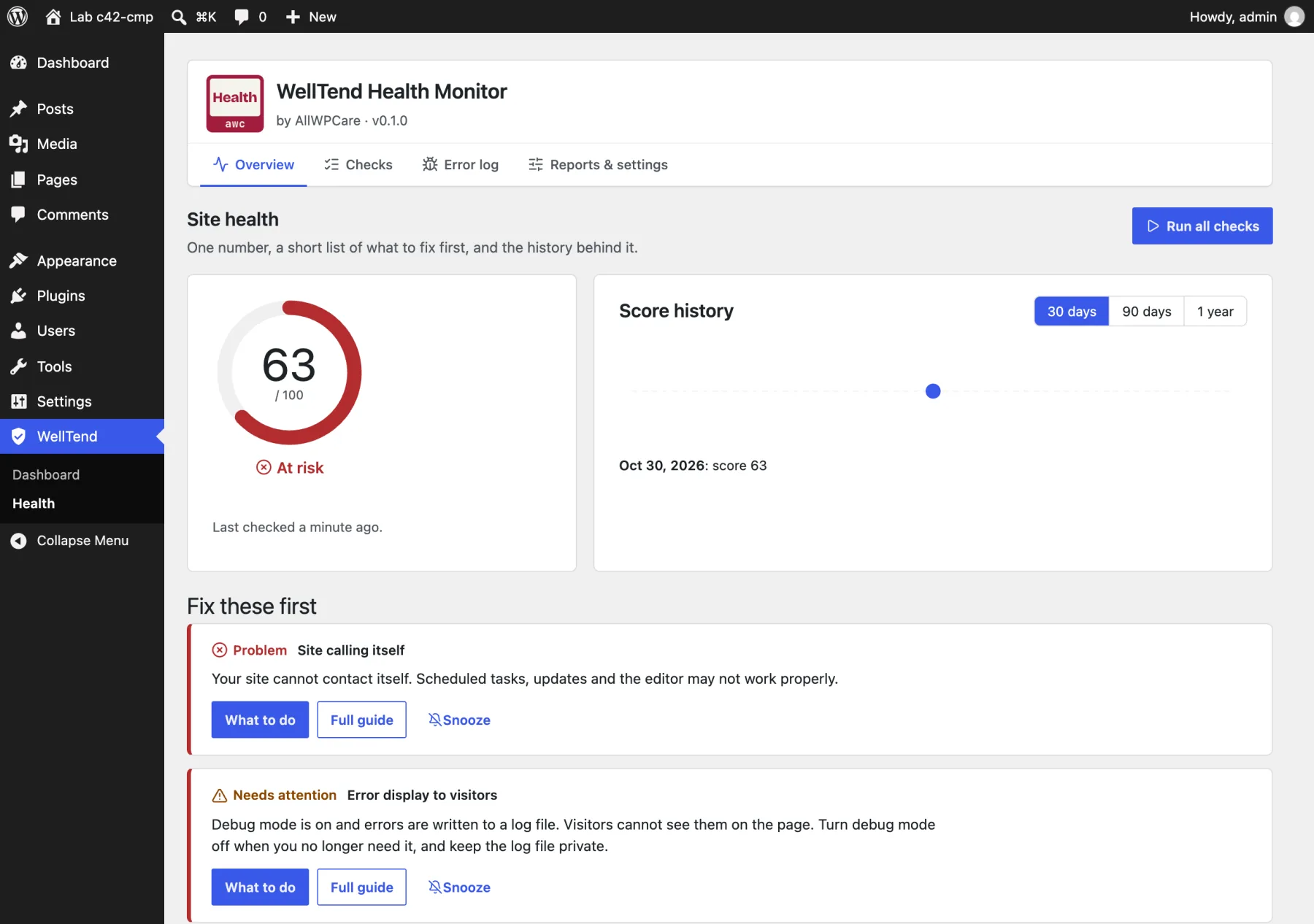
The test site had 47 checks after the first run. The score was 63, "At risk", mostly from lab conditions (no loopback, an old database version). Each item has a What to do button and a Full guide link, and Snooze hides one you have decided to live with.
The part Health Check cannot match is the error log view. Fancy Slider wrote warnings to the log, and Health Monitor grouped them by who wrote them:
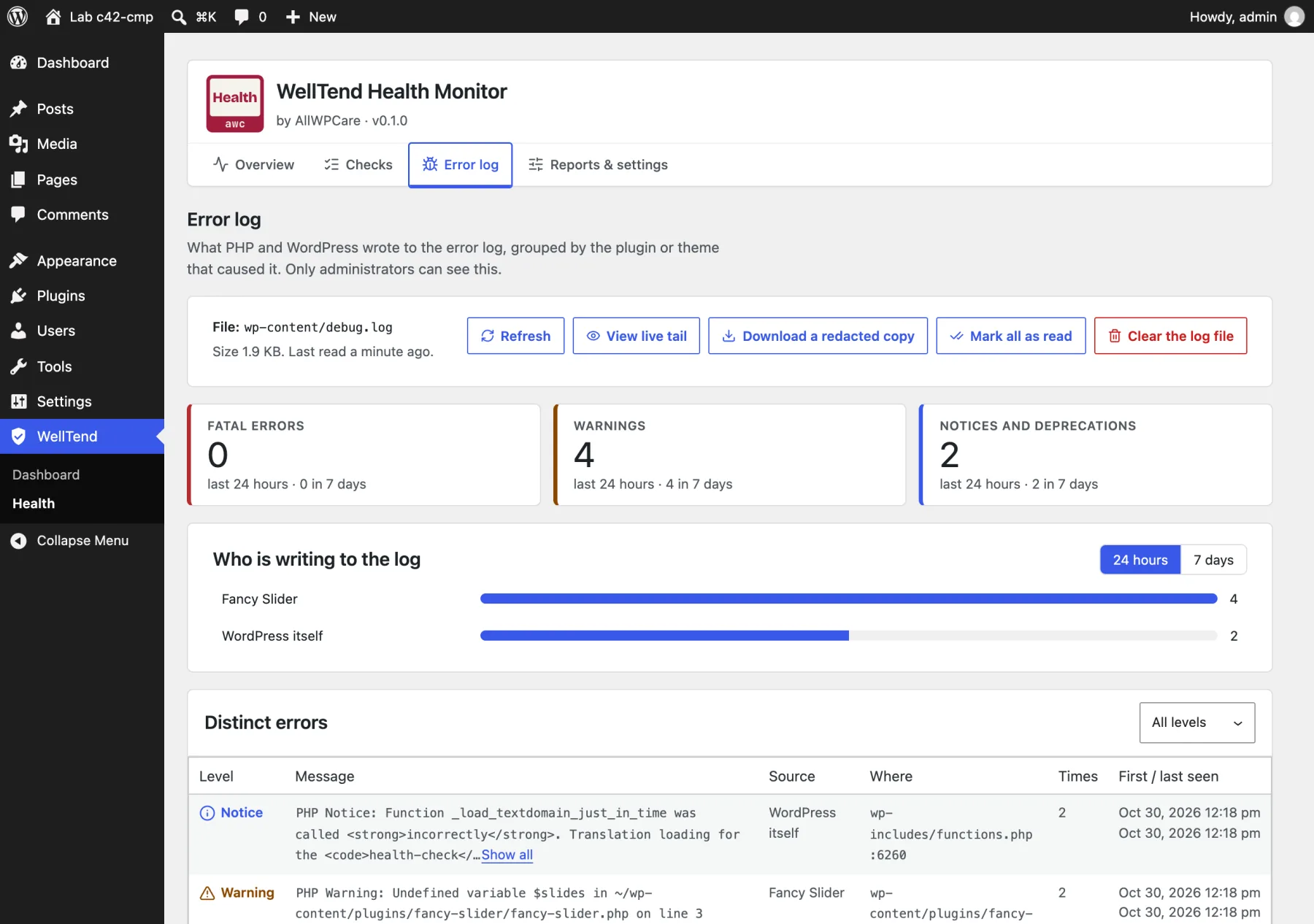
It also named "WordPress itself" for the Health Check notice above. That is how it works: it blames the file the notice points to, and that notice points to a core file. Read the message in the table to see which plugin is involved. There is a matching command for people who use WP-CLI: wp awc health status prints the checks and exits with 1 if one fails.
What it does not do, by its own readme: it cannot tell you the site is down, it is not a backup, malware scanner or firewall, and it never changes your site except the Clear the log file button, after you confirm. It has no troubleshooting mode, no core file check and no plugin-by-plugin testing. It is version 0.1.0, so expect rough edges.
Side by side#
| Core Site Health | Health Check 1.7.1 | WellTend Health Monitor 0.1.0 | |
|---|---|---|---|
| Job | Snapshot of your setup | Tools for tracking down a problem | Background checks with history |
| Where it comes from | Built into WordPress | wordpress.org, 200,000+ installs | Zip from AllWPCare, not on wordpress.org |
| Runs by itself | Yes, but keeps only a count | No, only when you open a tool | Yes: hourly and daily |
| History | No | No | 30 days, 90 days, 1 year |
| Troubleshooting Mode | No | Yes | No |
| Core file check | No | Yes (File integrity) | No |
| Mail test | No | Yes (Mail Check) | Yes, with a "did you get it?" link |
| Error log | No | Shows debug.log text | Grouped by plugin or theme |
| Email report or alerts | No | No | Opt-in |
| Needs an account | No | No | No |
| Last release | With WordPress | 2024-07-25 | New, pre-release |
Who should pick which#
- A plugin conflict is breaking the site, and you do not want to disturb visitors. Install Health Check, use Troubleshooting Mode, and remove it afterwards. Health Monitor cannot do this.
- You think someone changed core files. Health Check's File integrity, or
wp core verify-checksums. - You want to know if the site is getting healthier or worse, and which plugin fills the log. Health Monitor. Pair it with turning on the debug log if your host hides PHP errors.
- You just want a look at your setup. Core Site Health is enough. Do not install anything.
- You want to know if the site is up right now. None of these. Use an outside uptime service.
Using more than one is normal. Health Monitor shows that something is wrong, and Health Check's Troubleshooting Mode helps you find the plugin. If the loopback test fails, this page explains the cause. Other tools exist too (Query Monitor for slow pages, hosted dashboards for many sites), but they answer other questions and I did not test them here.
WellTend Health Monitor checks errors, scheduled tasks, updates, PHP and storage, and says in plain words what each result means and how to fix it.
FAQ
Do I still need the Health Check & Troubleshooting plugin?
Only when you have a problem to chase. Its Status and Info tabs are core's own Site Health screen now. What it adds is Troubleshooting Mode and the Tools tab (file integrity, mail check and others). Install it when a plugin conflict is breaking the site, and remove it when you are done.
Does Troubleshooting Mode take my site offline for visitors?
No. On the lab site, with the mode on, the logged-in admin saw no plugins and no output from the test plugin, while a logged-out visitor still saw the normal page. The mode is tied to a cookie in your browser.
Does WellTend Health Monitor replace Health Check?
No. Health Monitor has no troubleshooting mode, no file integrity check and no way to test one plugin at a time. It shows trends and the error log. Health Check is for finding a conflict now.
Can any of these tell me my site is down?
No. All three run inside your site, so they cannot report when it is down. Use an outside uptime service for that.
Is WellTend Health Monitor on wordpress.org?
Not yet. On 2026-10-30 the wordpress.org plugin API answered "Plugin not found" for that slug, and the plugin page redirected to a search. It is version 0.1.0 and you install it from a zip.
Sources
- Health Check & Troubleshooting on wordpress.org · Version, last update, tested-up-to and what the plugin says about itself
- wordpress.org plugin API: health-check · Active installs, rating and last updated date, read on 2026-10-30
- Troubleshooting using the Health Check plugin (Support handbook) · How Troubleshooting Mode is meant to be used
- Site Health screen (WordPress documentation) · What the core Status and Info tabs show
- Site Health Check in 5.2 (Make WordPress Core) · WordPress 5.2 added the Status and Info pages
- WP_Site_Health (WordPress core, class-wp-site-health.php) · The weekly wp_site_health_scheduled_check event that stores issue counts
- wp core verify-checksums (WP-CLI handbook) · The command-line way to check core files
One email when something breaks or changes.
New plugins and re-tested guides, about twice a month. Never a sales pitch.