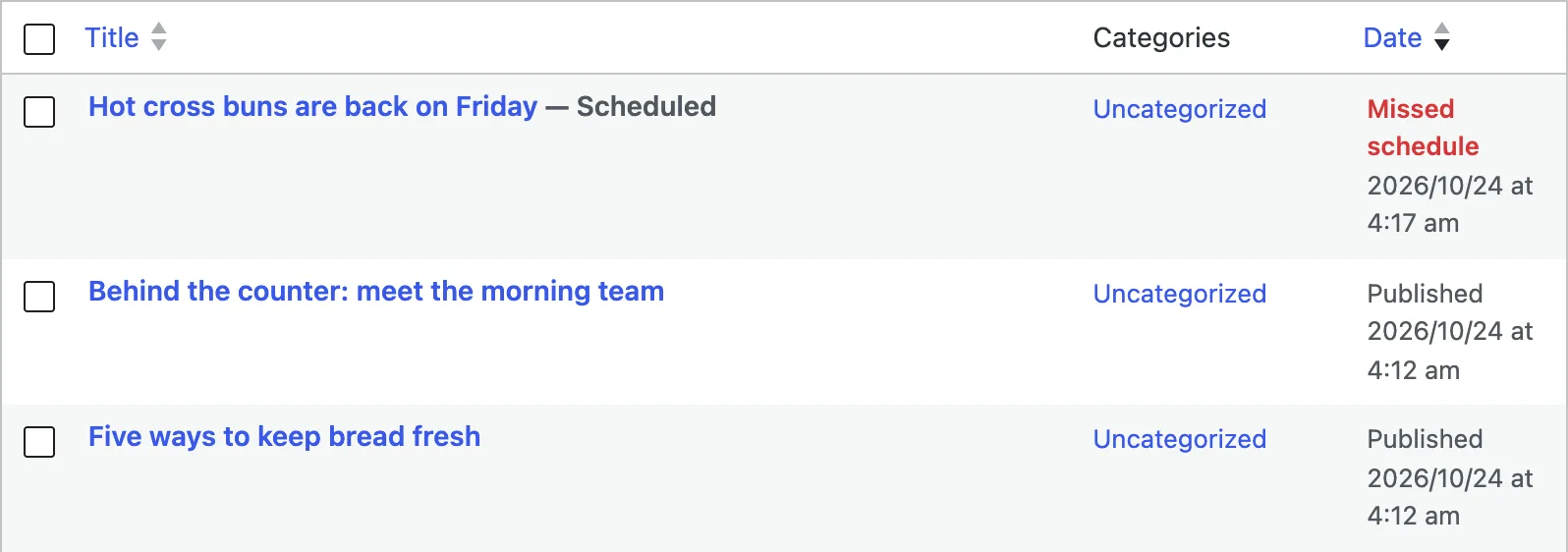
A post shows Missed schedule when its publish time has passed but WordPress has not published it yet. WordPress publishes scheduled posts with WP-Cron, a scheduler that only runs when someone visits the site and the site can send a request to itself. When either part fails, the post waits. The reliable fix is a real server cron job that runs WordPress's scheduled tasks every few minutes.
The same scheduler also runs update checks, cleanup jobs and many plugins' timed work, so a stuck WP-Cron rarely affects posts alone. I reproduced both common causes on a test site running WordPress 7.1.3 and fixed each one, so every output below is real.
How WP-Cron is supposed to work#
WP-Cron is not a clock that ticks on its own. Reading the WordPress 7.1 source, this is what happens:
- Someone requests a page. A visitor, a search engine bot, or you in wp-admin.
- At the end of that request, WordPress checks the task list. If any task is due, and
DISABLE_WP_CRONis not set, it carries on. - WordPress calls its own
wp-cron.phpin the background. This is the loopback request: the site sends a request to its own address, with a timeout of 0.01 seconds so the visitor never waits. WordPress sets a lock first, so this happens at most once a minute (theWP_CRON_LOCK_TIMEOUTconstant, 60 seconds by default). wp-cron.phpruns every task that is due, including thepublish_future_posttask that publishes a scheduled post.
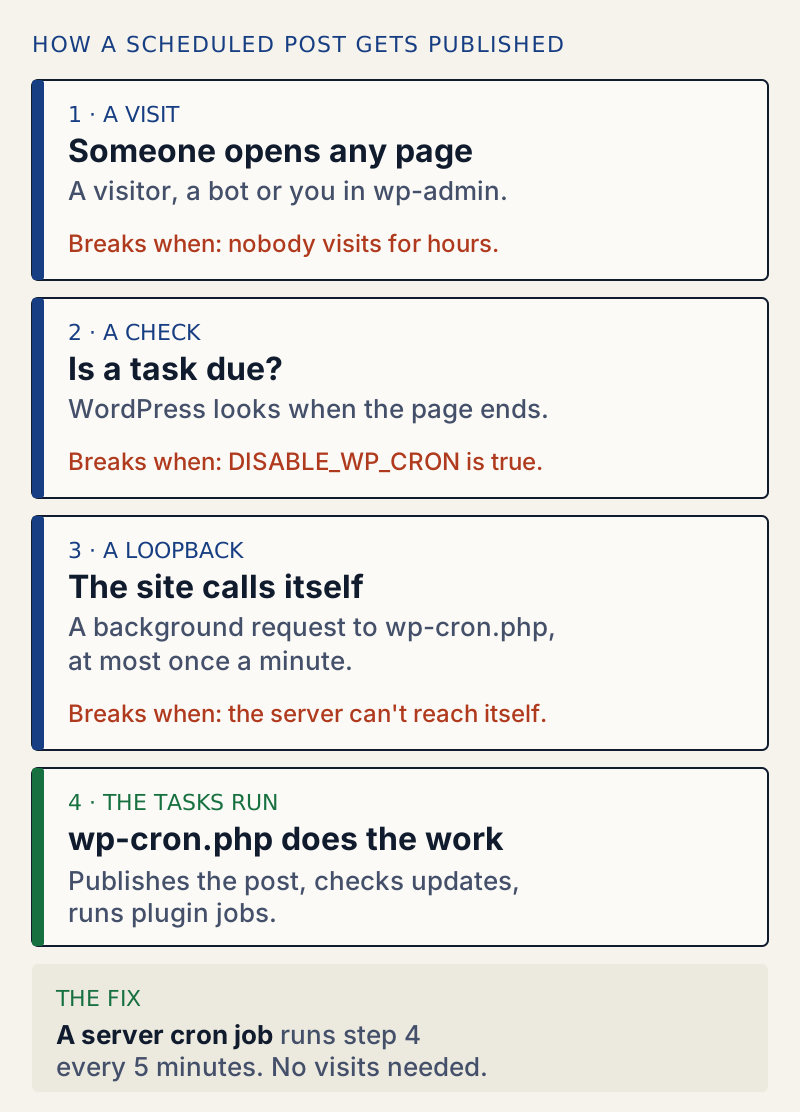
That design explains the three usual causes:
- No visits. A quiet site with no visitors overnight runs nothing overnight. The 6 am post goes out with the first visitor of the day.
DISABLE_WP_CRONis set totrueinwp-config.php. Some hosts and performance guides add it, and it is only safe if a server cron job takes over.- The site cannot call itself. Something between the server and its own address refuses or blocks the loopback request.
Cause 1: the site cannot reach itself#
My test site started with a broken loopback: from inside the server, the site's own address refused connections. I scheduled a post two minutes ahead, waited until its time had passed, and visited the home page three times. The post stayed scheduled, and the server's access log showed my three visits and not one request to wp-cron.php:
"GET / HTTP/1.1" 200 76741 "-" "curl/8.7.1""GET / HTTP/1.1" 200 76741 "-" "curl/8.7.1""GET / HTTP/1.1" 200 76741 "-" "curl/8.7.1"WP-CLI has a command that tests exactly this step:
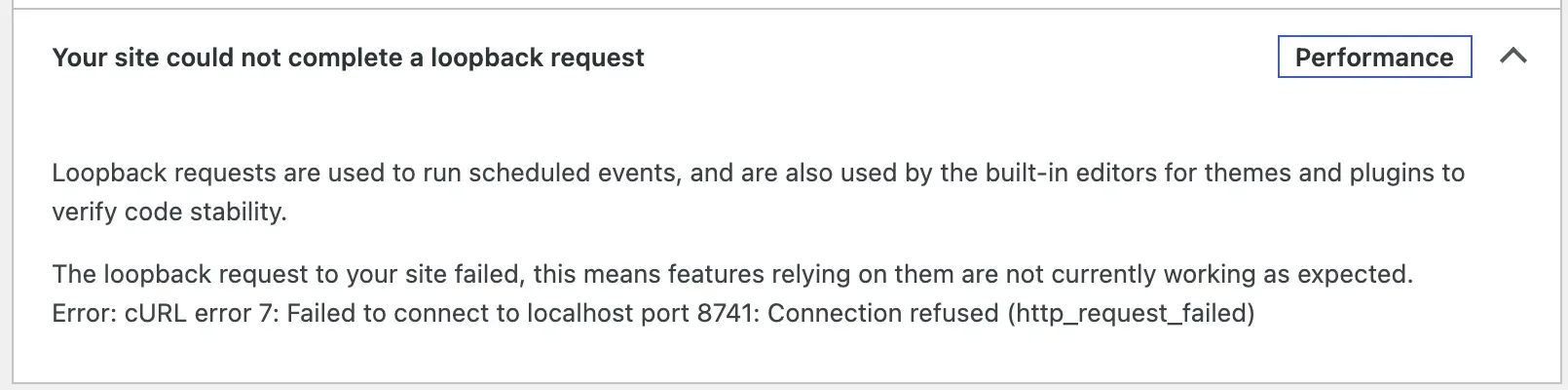
wp cron testError: WP-Cron spawn failed with error: cURL error 7: Failed to connect to localhost port 8741: Connection refusedTools → Site Health showed the same problem in two places:

After I fixed the server so the site could reach its own address, wp cron test printed Success: WP-Cron spawning is working as expected. The next visit produced the loopback request, and the post was published:
"GET / HTTP/1.1" 200 76741 "-" "curl/8.7.1""POST /wp-cron.php?doing_wp_cron=1792815689.0058190822601318359375 HTTP/1.1" 200 285 "-" "WordPress/7.1.3; http://localhost:8741"The lock shows up here too. A visit 41 seconds after a failed attempt did not start WP-Cron at all, because the one-minute lock from that attempt had not expired. WP-Cron starts at most once a minute, however many visits arrive.
How you fix a broken loopback depends on what blocks it, so start with the error text in the Your site could not complete a loopback request item. On my test site it was "Connection refused": the server would not accept a connection to its own address. Send that exact line to your host; they can see what blocked the request. If you added password protection to the whole site or a firewall rule recently, try with it switched off first.
Cause 2: DISABLE_WP_CRON with nothing taking over#
Next I set DISABLE_WP_CRON to true, which is how many hosts and caching guides configure WordPress:
wp config set DISABLE_WP_CRON true --rawSuccess: Added the constant 'DISABLE_WP_CRON' to the 'wp-config.php' file with the raw value 'true'.I scheduled a post for 04:33 and visited the home page at 04:33:21 and again at 04:34:32, more than a minute apart. No wp-cron.php request appeared, and the post stayed scheduled. The task list shows it waiting:
wp cron event list --fields=hook,next_run_gmt,next_run_relativehook next_run_gmt next_run_relativepublish_future_post 2026-10-24 04:33:00 nowwp_privacy_delete_old_export_files 2026-10-24 05:12:03 37 minutes 14 secondswp_version_check 2026-10-24 16:12:03 11 hours 37 minutesnow in the last column means "overdue". The next_run_gmt column shows by how much. wp cron test says plainly what is going on:
Error: The DISABLE_WP_CRON constant is set to true. WP-Cron spawning is disabled.Site Health, though, said Scheduled events are running. That is not a bug in your reading: with DISABLE_WP_CRON set, Site Health assumes a server cron job exists and waits until a task is an hour overdue before it reports A scheduled event has failed (15 minutes for A scheduled event is late). Without the constant, it reports a late task straight away and a failed one after 5 minutes. So a site with DISABLE_WP_CRON and no replacement can miss posts for a whole hour while Site Health shows nothing.
The fix: a real server cron job#
A server cron job runs a command on a timetable, whether or not anyone visits. Point it at WordPress's scheduled tasks and steps 1 to 3 in the diagram stop mattering. There are two ways; both worked on my test site with DISABLE_WP_CRON set to true.
Option A: WP-CLI (if your host has it)#
PATH=/usr/local/bin:/usr/bin:/bin*/5 * * * * cd /var/www/html && wp cron event run --due-now > /dev/null 2>&1Replace /var/www/html with your WordPress folder (the one with wp-config.php). */5 means every 5 minutes. When it ran, the command printed:
Executed the cron event 'do_pings' in 0.736s.Executed the cron event 'publish_future_post' in 0.013s.Success: Executed a total of 2 cron events.and the waiting post was published. Keep the PATH line. Cron jobs start with a very short list of folders to look in, and without it my first attempt failed with:
/bin/sh: 1: wp: not foundThe same happens one level down if php itself is not on that list (php: not found). Run which wp and which php over SSH and make sure both folders appear in the PATH line, or write the full path to wp.
Option B: request wp-cron.php#
If you have no WP-CLI, have cron request the file directly:
*/5 * * * * curl -s -o /dev/null "https://example.com/wp-cron.php?doing_wp_cron"On my test site this published the waiting post on the next run, and the access log showed one GET /wp-cron.php?doing_wp_cron a minute while the test ran. wp-cron.php does not look at DISABLE_WP_CRON (only the visit-based trigger does), so this works with the constant set. Unlike Option A, it goes through the web server like a normal visit, so anything that blocks requests to your site can block it too.
Add the line with crontab -e over SSH, or in your host's control panel if it has a cron page. Then:
- Set
DISABLE_WP_CRONtotrueonce the server cron job runs, so visits stop starting WP-Cron as well. This is the setup that does not depend on visitors. - Check it works. Schedule a test post 10 minutes ahead (at least one minute, or WordPress publishes it at once), wait 15 minutes, and look at the Posts list.
Publishing the posts that already missed#
A server cron job publishes overdue posts on its next run, so you may not need to do anything. To publish one by hand, open the post in the editor. The top button says Save, not Publish, because the post is still scheduled. In the Post sidebar, click Scheduled next to Status, choose Published ("Visible to everyone"), then click Save. I did this on my test site and the post went live at once. With WP-CLI, wp cron event run --due-now runs every overdue task in one go.
Plugin help, and its limits#
WellTend Site and Admin Toolkit has a module called Auto-Publish Missed Scheduled Posts. When it is on, it publishes scheduled posts whose time has passed. On my test site, with DISABLE_WP_CRON set and no server cron job, a missed post was published by the first page view after its time. That page-view check only runs while DISABLE_WP_CRON is set, and at most every 15 minutes. Otherwise the module relies on an hourly WP-Cron task, so it cannot help if WP-Cron itself never runs. Treat it as a safety net, not a replacement for a server cron job.
WellTend Health Monitor checks the scheduler as well. On the same test site it reported, with DISABLE_WP_CRON set and no server cron job yet:
cron_disabled warn WordPress's built-in scheduler is switched off, and we cannot see anything taking over. Unless your host runs wp-cron.php on a schedule, scheduled tasks never run.Its overdue check is slower on purpose: it warns only when a task is 6 hours late and fails at 24 hours, because quiet sites often run tasks a little late. It lists the plugin each late task belongs to, which helps when the stuck task is not a post.
If missed tasks came with a stuck update, see Another update is currently in progress. For the other checks on the Site Health screen, read WordPress Site Health explained.
WellTend Health Monitor warns when scheduled tasks are overdue or WP-Cron is switched off, and lists which plugin each task belongs to.
FAQ
Why does my post say Missed schedule?
The publish time has passed, but the post is still waiting to be published. WordPress publishes scheduled posts with its built-in scheduler, WP-Cron, and WP-Cron only runs when someone visits the site and the site can call itself. If either part fails, the post waits and the Posts list shows Missed schedule.
How do I publish a post that missed its schedule?
Open the post in the editor. In the sidebar, click the Scheduled status, choose Published, then click Save. That fixes this one post. To stop it happening again, fix WP-Cron or set up a server cron job as this guide shows.
Does DISABLE_WP_CRON stop scheduled posts?
Yes, unless something else runs WordPress's scheduled tasks. With DISABLE_WP_CRON set to true, page visits no longer start the scheduler, so a server cron job must call wp-cron.php or run wp cron event run --due-now. Calling wp-cron.php directly still works with the constant set.
How often should the server cron job run?
Every 5 minutes suits most sites: a scheduled post goes out at most about 5 minutes late. Every minute is fine on a server that can take it. Running it less often than every 15 minutes makes the delays noticeable.
Why did my post publish straight away when I scheduled it?
WordPress only schedules a post if its time is at least one minute in the future. Anything closer is published at once. I checked this on WordPress 7.1: a post set 54 seconds ahead was published the moment it was saved.
One email when something breaks or changes.
New plugins and re-tested guides, about twice a month. Never a sales pitch.