Why it happens
- An earlier core update stopped before it finished. The PHP process was killed, hit a time limit, or the server restarted, so WordPress never removed its lock.
- A core update really is running right now. It may be an automatic background update that started on its own, or a second person or browser tab that clicked Update first.
- A host's update tool or a management dashboard started a core update through WP-CLI at the same time as you.
How to fix it
Try the fixes in this order. Each one is independent: stop as soon as the error is gone.
Wait 15 minutes and try again
- WordPress only honours the lock for 15 minutes. After that, the next update attempt removes the old lock by itself and runs.
- Go back to Dashboard → Updates and click Update to version … (or Re-install version …) again.
- I tested both sides of the limit: a lock 14 minutes old still blocked the update, and a lock just over 15 minutes old let it run and was removed afterwards.
Check that no update is really running
- Look in the WordPress folder for a file called
.maintenance. WordPress creates it while it copies the new files. If it is there and less than 10 minutes old, an update is in the middle of copying. Wait. - With WP-CLI, see how old the lock is:
wp option get core_updater.lockprints a Unix timestamp. A lock from a minute ago usually means an update is running. A lock from long ago means one died. - Ask anyone else who manages the site whether they started an update, and check your host's dashboard for a scheduled or running update.
Delete the lock with WP-CLI
- Only do this when you are sure no update is running.
- Run
wp option delete core_updater.lock. It prints "Success: Deleted 'core_updater.lock' option." - Start the update again from Dashboard → Updates or with
wp core update. - If WP-CLI says "Could not get 'core_updater.lock' option. Does it exist?", there is no lock now. The update that held it has ended since, so try again.
Delete the lock in phpMyAdmin
- Use this when you have no WP-CLI. Back up the database first.
- Open phpMyAdmin from your hosting panel, select the site's database, and open the SQL tab.
- Run
DELETE FROM wp_options WHERE option_name = 'core_updater.lock';. Changewp_to your table prefix, which is the$table_prefixline inwp-config.php.
Check the files after a failed update
- An update that died halfway may have copied some new files and not others. Run
wp core verify-checksums. On a healthy install it prints "Success: WordPress installation verifies against checksums." - If it lists changed or missing files, run the update again. Once the lock is gone, Re-install version … on Dashboard → Updates copies the core files again, replacing any that are missing or different.
- If the site shows "Briefly unavailable for scheduled maintenance", see the stuck maintenance mode page.
WordPress allows one core update at a time. When an update starts, it writes a lock into the database. Any other core update that starts while the lock is fresh stops at once with this message. If the earlier update died, the lock is left behind. It stops counting after 15 minutes, so waiting fixes it. Deleting the lock is a shortcut.
What you see#
The message appears after you click Update to version … or Re-install version … on Dashboard → Updates. The page heading is "Update WordPress", and the message is the only line under it. Nothing is downloaded and no file is touched.
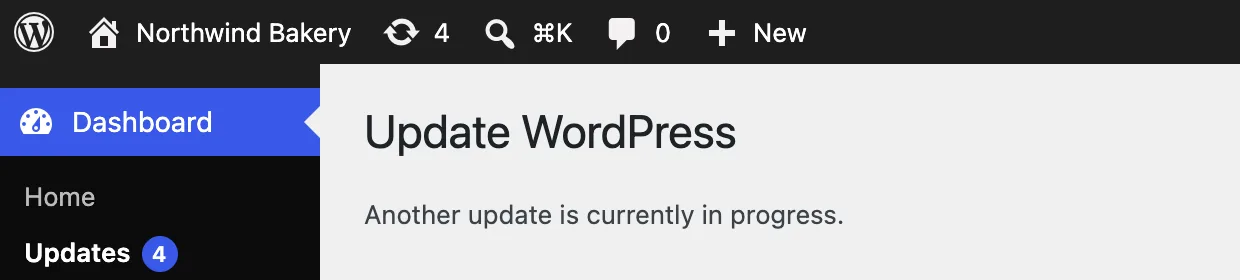
Simply opening the Updates screen does not show it. The lock is only checked when an update starts, so the screen looks normal until you click the button. WP-CLI hits the same check:
wp option add core_updater.lock $(date +%s)wp core update --version=7.1.3 --forceSuccess: Added 'core_updater.lock' option.Updating to version 7.1.3 (en_US)...Error: Another update is currently in progress.How the lock works#
The lock is a row in the options table named core_updater.lock. Its value is the time the update started, as a Unix timestamp. In WordPress 7.1, Core_Upgrader::upgrade() creates it with a 15-minute timeout just before it downloads the new version. When the update ends, normally or with an error that WordPress catches, it deletes the row.
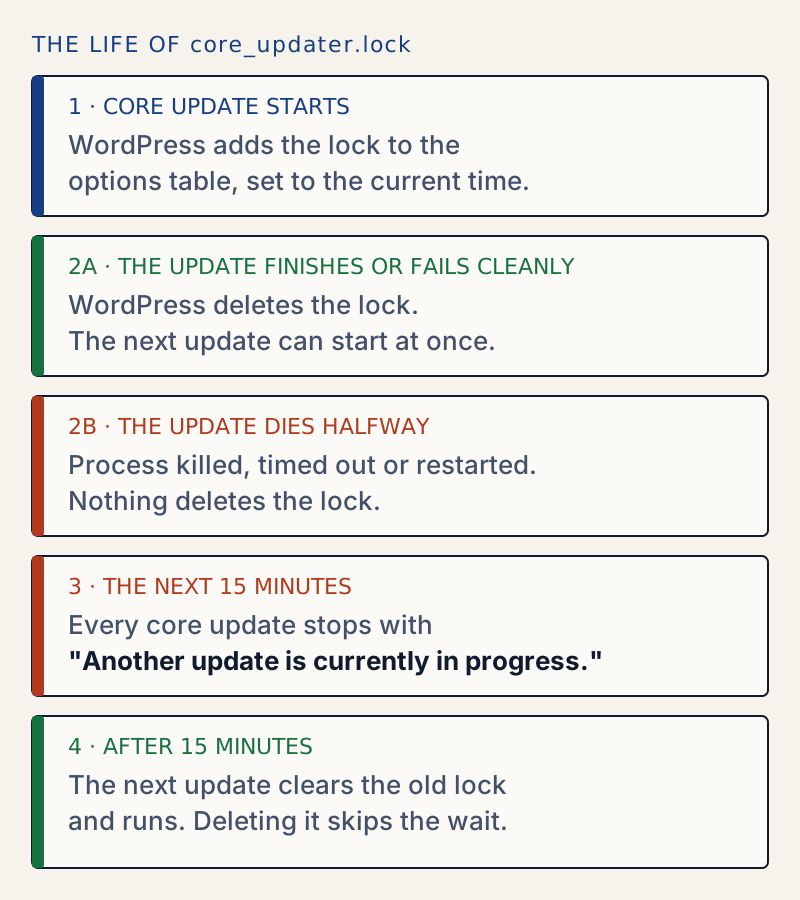
The lock is only left behind when PHP stops before the cleanup runs. I reproduced that by killing a running wp core update during the download:
Updating to version 7.1.3 (en_US)...Downloading update from https://wordpress.org/wordpress-7.1.3.zip...The output stopped there. The core_updater.lock row was still in the database, the next wp core update failed with "Another update is currently in progress.", and the front end kept answering with status 200. The process died before the copy step, so there was no .maintenance file and visitors noticed nothing. An update that dies during the copy step also leaves .maintenance, which is a different message.
Here is how I read the age of a lock:
wp eval '$t = (int) get_option( "core_updater.lock" ); echo gmdate( "Y-m-d H:i:s", $t ), " UTC, ", round( ( time() - $t ) / 60 ), " minutes ago\n";'2026-10-24 04:33:00 UTC, 2 minutes agoWhen not to delete it#
The lock exists so that two updates never copy files over each other. If one is really running, deleting the lock lets a second one start, and the two can leave a mix of old and new core files. That is far harder to fix than a 15-minute wait. Delete the lock only when the timestamp is old, there is no fresh .maintenance file, and nobody else started an update.
Plugin and theme updates use no such lock#
I checked core for every place that creates an update lock. There are only two:
| Option | Created by | Honoured for | What happens when it is set |
|---|---|---|---|
core_updater.lock | Core updates, manual or automatic | 15 minutes | The update stops with this message |
auto_updater.lock | Background automatic updates | 1 hour | The background run quietly skips; no message |
Plugin and theme updates take no lock of their own. With both locks set on my test site, a bulk theme update from Dashboard → Updates and wp plugin update akismet both finished normally. So this message is never about a plugin or theme, and a stuck auto_updater.lock only delays the next background update run. It does not block anything you click.
If it keeps happening#
A lock that is left behind again and again means something keeps ending PHP before the update finishes, such as a time limit or a host that stops long requests. The debug log shows what ended it. WordPress asks PHP for 300 seconds while it updates. See maximum execution time exceeded. An update that cannot write its files fails with a different message; see could not create directory.
For a calmer routine, read how to update plugins safely.
Sources
- WordPress core: Core_Upgrader · upgrade() takes the core_updater.lock with a 15-minute timeout; read it at the 6.8.3 tag
- WordPress core: WP_Upgrader::create_lock() · Writes the lock option and refuses when it is fresh
- WordPress core: maintenance mode · The .maintenance file a failed copy step leaves behind
- WP-CLI: wp option delete · How to delete core_updater.lock
- WP-CLI: wp core verify-checksums · Checks core files after a failed update
One email when something breaks or changes.
New plugins and re-tested guides, about twice a month. Never a sales pitch.