Why it happens
- The browser blocks cookies for the site, in its settings or through an extension. This is the case the message describes.
- You opened the login page on a different host from the one in Settings → General → WordPress Address and Site Address, for example
example.comwhen the site useswww.example.com. The test cookie is stored for one host and the form posts to the other. COOKIE_DOMAINinwp-config.phpnames a domain that does not match the address in the browser. The browser throws the cookie away.- A cache, CDN or proxy serves
wp-login.phpwithout itsSet-Cookieheader, so the test cookie never reaches the browser.
How to fix it
Try the fixes in this order. Each one is independent: stop as soon as the error is gone.
Open the login page on the exact Site Address
- Look at Settings → General, or run
wp option get siteurlif you cannot log in. Type that address, with or withoutwww, exactly as shown, and add/wp-login.php. - Why: the login form always posts to the Site Address. If you opened another host, the test cookie sits on that host and is not sent along. I reproduced it with the site set to
www.lab.testand the login page opened onlab.test. The same message appeared. Openingwww.lab.testlogged in at once.
Allow cookies for this site in the browser
- Open the login page in a private window with extensions off. If it works there, an extension or a saved setting is the cause.
- In your browser's cookie settings, switch off "block all cookies", or add your site to the list of sites that may always use cookies. The menu names change between browsers, so use the enable cookies link in the error itself, which goes to the WordPress guide.
- I tested this in Chrome with cookies blocked for every site: the error appeared and no cookie was stored. After adding the site to the allowed list, login worked.
- Blocking only third-party cookies is not the cause. In my test Chrome with that setting still logged in, because the login cookie belongs to the site itself.
Remove or correct COOKIE_DOMAIN
- Open
wp-config.phpand find a line likedefine( 'COOKIE_DOMAIN', 'example.com' );. - Delete the line, or set it to your site's own host name, or to its parent domain. With WP-CLI:
wp config delete COOKIE_DOMAIN. - Why: when
COOKIE_DOMAINis empty, WordPress sends noDomainattribute and the browser keeps the cookie for the exact host. When you set it, the browser accepts it only if it is the current host or a parent of it. I set it toexample.comon a site atlocalhost: the header readdomain=example.comand the browser discarded the cookie. Setting it tolocalhostfixed it. - A value of
www.example.comworks onwwwbut fails on the bareexample.com. A value ofexample.comworks on both.
Keep wp-login.php out of the cache
- In your caching plugin, CDN or host cache, add
/wp-login.phpand/wp-admin/to the pages that are never cached. Then purge the cache. - Check with
curl -si https://example.com/wp-login.php | grep -i set-cookie. A working page printsSet-Cookie: wordpress_test_cookie=WP%20Cookie%20check. No line means something is removing it. - I could not test a real CDN. I simulated one with Apache's
Header unset Set-Cookieforwp-login.php: the login page loaded, no cookie was set, and the error appeared. Removing the rule fixed it.
If the message says "unexpected output"
- That is a different message with a different cause: a file printed text before WordPress could send its headers. See headers already sent for how to find the file and line.
- In short: remove the blank line or space before
<?phpinwp-config.php, or the byte order mark, or any strayecho.
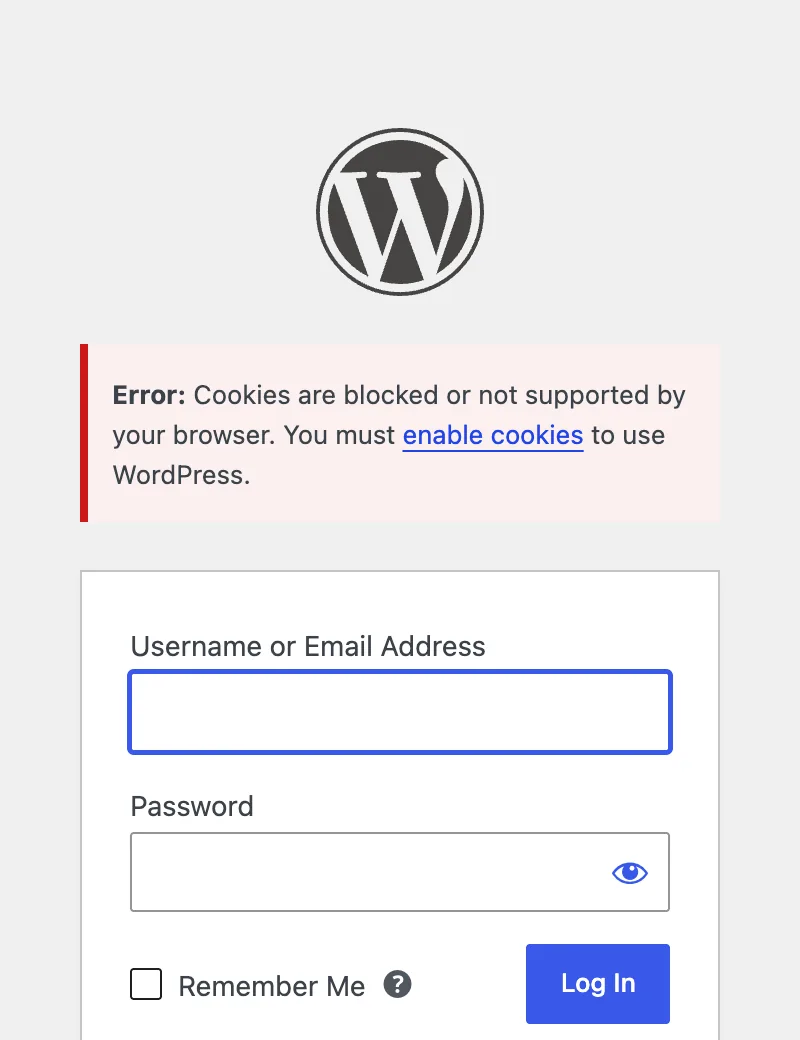
WordPress sets a small test cookie when the login page loads. When you press Log In, it checks that the browser sent the cookie back. If it did not, WordPress cannot trust that a login cookie would survive either, so it shows this message. The browser is not always at fault. The same host name, the COOKIE_DOMAIN setting and a cache in front of the site all cause it.
What you see#
The message appears on the login screen after you press Log In. The form is empty again and the username is not kept.
How the check works#
In wp-login.php, WordPress sends wordpress_test_cookie on every page view of the login screen. The login form carries a hidden field, testcookie=1. On the login request, WordPress decides in this order:
- If it sent no login cookie because output had already started, it shows the unexpected output message.
- Otherwise, if the form said
testcookie=1and the request has nowordpress_test_cookie, it shows this message.
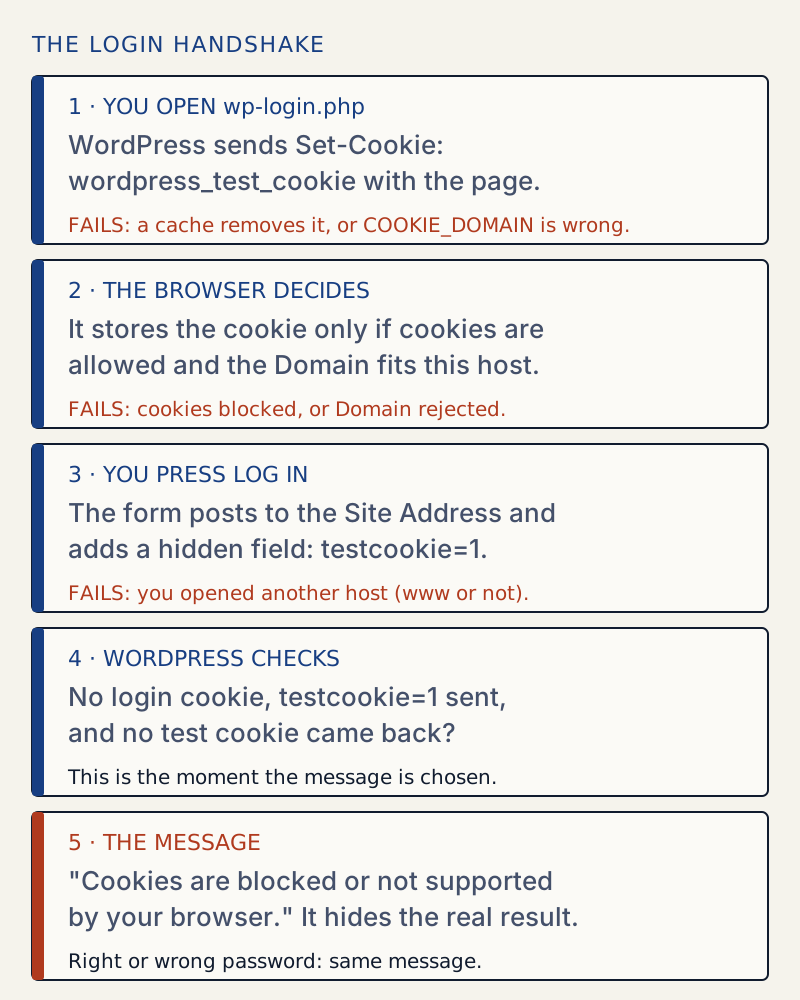
Here is a normal login page, with the cookie in the headers:
curl -si http://localhost:8904/wp-login.php | grep -i "^HTTP\|set-cookie\|cache-control"HTTP/1.1 200 OKCache-Control: no-cache, must-revalidate, max-age=0, no-store, privateSet-Cookie: wordpress_test_cookie=WP%20Cookie%20check; path=/; HttpOnlyThe message hides the real error#
The check runs before WordPress reports a bad password. With no cookie jar, curl got the same message for all of these:
| Login sent | Message shown |
|---|---|
Correct user and password, testcookie=1, no cookie | Cookies are blocked or not supported by your browser |
Wrong password, testcookie=1, no cookie | Cookies are blocked or not supported by your browser |
Unknown user, testcookie=1, no cookie | Cookies are blocked or not supported by your browser |
Wrong password, no testcookie field | The password you entered for the username admin is incorrect |
The last row shows that a login form from a plugin that leaves out the testcookie field never gets this message. Also note the first row: WordPress had logged the user in and sent the login cookies. It still shows the error, and a browser that blocks cookies discards them. So you cannot tell from this screen whether your password was right. Once the cookie problem is fixed, a wrong password gives the password you entered is incorrect instead.
What each cause looks like#
I tested each cause on a lab site, in Chrome driven by Playwright.
| Cause | Test cookie after loading the login page | Result of Log In |
|---|---|---|
| Normal | wordpress_test_cookie stored | Logged in |
| Chrome blocks all cookies | none | This message |
| Third-party cookies blocked only | stored | Logged in |
COOKIE_DOMAIN = example.com on localhost | none (header said domain=example.com) | This message |
COOKIE_DOMAIN = www.lab.test, page opened on lab.test | none | This message |
No COOKIE_DOMAIN, site at www.lab.test, page opened on lab.test | stored for lab.test only | This message |
Set-Cookie removed from wp-login.php by the server | none | This message |
Cookies are blocked due to unexpected output#
A second message uses almost the same words: "Error: Cookies are blocked due to unexpected output. For help, please see this documentation or try the support forums." It means PHP had already printed something, so the headers could not be sent. I made it by putting one blank line before <?php in wp-config.php. The login page then set no cookie at all, and logging in showed this message. Removing the blank line fixed it. The mechanism, the hunt for the file and the byte order mark are all in headers already sent.
When it is not this error#
If the login works but you land on the login page again with no message, that is a redirect loop, not a missing cookie. See too many redirects. If the reset email link ends on a login page, see your password reset link appears to be invalid: it needs cookies too. If you moved the login address with a plugin and forgot it, see the login URL guide.
Sources
- WordPress cookies (Advanced Administration Handbook) · the test cookie and how to enable cookies
- wp-login.php in WordPress core (trunk) · where the test cookie is set and where the message is chosen
- PHP: setcookie · the domain parameter, and that cookies are headers sent before output
- MDN: Set-Cookie header · host-only cookies and why a mismatched Domain is ignored
One email when something breaks or changes.
New plugins and re-tested guides, about twice a month. Never a sales pitch.