Why it happens
- The server could not turn the host name into an address (DNS). The message reads "cURL error 6: Could not resolve host: ...". WordPress checks a name before it downloads, so you only see this when that check was skipped (the package is on your site's own address and the server cannot resolve that domain) or when the lookup worked for the check and failed a moment later.
- The name did not resolve at all, or the address is not allowed. The message is only "A valid URL was not provided." A host that DNS cannot find, a host that points to a private or loopback address, a port other than 80, 443 or 8080, a user name and password in the address, and a missing
https://all give this. WP_HTTP_BLOCK_EXTERNALis set totrueinwp-config.php. The message is "User has blocked requests through HTTP to the URL: ...".- The server was reached and answered with an error. The message is the HTTP status text: "Not Found", "Forbidden", "Unauthorized", "Service Unavailable". The package address is wrong, expired or needs a licence.
- The connection itself failed: cURL error 7 (nothing listening or a firewall refusal), 28 (timed out) or 35 (the secure handshake failed).
How to fix it
Try the fixes in this order. Each one is independent: stop as soon as the error is gone.
Read what follows "Download failed."
- "Download failed." is only the start. WordPress prints the real reason after it. Match it with the table in this page: "cURL error 6" is a name lookup, "A valid URL was not provided." is the address check, "User has blocked requests" is the block setting, a plain word such as "Not Found" is an HTTP status.
- With WP-CLI the reason is printed in quotes:
Warning: Download failed. "Not Found". In the dashboard it follows the words on the same line.
Test the name lookup from the server, not from your laptop
- Your browser can reach downloads.wordpress.org when your server cannot. Over SSH run
getent hosts downloads.wordpress.organdcurl -sS -o /dev/null -w "http=%{http_code} dns=%{time_namelookup}s\n" https://downloads.wordpress.org/plugin/akismet.zip. On a healthy server the first prints an address and the second printshttp=200. - If
curlends withcurl: (6) Could not resolve host, the server's DNS is the problem, and no WordPress setting changes that. Check/etc/resolv.conf, then ask your host to fix the resolver or open outgoing DNS (port 53). Give them the command and its output. - If the lookup works when you test but the error comes and goes, run the update again. WordPress looks the name up twice, once for its own check and once in cURL, so a resolver that answers one and not the other gives this message. Ask your host about their DNS, and give them the output of both commands.
Fix a package that lives on your own domain
- WordPress skips its own name check for a package on the same host as your Site Address (URL) in Settings → General. Then cURL does the only lookup, and if your server cannot resolve its own domain you get cURL error 6. It happens with a premium plugin that updates from your own site, behind some proxies, and on staging copies.
- Check with
getent hosts yourdomain.comon the server. If it prints nothing, the server cannot find its own domain. Fix the DNS record or the server's resolver, or ask your host to. Give them the output of the command. - If you moved the site and only the WordPress Address (URL) or only the Site Address (URL) is the new domain, set both to the same address. WordPress uses the Site Address for the name check and the WordPress Address for the block setting (next fix), so a mismatch gives odd results.
Turn off the block, or allow the hosts WordPress needs
- Open
wp-config.phpand look fordefine( 'WP_HTTP_BLOCK_EXTERNAL', true );. Your host, a security plugin or a former developer may have added it. Remove the line, or set it tofalse, and run the update again. - If the block must stay, allow the hosts WordPress talks to:
define( 'WP_ACCESSIBLE_HOSTS', 'api.wordpress.org,*.wordpress.org' );.*.wordpress.orgcovers downloads.wordpress.org. With the block on and that list, a plugin update downloaded and installed. With a list that held only api.wordpress.org the download stayed blocked. - Requests to
localhostand to your own site (the WordPress Address) are never blocked by this setting, so a package on your own domain still works.
Fix an address that the check rejects
- "A valid URL was not provided." with an address that looks fine means
wp_http_validate_url()said no. Test the host:getent hosts the-host-name. No answer means DNS (second fix). An answer starting with 127., 10., 192.168. or 172.16 to 172.31 means the name points to a private address. A common cause is a hosts-file line that blocks the update server. - Remove that line, or if the private address is intended, let it through with a small mu-plugin:
add_filter( 'http_request_host_is_external', function ( $external, $host ) { return 'updates.example.com' === $host ? true : $external; }, 10, 2 );. - For a port other than 80, 443 or 8080, allow it:
add_filter( 'http_allowed_safe_ports', function ( $ports ) { $ports[] = 9999; return $ports; } );. This applies to an outside host. A port is also accepted when the address uses the same host and port as your Site Address. - Take a user name and password out of the address and make sure it begins with
http://orhttps://. Both are rejected, and so is a redirect to a host that does not resolve.
Fix a Not Found, Forbidden or Unauthorized download
- These come from the server that holds the zip, so the connection is fine. Open the address from the "Downloading update from" line on the same screen. From the server run
curl -sSI "ADDRESS"to see the status. - Not Found (404) means the file is gone or the address is mistyped. Update the plugin's licence or its update source, or install the latest zip by hand. Forbidden (403) and Unauthorized (401) usually mean an expired licence or a firewall that blocks your server's address. Service Unavailable (503) is temporary. Wait and retry.
Install the zip by hand when the server cannot download
- Download the plugin zip on your computer, then use Plugins → Add New Plugin → Upload Plugin. The upload does not use the download step, so none of these checks run.
- With
WP_HTTP_BLOCK_EXTERNALon, installing a local zip worked, and installing by name failed with "An unexpected error occurred", because the call to the plugin directory was blocked before any download started. - This is a workaround. Fix the cause too, or the next update will fail the same way.
"Download failed. cURL error 6: Could not resolve host" means your server could not turn the host name of the zip into an address. Run getent hosts the-host-name and curl -I https://the-host-name/ over SSH. If they fail too, the server's DNS is the problem; if the host is your own domain, see the third fix.
"Download failed." is only a heading. The words after it name the step that stopped: a name lookup, an address check, the block setting, the connection or the server's answer. Each has a different fix, and the table below sorts them. Nothing on your site was changed: the old version is still in place.
What you see#
The message appears on the Update Plugin screen after you click Update now, in the update log, and in WP-CLI. This is the lookup variant on WordPress 7.1.4, with a package on the site's own address that the server cannot resolve:
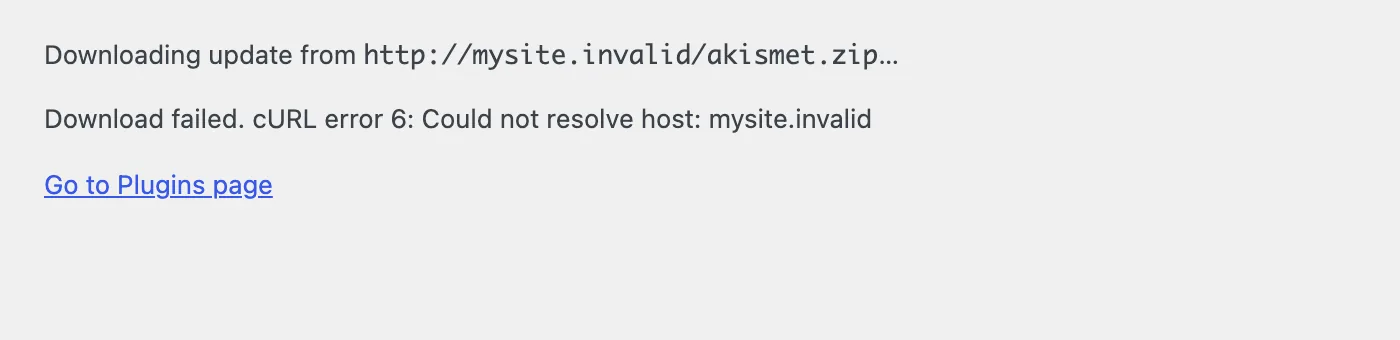
The same text in WP-CLI is quoted:
Downloading update from http://mysite.invalid/akismet.zip...Warning: Download failed. "cURL error 6: Could not resolve host: mysite.invalid"Error: No plugins updated (1 failed).How the download works#
WP_Upgrader::download_package() calls download_url(), which uses wp_safe_remote_get(). If that returns an error, the upgrader wraps it: the error message becomes the string "Download failed." and the original reason is attached as data. The upgrade screens print the two together. So you see one fixed prefix and a reason that differs by case.
The "safe" request runs more checks than a normal one, in this order:
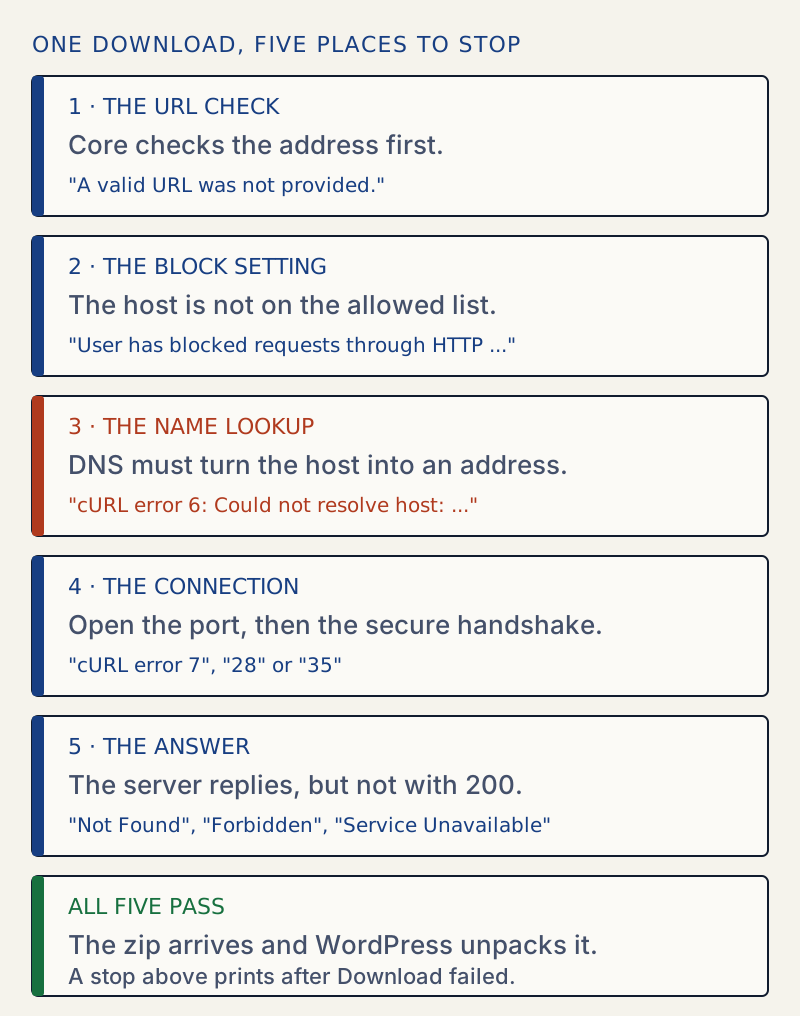
Stage 1 asks PHP for the host's address (gethostbyname(), see the PHP manual). That is why an unknown host never reaches cURL during a download: the check says no first. Stage 3 asks again, through cURL. So cURL error 6 on a download means one of two things: stage 1 was skipped (the package is on your own Site Address, see the third fix) or the lookup passed stage 1 and then failed in cURL. I reproduced the first. For the second I removed a hosts-file entry between the two lookups to stage it; I did not test other resolver differences, such as IPv6 answers.
Which message means what#
All results on this page come from a disposable lab site running WordPress 7.1.4, PHP 8.3 and cURL 8.14.1.
| After "Download failed." | Stage | Typical cause | Reproduced by |
|---|---|---|---|
A valid URL was not provided. | 1 | Name does not resolve, resolves to a private address, port not 80, 443 or 8080, user:pass in the address, no http(s)://, redirect to an unresolvable host | Each case in turn |
User has blocked requests through HTTP to the URL: ... | 2 | WP_HTTP_BLOCK_EXTERNAL is true and the host is not in WP_ACCESSIBLE_HOSTS | Setting the constant |
cURL error 6: Could not resolve host: ... | 3 | The package is on your own Site Address and that domain does not resolve, or DNS failed after the check passed | Own-domain case; host removed after the check (staged) |
cURL error 7: Failed to connect to ... | 4 | Nothing listening on that port | Port with no server |
cURL error 35: TLS connect error | 4 | https address on a port that speaks plain http | https to a plain port |
Not Found, Forbidden, Unauthorized, Gone, Internal Server Error, Service Unavailable | 5 | The server answered with that status | A test server returning each code |
cURL error 28 (timed out) also lives at stage 4. It has its own page: cURL error 28: operation timed out. I did not reproduce cURL error 60 (certificate problems), so it is not in the table.
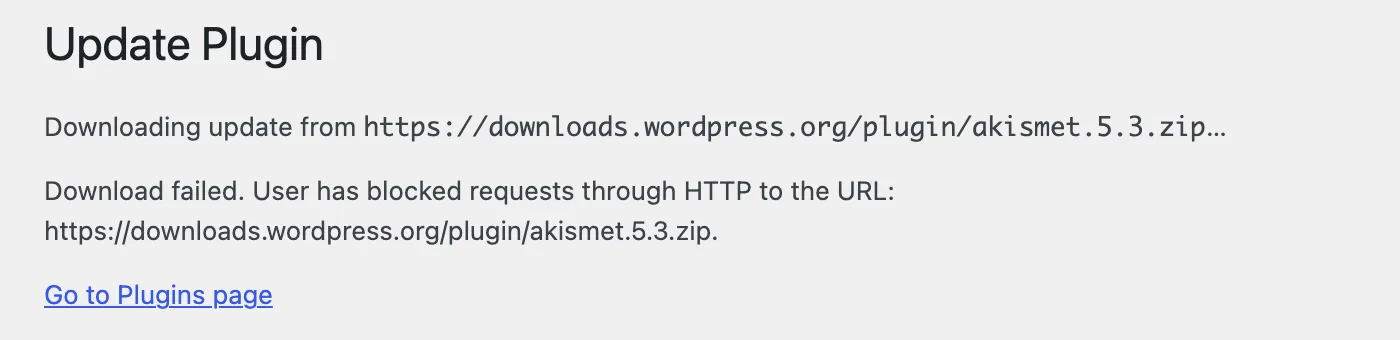
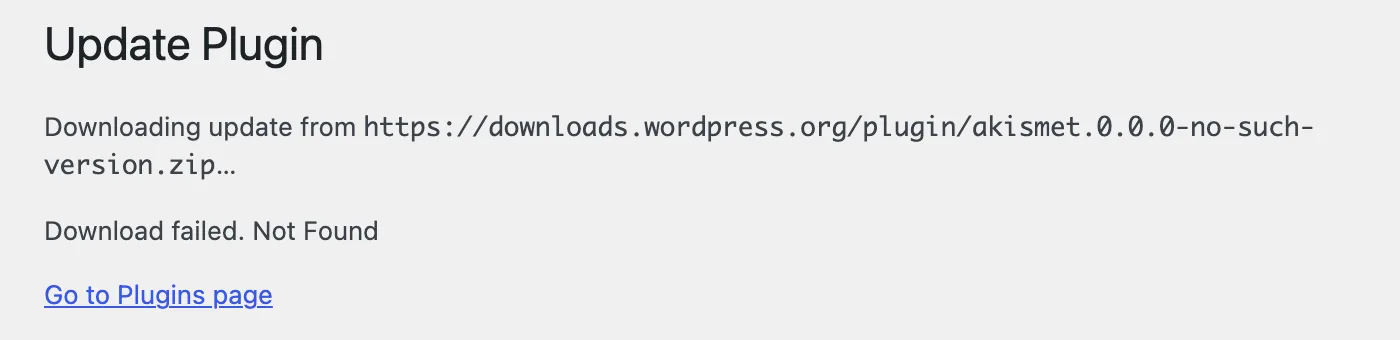
The same screen, three more times#
The block setting:
A file that does not exist on the real download server:
A host name that DNS cannot find. This is the one people expect to read "could not resolve host" and do not:
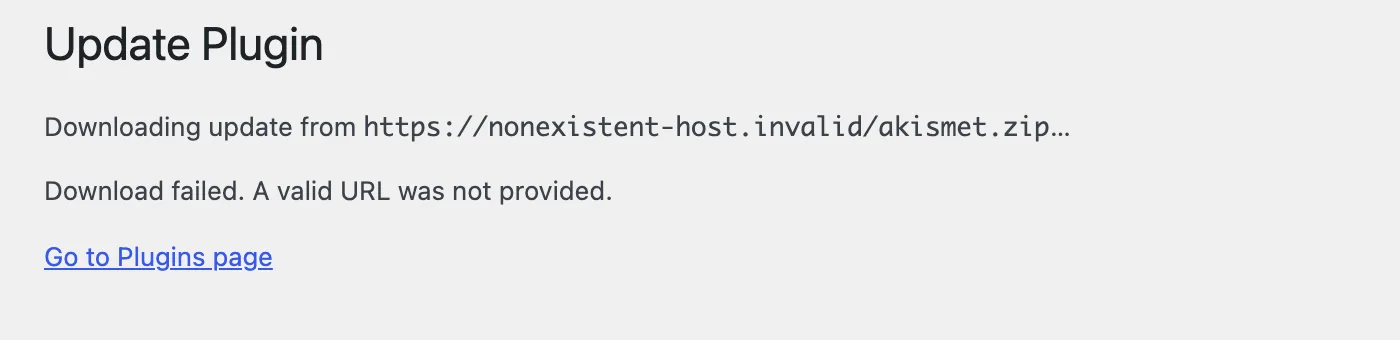
Test it on the server#
Run these over SSH. A healthy server gives:
getent hosts downloads.wordpress.orgcurl -sS -o /dev/null -w "http=%{http_code} dns=%{time_namelookup}s\n" https://downloads.wordpress.org/plugin/akismet.zip2620:109:b00a::4206:2afa downloads.wordpress.orghttp=200 dns=0.002522sA name that does not exist gives cURL's own version of the error:
curl -sS -o /dev/null https://nonexistent-host.invalid/curl: (6) Could not resolve host: nonexistent-host.invalidTo ask WordPress itself whether it accepts an address, run wp eval 'var_dump( wp_http_validate_url( "https://example.com/a.zip" ) );'. Results for these addresses:
| Address | Result |
|---|---|
https://downloads.wordpress.org/plugin/akismet.zip | accepted |
https://nonexistent-host.invalid/a.zip | rejected (no such host) |
a name mapped to 127.0.0.1 in /etc/hosts | rejected (loopback) |
https://downloads.wordpress.org:8443/a.zip | rejected (port) |
https://user:pw@downloads.wordpress.org/a.zip | rejected (credentials) |
downloads.wordpress.org/a.zip | rejected (no scheme) |
ftp://downloads.wordpress.org/a.zip | rejected |
https://[::1]/a.zip | rejected |
http://localhost:8902/a.zip on a site whose Site Address is http://localhost:8902 | accepted (same host and port as the site) |
http://localhost:8903/a.zip on the same site | rejected (other port) |
Why a name that works in your browser fails here#
The browser uses your computer's DNS. PHP uses the server's resolver, set in /etc/resolv.conf or by the host. A DNS outage, a blocked outgoing port 53 or a bad resolver on the server breaks WordPress and leaves your browser fine. That is why the test above must run on the server.
The own-domain case is the one guides miss. WordPress trusts a package on the same host as your Site Address (URL) (the home option) and skips stage 1. The block setting looks at a different option, the WordPress Address (URL) (siteurl). I tested the two apart on one lab site, with the same update package http://mysite.invalid/akismet.zip each time:
| Site Address | WordPress Address | Result |
|---|---|---|
http://localhost:8902 | http://localhost:8902 | A valid URL was not provided. |
http://mysite.invalid | http://localhost:8902 | cURL error 6: Could not resolve host: mysite.invalid |
http://localhost:8902 | http://mysite.invalid | A valid URL was not provided. |
Only the Site Address matters for the skip. When it is the domain the server cannot resolve, the check is skipped and cURL fails alone.
What it is not#
- It is not a PHP memory or time limit. Nothing here needed a change to either.
- It is not a missing cURL extension. The text comes from cURL, so cURL works.
- It is not a damaged plugin. The download stopped before any file was touched. For file errors after a good download, see could not create directory and incompatible archive.
For a safer update routine, read how to update plugins safely. Site Health can also show failed outgoing requests; see the Site Health guide.
Sources
- download_url() (WordPress Code Reference) · Returns a WP_Error on failure; fetches with wp_safe_remote_get()
- wp_http_validate_url() (WordPress Code Reference) · The address check: scheme, credentials, resolving host, private IPs, ports
- Editing wp-config.php: block external URL requests · WP_HTTP_BLOCK_EXTERNAL and WP_ACCESSIBLE_HOSTS
- libcurl error codes · 6 = host not resolved, 7 = could not connect
- WP_Upgrader::download_package() in wordpress-develop (6.8 branch) · Where the words Download failed. are added to the reason
- WP_Http::block_request() in wordpress-develop · Where the block setting and the allowed-hosts list are applied
- gethostbyname() (PHP manual) · Used by the address check; returns the host name unchanged when it cannot resolve
One email when something breaks or changes.
New plugins and re-tested guides, about twice a month. Never a sales pitch.