Why it happens
- The disk, or the hosting account's storage quota, filled up while WordPress was writing the new files. The write stops halfway through one file.
- The folder the files go into is on a different disk or quota from
wp-content/upgrade. WordPress then has to copy file by file instead of moving the folder, so it can run out of room even when the disk withupgradehas plenty. - The
pluginsfolder belongs to another user, such asroot, while the plugin's own folder belongs to the PHP user. WordPress can empty the old plugin but cannot delete its folder, so "Could not remove the old plugin." appears. - The plugin's own folder and files belong to another user. This shows as a longer message, "The update cannot be installed because some files could not be copied."
How to fix it
Try the fixes in this order. Each one is independent: stop as soon as the error is gone.
Work out which step failed
- The two buttons only show the short message, and it is the same message for two different steps. WP-CLI prints the path, which tells them apart. Run
wp plugin update plugin-nameorwp plugin install plugin-name. Could not copy file.followed by a path likeawc-lab-hours/data.bin, printed right after "Unpacking the update...", failed while unpacking the zip intowp-content/upgrade.Could not copy file.followed by a full path like/var/www/html/wp-content/plugins/awc-lab-hours/data.bin, printed after "Installing the latest version...", failed while writing into thepluginsfolder.Could not remove the old plugin.means the delete of the old plugin folder failed. Go to the owner fix below. Do this before you try again.
Free disk space or quota
- Over SSH, run
df -h wp-content wp-content/plugins wp-content/upgradein the WordPress folder. If two of these are on different lines of the output, they are different disks, and each needs free room. - In a hosting panel, look at the disk or quota meter. Delete old backups and large logs, or ask the host for more room.
- On my test site I left 1 MB free on the disk that holds
plugins, and the update of a 3 MB plugin failed with "Could not copy file." I deleted the filler file and ran the same update again, and it printed "Plugin updated successfully."
Give the plugins folder back to PHP's user
- Use this for "Could not remove the old plugin." Run
ls -ld wp-content/plugins wp-content/plugins/*and compare the owner (third column) with the owner of the plugin folders. Find PHP's user as described on the could not create directory page. - With root or sudo, run
chown www-data:www-data wp-content/plugins, using your own user. On shared hosting, ask the host to reset the owner of your files. - On my test site, changing only the owner of
pluginsback towww-datamade the same update succeed. - Set folders to 755, not 777. The could not create directory page shows why 777 only hides a wrong owner.
Fix the owner of the plugin's own files
- Use this when the message is "The update cannot be installed because some files could not be copied. This is usually due to inconsistent file permissions." It lists the files, such as "awc-lab-hours.php, includes, includes/helper.php, readme.txt".
- Run
chown -R www-data:www-data wp-content/plugins/plugin-nameand try again. WordPress left the old plugin in place in my test, still on 1.0.0 and still active.
Delete a half-copied folder, then install again
- A failed install can leave part of the plugin in
wp-content/plugins. Trying again then fails with "Destination folder already exists." - Delete that plugin's folder from
wp-content/pluginswith SFTP, the file manager orrm -rf wp-content/plugins/plugin-name, then install again. On my test site this worked. See the destination folder page for why WordPress refuses.
If the old plugin has vanished, reinstall it
- After "Could not remove the old plugin.", the plugin's folder can be left empty and the plugin disappears from Plugins. Fix the owner first, then upload the same plugin again with Plugins → Add Plugin → Upload Plugin, or run
wp plugin install /path/to/plugin.zip. - An empty folder does not block the install. On my test site,
wp plugin installover the empty folder printed "Plugin installed successfully." and the plugin was still active. Only files were lost, so settings kept in the database remain. - Keep a backup of
wp-content/pluginsbefore you update, so you do not depend on a download.
Install by hand as a last resort
- Download the plugin zip, unzip it on your computer, and upload the folder to
wp-content/pluginswith SFTP or the host's file manager. Then activate it on Plugins. - This skips the unpack, the delete and the copy steps, so none of the three messages can appear. It does not fix the cause, so the next update will fail the same way.
WordPress writes a plugin in several steps, and this message does not say which one failed. The same words, "Could not copy file.", come from two different steps, and a third step says "Could not remove the old plugin." The first thing to do is find the step. Then fix what that step needs: free room on the disk, or the right owner on a folder. On an update, check afterwards that the old plugin is still there.
What you see#
On Plugins → Add Plugin, Install Now shows the message under the plugin card:
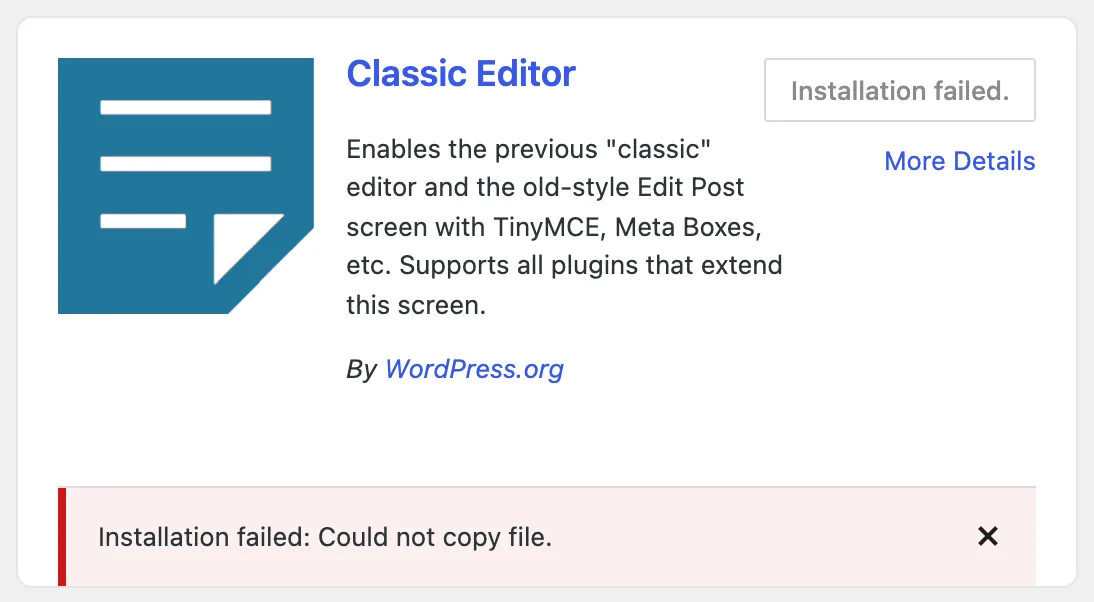
An update from Plugins shows the same words with "Update failed:" in front:

And when the old folder cannot be deleted:

The steps and where each message comes from#
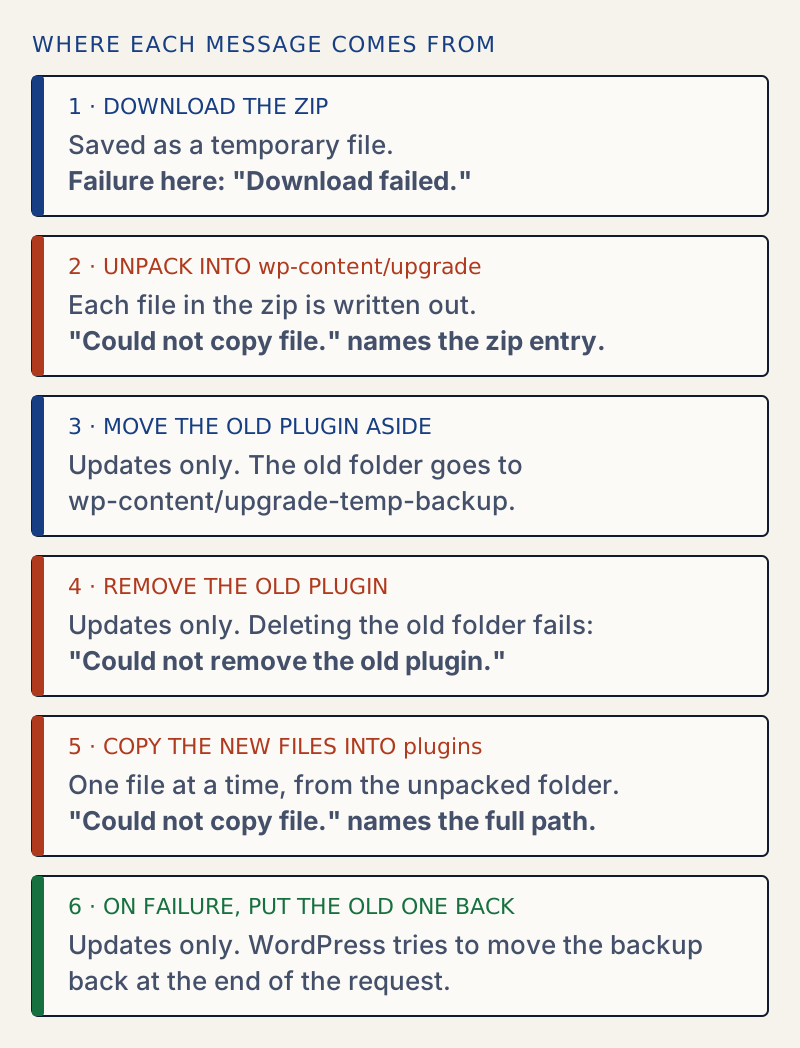
Here is how to tell them apart. I produced each one on a WordPress 7.1.4 test site running PHP 8.3.
| Message | Step | The path after it | What I did to cause it |
|---|---|---|---|
| Could not copy file. | 2, unpack | A name from the zip, awc-lab-hours/data.bin | wp-content/upgrade on a disk with 1 MB free |
| Could not copy file. | 5, copy | Full path under wp-content/plugins | plugins on a disk with 1 MB free |
| Could not remove the old plugin. | 4, remove | None | plugins owned by root, the plugin folder owned by www-data |
| The update cannot be installed because some files could not be copied. | 4, remove | The file names | The plugin's own folder and files owned by root |
| Could not copy files. You may have run out of disk space. | 2, unpack, background only | A size check, no path | See below |
The paths do not show in the browser. WP-CLI prints them. Here is the unpack step failing for a new install:
wp plugin install awc-lab-hours-1.1.0.zipUnpacking the package...Warning: Could not copy file. "awc-lab-hours/data.bin"Warning: The '/var/www/html/awc-lab-hours-1.1.0.zip' plugin could not be found.Error: No plugins installed.And the copy step failing on an update:
Enabling Maintenance mode...Downloading update from http://localhost/awc-lab-hours-1.1.0.zip...Unpacking the update...Installing the latest version...Removing the old version of the plugin...Warning: Could not copy file. "/var/www/html/wp-content/plugins/awc-lab-hours/data.bin"Plugin update failed.Disabling Maintenance mode...Error: No plugins updated (1 failed).Why the copy step fails when the disk is not the same#
When WordPress installs from its working folder, it first tries to rename the folder into place. That is instant and needs no space. A rename cannot move a folder from one disk to another, so then WordPress falls back to copying every file with copy_dir(). PHP says so:
PHP Warning: rename(/tmp/exa,/dev/shm/exb): Invalid cross-device linkSo when plugins is on a different disk or quota from wp-content/upgrade, each install writes the new plugin there for real, one file at a time. If that disk is full, the file in progress fails and the error names it. I set this up on purpose in my lab: a small memory disk for plugins, and the normal disk for upgrade. Many sites do not do this, and on them the rename works and a full disk shows up in the unpack step instead.
What is left behind after a failure#
Do not assume the site is clean. I checked the folders after each failure.
A failed install leaves a part-written plugin. After the Classic Editor install above, wp-content/plugins/classic-editor held a js folder and a scripts folder, and post.min.js was cut off at 4096 bytes. Trying again said "Destination folder already exists." Deleting that folder, with space freed, made the install work.
A failed update after the copy step puts the old plugin back. Since WordPress 6.3, an update moves the old plugin into wp-content/upgrade-temp-backup before it removes anything, and moves it back on failure. After the failed copy above, the plugin was back on version 1.0.0 and active, and the backup folder was empty. When I freed the space and ran the update again, it worked. The Make Core merge proposal describes the manual update safeguard as present since 6.3.
A failed remove can leave the plugin empty. This is the dangerous case. With plugins owned by root and the plugin folder owned by www-data, the update printed "Could not remove the old plugin." and the plugin was gone from the list. The backup step could copy the old files out and delete their contents, but it could not delete the folder itself. The restore step then could not delete that folder either, so it did not put the files back, and WordPress deleted the backup. I logged the folders at the end of the request:
before restore backup:3 items plugin dir:0 itemsafter restore, before delete backup:3 items plugin dir:0 itemsafter delete backup:missing plugin dir:0 itemsThe plugin folder was empty and the backup was gone. The same thing happened when I clicked Update in the browser. Reinstalling fixed it, as in the fix list above. I only saw this when the plugin's folder is owned by PHP's user and its parent folder is not. That is why the owner fix comes before any retry.
Edge cases I tested#
A root-owned file inside the plugin folder does not block an update. Many guides say it does. I put a file owned by root inside a plugin folder that www-data owned, and the update printed "Plugin updated successfully." WordPress moves the whole old folder away in one step, so it never has to delete that one file separately. The delete of the backup folder works too, because the folder is the one PHP owns.
A root-owned plugin folder gives a different message. With the folder and all its files owned by root, WordPress checked the files before it deleted anything and printed "The update cannot be installed because some files could not be copied. This is usually due to inconsistent file permissions." The plugin stayed on 1.0.0 and active. That is the safe outcome. The unpacked new version stayed behind in wp-content/upgrade, so look there if the folder grows.
"Could not copy files. You may have run out of disk space." This is a separate message. The code in unzip_file() only checks free space when it runs from WP-Cron, for background updates, and it needs 2.1 times the unpacked size. I did not get a real background update to show it. To check the code, I defined DOING_CRON in WP-CLI and called unzip_file() on a zip that holds 8 GB of zeros. It returned the error disk_full_unzip_file and wrote nothing. Do not confuse it with "Could not copy file." from a browser click: that message has no space check, and it appears only once a write has failed.
A WP-CLI update is not the same as an admin click. Every terminal result above comes from WP-CLI as www-data. I used the browser for the three screenshots, and the outcome for the copy and remove cases matched. WP-CLI forces direct file writes, so on a site that shows the FTP form in the browser, see the filesystem credentials page.
If it keeps happening#
An update that fails on the same file each time points to a full disk or to a folder on a separate small disk. Compare the three folders in the first fix. An update that stops with a different message is probably a different problem: see could not create directory for the step before this one, and another update is currently in progress if WordPress says an update is already running.
For a safe routine before you update plugins, read how to update plugins safely.
Sources
- copy_dir() in the WordPress Code Reference · What copy_dir does and when it returns an error
- wp-admin/includes/class-wp-upgrader.php (WordPress 6.8.3) · install_package(), clear_destination(), move_to_temp_backup_dir(), restore_temp_backup()
- wp-admin/includes/file.php (WordPress 6.8.3) · unzip_file() and its disk-space check, copy_dir(), move_dir()
- Merge Proposal: Rollback Auto-Update (Make WordPress Core) · The safeguard manual plugin updates have had since 6.3
- PHP manual: rename() · Moving a folder between disks fails, so WordPress copies instead
One email when something breaks or changes.
New plugins and re-tested guides, about twice a month. Never a sales pitch.