Why it happens
- The tables were renamed to a new prefix, but the
user_rolesoption and thecapabilitiesusermeta rows still use the old prefix. WordPress then reads no role for the user. - The roles list stored in the database under the old prefix (
old_user_roles) was not renamed, so no role has any capability. - The user's role was changed or removed, by a plugin, a security tool, a cleanup or by hand.
- The page needs a capability that the user's role does not have, for example a plugin or settings page reached through an old link or a bookmark.
- The page belongs to a plugin that is now deactivated or deleted, so its menu entry no longer exists.
- On a multisite network, the user has no role on this particular site.
How to fix it
Try the fixes in this order. Each one is independent: stop as soon as the error is gone.
Check which user and role WordPress sees
- Log in as the user who gets the error. Try
/wp-admin/profile.php. If that is blocked as well, WordPress sees no role for this user at all, which points at a prefix or role-record problem. - If only one plugin or settings page is blocked, the user's role lacks that capability. Check the role in Users → All Users, or ask an administrator.
- If you can use WP-CLI, run
wp user list --fields=ID,user_login,roles. A user with an emptyrolescolumn has the problem. I confirmed this on a test site: the user was an administrator, then its role record went missing, and every admin screen returned this message with a 403 status. - Also run
wp config get table_prefixandwp db prefix, which should both print the prefix of your tables, for examplewp_.
Give the user a role again
- Run
wp user set-role admin administrator, replacingadminwith the username or ID. On my 7.1.4 test site this wrote a newwp_capabilitiesrow under the current prefix and left the oldold_capabilitiesrow in place. - Run
wp user list --fields=ID,user_login,rolesagain and reload the dashboard. On my test site this restored access at once. - If you have no WP-CLI, ask another administrator to set your role under Users. If nobody can, use the database fix below.
- If the old record is still in the table under a different prefix, it is harmless. The repair below removes the guesswork.
Repair keys left on an old prefix
- Use this after a migration or after you changed
$table_prefix. Take a database backup first. - Work out the old prefix and the new one. The new one is in
wp-config.php. The old one is visible in the leftover keys:SELECT meta_key FROM new_usermeta WHERE meta_key LIKE '%capabilities';shows it as the part beforecapabilities. - Run the two statements shown under "The SQL repair" below in phpMyAdmin or with
wp db query, after replacingold_andnew_with your prefixes and the table names to match. - Check the result with
wp user list --fields=ID,user_login,rolesandwp role list --fields=role. Every user should show a role, and the list should show administrator, editor, author, contributor and subscriber. - I ran these statements on a test site after renaming the keys to a fake old prefix. They put the role back and the dashboard loaded.
Rebuild the default roles
- If
wp role listprints nothing, the roles option is missing under the current prefix. Before you reset, export what exists under any prefix:wp option get old_user_roles --format=json > roles.json(use the real prefix). The reset removes custom roles, such as WooCommerce's shop manager and customer, and extra capabilities granted to the five default roles. - Then run
wp role reset --all. - It recreates the five default roles with their default capabilities and printed "5 of 5 roles reset" on my test site, after which access returned.
- Be aware that it also resets any change you or a plugin made to the default roles, such as extra capabilities for an editor. Custom roles added by plugins may need the plugin to be reactivated or re-saved.
Look at the page, not the user
- Check the address. A plugin page link such as
admin.php?page=namegives this message when the plugin is deactivated or the page name is wrong. I got the same 403 message for a page name that did not exist. A plain "403 Forbidden" page from the server is a different problem: see 403 forbidden. - Open Plugins and check the plugin is active. If it is, open it from its menu, not from an old bookmark.
- If a security plugin limits who can reach a screen, look for its "hide login" or "restrict admin" settings.
- On multisite, a network admin can open that site's dashboard, go to Users → Add New, and use the Add Existing User form.
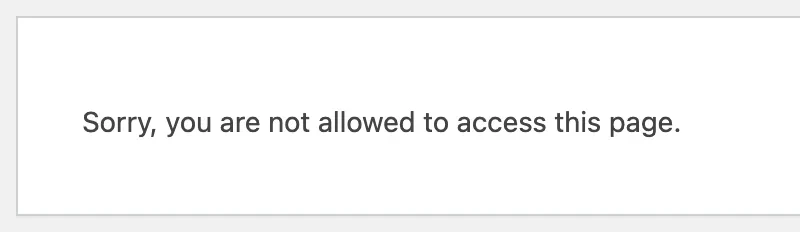
WordPress shows this message when you ask for an admin screen and it decides that you lack the required capability. It is a permissions check, not a missing file. The text is the same for many causes, so the useful question is whether this user can open any admin screen at all.
Why a migration breaks it#
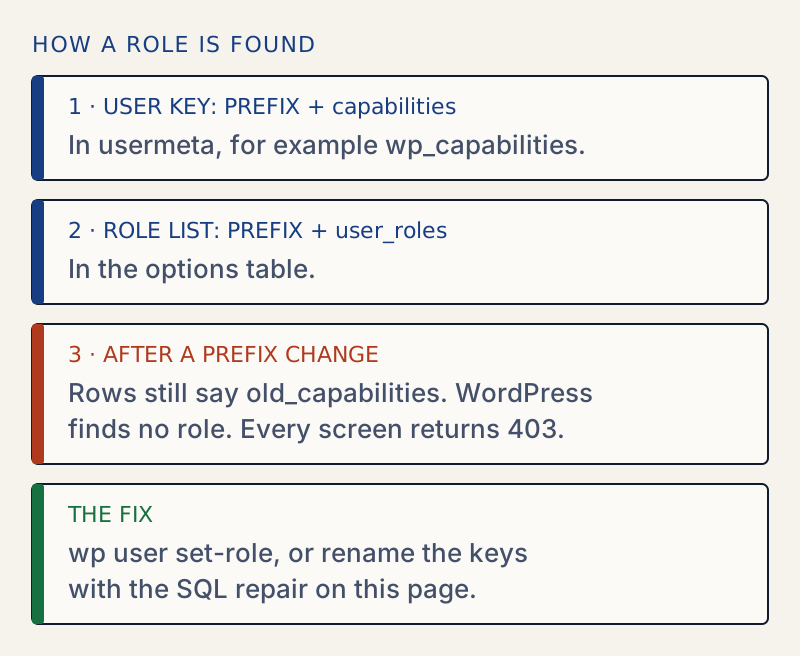
WordPress stores a user's role in a row of the usermeta table whose key is the table prefix plus capabilities. The key is wp_capabilities for the default prefix. The list of roles and their capabilities lives in the options table under the prefix plus user_roles.
Because the prefix is part of the key, a site that changes its prefix must rename those keys too. If it does not, WordPress looks for new_capabilities, finds only old_capabilities, and concludes that the user has no role. I read this in the WordPress source: WP_User builds the key from $wpdb->get_blog_prefix() plus capabilities.
On my WordPress 7.1.4 test site, I renamed an administrator's wp_capabilities key to old_capabilities. The result:
| Request | Result |
|---|---|
/wp-admin/ | 403, "Sorry, you are not allowed to access this page." |
/wp-admin/options-general.php | The same |
/wp-admin/profile.php | The same |
The profile screen failing too is the sign of a role-record problem. Any ordinary role can open its own profile, so a 403 there means WordPress sees no capabilities for the user at all, not just a missing one.
The SQL repair#
Replace old_ and new_ with your real prefixes, and use the real table names. Keep the backslash in old\_%: it makes the underscore match a literal underscore instead of any character, and it must stay in phpMyAdmin too.
First preview what the second statement would touch. Every key listed should belong to WordPress, such as capabilities, user_level or user-settings. If you see keys from a plugin that merely start with the old prefix, they would be renamed as well.
SELECT meta_key, COUNT(*)FROM new_usermetaWHERE meta_key LIKE 'old\_%'GROUP BY meta_key;Then run the repair.
UPDATE new_optionsSET option_name = 'new_user_roles'WHERE option_name = 'old_user_roles';UPDATE new_usermetaSET meta_key = CONCAT('new_', SUBSTRING(meta_key, LENGTH('old_') + 1))WHERE meta_key LIKE 'old\_%';The first statement renames the roles list. The second renames every user key that starts with the old prefix, which covers capabilities and user_level. Run them once. If the preview showed keys you did not expect, stop and check them first.
Prevent it#
- When you change the table prefix, rename the tables, the roles option and the user keys together. A migration plugin that offers a prefix change usually does all three. Check that it did. If the migration instead leaves pages saying a table is missing, see WordPress database error: table doesn't exist.
- Keep an administrator account you can reach by WP-CLI or the database. If you cannot log in, see the password you entered for the username is incorrect. The commands above need no working login.
- Do not run
wp role reset --allon a site with custom role setups without noting them first.
If settings look wrong after you recover access, see how to find and undo changed settings, and moving settings from staging to live before you copy a configuration between two sites.
Sources
- WordPress core: WP_User · On a single site the capabilities key is the table prefix plus capabilities (on multisite the blog ID is added). This is the 6.8.3 tag, older than the 7.1.4 tested here; see WP_User::for_site and wpdb::get_blog_prefix
- WordPress: roles and capabilities · Roles and capabilities are stored in the options table under user_roles
- WP-CLI: wp user set-role · Sets a user's role
- WP-CLI: wp role reset · Puts the default roles back to their fresh-install capabilities (recreating deleted ones was tested on the lab)
- MySQL: LIKE and escaping · Why the underscore in a prefix needs a backslash in LIKE
One email when something breaks or changes.
New plugins and re-tested guides, about twice a month. Never a sales pitch.