Why it happens
- A plugin or theme asked WordPress for something, the call failed, and the code then read the answer as an array (
$response['body']). A failed call returns aWP_Errorobject, and PHP cannot read an object like an array. - The failed call is most often an outgoing web request:
wp_remote_get()orwp_remote_post(). The server could not look up the host (cURL error 6), could not connect (7), timed out (28), orWP_HTTP_BLOCK_EXTERNALblocks outgoing requests inwp-config.php. - Many other core functions return a
WP_Errortoo:get_the_terms()andget_terms()for a taxonomy that does not exist,wp_insert_term()for a name that exists,wp_insert_post()called with its error flag,wp_create_user()for a taken user name. - It is a bug in the plugin or theme, even when something outside it started the failure. Code that makes a web request has to cope with the request failing.
How to fix it
Try the fixes in this order. Each one is independent: stop as soon as the error is gone.
Find the file and line in the message
- The message ends with a path and a line:
... as array in /var/www/html/wp-content/plugins/rates-widget/rates-widget.php:7. The folder afterplugins/orthemes/is the plugin or theme at fault. A path undermu-plugins/is a must-use plugin. - On a live site the message is hidden and visitors see "There has been a critical error on this website." Turn on logging in
wp-config.phpwithdefine( 'WP_DEBUG', true );,define( 'WP_DEBUG_LOG', true );anddefine( 'WP_DEBUG_DISPLAY', false );. The same line is written towp-content/debug.log. I tested this: the log heldPHP Fatal error: Uncaught Error: Cannot use object of type WP_Error as array in .../rates-widget.php:7. - Turn debugging off again when you have the line. See the debug log guide.
Get the site back by switching off that plugin
- With WP-CLI:
wp plugin deactivate rates-widget. Use the folder name from the path. In my test the page that returned status 500 returned 200 straight after. - Without WP-CLI: in your host's file manager or over SFTP, rename
wp-content/plugins/rates-widgettorates-widget.off. WordPress stops loading it. I tested the rename too: the page went from 500 to 200, and the plugin showed as inactive. - For a theme, rename its folder in
wp-content/themes. WordPress falls back to another installed theme. - Then work on the cause below. Reactivating the plugin without a fix brings the error straight back.
Read the real reason from the WP_Error
- The fatal error hides the reason the call failed. Ask the object:
$response->get_error_code()and$response->get_error_message(). The table in this page lists what I got for each cause. - To see it without editing the plugin, run the same call from WP-CLI:
wp eval '$r = wp_remote_get( "https://api.example.com/rates.json" ); echo is_wp_error( $r ) ? $r->get_error_message() : "ok";'. Put the address from the plugin's code in place of the example. - If the message starts with "cURL error", go to cURL error 28 for timeouts or Download failed. cURL error for a name lookup or connection that fails.
Lift the block on outgoing requests
- If the message is "User has blocked requests through HTTP to the URL: ...", open
wp-config.phpand look fordefine( 'WP_HTTP_BLOCK_EXTERNAL', true );. A host, a security plugin or an earlier developer may have added it. - Either remove the line, or keep the block and allow the one host the plugin needs:
define( 'WP_ACCESSIBLE_HOSTS', 'api.example.com' );. Wildcards such as*.example.comwork. - I tested both on the same site and the same unfixed plugin. With the block on and no allow list the page returned 500. With
WP_ACCESSIBLE_HOSTSset to the host, and again with the block removed, the page returned 200 and showed the rate. This changes the cause only. The plugin still has the bug.
Fix the code: check for WP_Error before you read the array
- Use this only on your own code, or send it to the plugin's developer. Do not edit a plugin from wordpress.org, because the next update erases your change.
- Put
if ( is_wp_error( $response ) ) { ... }directly after the call, and stop or return a fallback inside it. Also check the HTTP status withwp_remote_retrieve_response_code( $response ). A 404 or 500 reply is a normal array, not aWP_Error. - Read the body with
wp_remote_retrieve_body( $response ). It returns an empty string when given aWP_Error, so it never crashes. Check the result before you use it. - I ran the fixed version through four failures and one success. The page returned 200 every time. It showed the fallback text for a blocked request, a 404 and a failed lookup, and "EUR: 0.92" when the request worked. The reason of each failure was written to the debug log.
Some code on your site made a request or a lookup, and it failed. The code did not check, and read the answer as a list of values. A failed WordPress call gives back a WP_Error, which holds the failure and has no values to read, so PHP stops the page. The plugin or theme named in the message is the one to switch off. The failed call underneath is what you fix.
What you see#
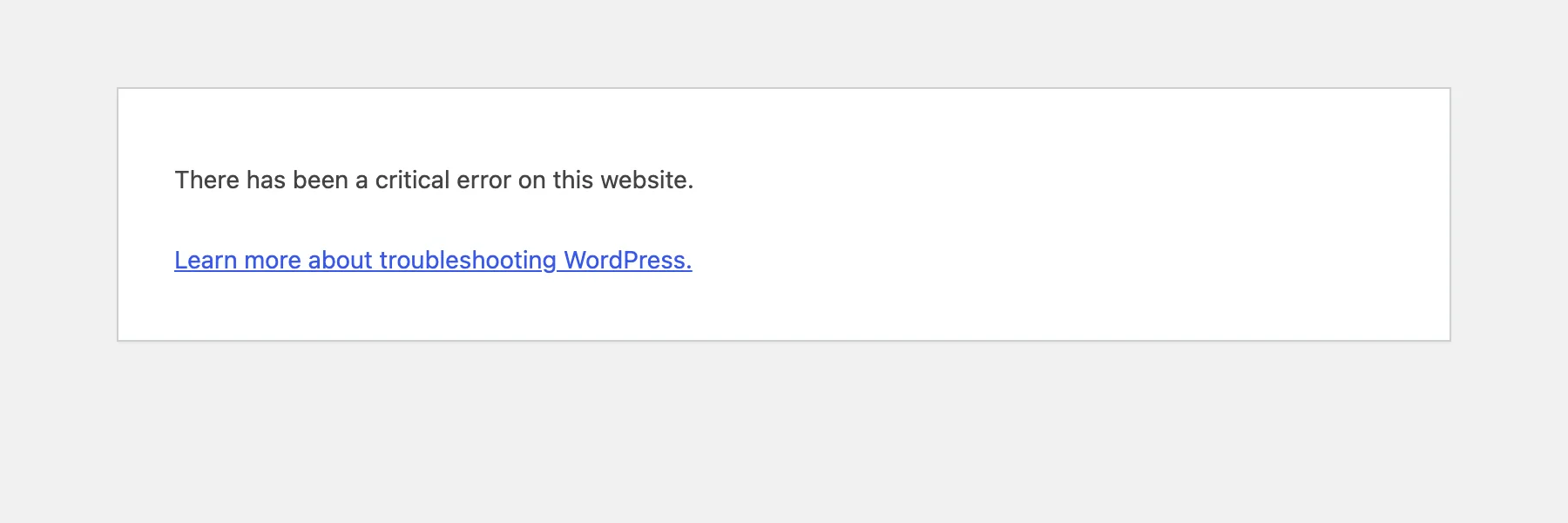
On a live site, PHP's message is hidden and WordPress shows its general page. The status is 500, and every page that runs the code is affected:
With errors shown (many local and staging sites), you get the real message, with the file and line of the code that made the mistake:

I made this with a five-line plugin that shows a currency rate from a web service. The plugin is a stand-in for any plugin that fetches data. Outgoing requests were blocked in wp-config.php:
add_shortcode( 'eur_rate', function () { $response = wp_remote_get( 'https://api.example.com/rates.json' ); $data = json_decode( $response['body'], true ); // line 7: the fatal error return 'EUR: ' . esc_html( $data['EUR'] );} );The wp-admin screens kept working, because the shortcode only runs when a page that holds it is shown. That is why you can often still log in to fix it.
How one call gives two kinds of answer#
wp_remote_get() has two possible return values. A request that finished gives an array, even when the answer is an error page. A request that could not be made or did not finish gives a WP_Error object.
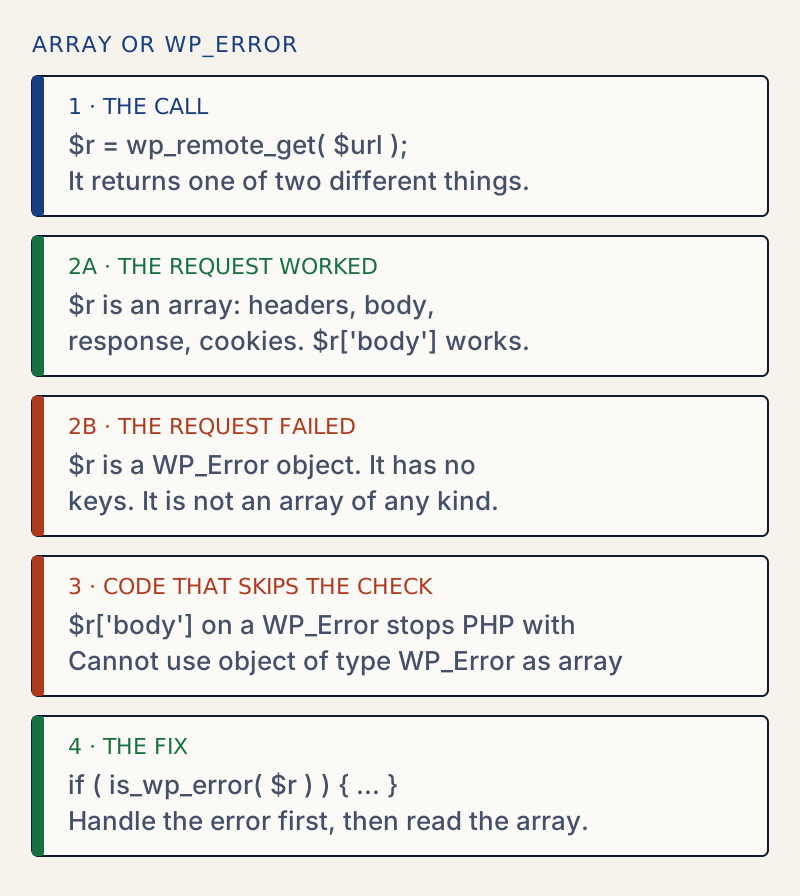
WP_Error does not implement PHP's ArrayAccess, so square brackets are not allowed on it. I tested every way to use brackets on a WP_Error in PHP 8.3:
| Code | Result |
|---|---|
$r['body'] | Error: Cannot use object of type WP_Error as array |
isset( $r['body'] ) | The same error. isset does not make it safe. |
empty( $r['body'] ) | The same error |
$r['body'] = 1 | The same error |
count( $r ) | TypeError: count(): Argument #1 ($value) must be of type Countable|array, WP_Error given |
wp_remote_retrieve_body( $r ) | An empty string, no error |
wp_remote_retrieve_response_code( $r ) | An empty string, no error |
The message is not new with PHP 8. I ran the same code on PHP 7.4.33, 8.1.34 and 8.3.36 and got the same Error each time. Since PHP 7 these failures are Error exceptions, and an uncaught one ends the request with "Fatal error: Uncaught Error". That is what makes the plugin crash instead of only warn.
What the WP_Error says#
The WP_Error has a code and a message. These are the ones I got from wp_remote_get() on WordPress 7.1.4, one per cause:
| Cause | Code | Message |
|---|---|---|
WP_HTTP_BLOCK_EXTERNAL is on | http_request_not_executed | User has blocked requests through HTTP to the URL: https://api.example.com/rates.json. |
| Host name does not resolve | http_request_failed | cURL error 6: Could not resolve host: no-such-host.invalid |
| Nothing listens on that port | http_request_failed | cURL error 7: Failed to connect to 127.0.0.1 port 9 after 0 ms: Could not connect to server |
| The server is too slow | http_request_failed | cURL error 28: Operation timed out after 1006 milliseconds with 0 bytes received |
A server that answers with 404 gave a plain array, not a WP_Error:
dns WP_Error http_request_failed | cURL error 6: Could not resolve host: no-such-host.invalidrefused WP_Error http_request_failed | cURL error 7: Failed to connect to 127.0.0.1 port 9 after 0 ms: Could not connect to servertimeout WP_Error http_request_failed | cURL error 28: Operation timed out after 1006 milliseconds with 0 bytes received404 array code=404 message=Not Found body=not found200 array code=200 message=OK body={"EUR":0.92}So is_wp_error() alone is not a full check. The 404 reply passes it, and its body is not the data you wanted. Check the status code as well.
The check that fixes it#
add_shortcode( 'eur_rate', function () { $response = wp_remote_get( 'https://api.example.com/rates.json' ); if ( is_wp_error( $response ) ) { error_log( 'Rates Widget: ' . $response->get_error_code() . ': ' . $response->get_error_message() ); return 'EUR: not available right now'; } if ( 200 !== wp_remote_retrieve_response_code( $response ) ) { error_log( 'Rates Widget: HTTP ' . wp_remote_retrieve_response_code( $response ) ); return 'EUR: not available right now'; } $data = json_decode( wp_remote_retrieve_body( $response ), true ); if ( ! is_array( $data ) || ! isset( $data['EUR'] ) ) { return 'EUR: not available right now'; } return 'EUR: ' . esc_html( $data['EUR'] );} );Each failure now shows the fallback text, the page stays up, and the debug log keeps the reason:
[30-Oct-2026 12:05:23 UTC] Rates Widget: http_request_not_executed: User has blocked requests through HTTP to the URL: https://api.example.com/rates.json.[30-Oct-2026 12:05:26 UTC] Rates Widget: HTTP 404[30-Oct-2026 12:05:30 UTC] Rates Widget: http_request_failed: cURL error 6: Could not resolve host: rates.invalidThe fix works because it moves the failure to a place the code controls. The call can still fail, and it will. The page just no longer depends on it.
The same error from other functions#
The web request is the most common source, not the only one. These all returned a WP_Error in my tests, and indexing the result with [0] gave the same fatal error:
| Call | Code | Message |
|---|---|---|
get_the_terms( 1, 'nope' ) | invalid_taxonomy | Invalid taxonomy. |
get_terms( array( 'taxonomy' => 'nope' ) ) | invalid_taxonomy | Invalid taxonomy. |
get_term_link( 9999, 'category' ) | invalid_term | Empty Term. |
wp_insert_term( 'Rates', 'category' ) a second time | term_exists | A term with the name provided already exists with this parent. |
wp_insert_post( array(), true ) | empty_content | Content, title, and excerpt are empty. |
wp_create_user( 'admin', 'x', 'a@example.com' ) | existing_user_login | Sorry, that username already exists! |
Two details are worth knowing. wp_insert_post( array() ) without the true flag does not return a WP_Error. It returns 0. And a foreach over a WP_Error does not fail. It loops over the object's own properties, so you get two array values with the keys errors and error_data, and no terms. That bug shows up later as a different warning.
When it is not your code#
If the plugin comes from wordpress.org or a vendor, you cannot fix its code in a way that lasts. Do this:
- Switch the plugin off and get the site back (fix 2).
- Find why the call fails (fixes 3 and 4). Often the failure is a setting on your server, not the plugin.
- Tell the plugin's developer the file and line from the message, and that the code needs
is_wp_error()after the call. That is a precise report they can act on in minutes. - Update the plugin when they ship the fix, using the steps in how to update plugins safely.
If the plugin will not activate at all, see plugin could not be activated. If your site shows the critical error page and you cannot tell which plugin it is, see there has been a critical error on this website.
Sources
- WP_Error (WordPress Code Reference) · get_error_code(), get_error_message(), get_error_data()
- is_wp_error() (WordPress Code Reference) · True when the value is a WP_Error object
- wp_remote_get() (WordPress Code Reference) · Returns the response array, or a WP_Error on failure
- wp_remote_retrieve_body() (WordPress Code Reference) · Returns an empty string for a WP_Error
- Editing wp-config.php: block external URL requests · WP_HTTP_BLOCK_EXTERNAL and WP_ACCESSIBLE_HOSTS
- PHP 7.0 backward incompatible changes: error and exception handling · Fatal errors became Error exceptions; an uncaught one ends the script
One email when something breaks or changes.
New plugins and re-tested guides, about twice a month. Never a sales pitch.