Why it happens
- Two copies of the same plugin are installed in different folders, for example
my-pluginandmy-plugin-copy, ormy-plugin (1)after a download was unzipped twice. WordPress sees two plugins, you can activate both, and both define the same functions. - A free and a paid version of one plugin, or an old and a renamed version, are active at the same time. They share function names.
- A theme's
functions.phpdefines a function that an active plugin already defines. Switching themes is what triggers it. - A plugin defines a function that WordPress itself has (for example
esc_html), or one that PHP has built in (for examplestr_contains). - One plugin includes the same file twice with
requireorincludeinstead ofrequire_once. Then both paths in the message are the same file.
How to fix it
Try the fixes in this order. Each one is independent: stop as soon as the error is gone.
Read the message: it names two files
- The path after "previously declared in" is the file that loaded first. The path after "in" at the end is the file that PHP stopped on. The function name comes right after "Cannot redeclare".
- If both paths are inside
wp-content/plugins/and the folder names differ only a little (my-pluginandmy-plugin-copy), you have two copies of one plugin. Go to the next fix. - If one path is in
wp-content/themes/, a theme and a plugin clash. If a path is inwp-includes/or there is no "previously declared in" part at all, a plugin redefines a WordPress or PHP function. Both need the plugin or theme author to rename the function; see the last fix. - If both paths are the same file, one file is loaded twice. Change
requiretorequire_oncefor that file. - On a live site the message is hidden behind "There has been a critical error on this website." Read it in
wp-content/debug.log. See the debug log guide.
Deactivate the extra copy (when wp-admin still works)
- Go to Plugins → Installed Plugins. Two rows with the same or nearly the same name are the two copies. The version number under each tells you which is newer.
- Click Deactivate under the older one, or under the one in the oddly named folder. Then click Delete under it. Keep the copy that is in the folder you expect.
- If you tried to activate the second copy and WordPress said "Plugin could not be activated because it triggered a fatal error.", nothing was changed. The site is still running on the first copy. Delete the copy that failed.
- I tested this: with
my-pluginactive, activatingmy-plugin-copyfrom the Plugins screen showed that notice, the copy stayed inactive and the site kept working.
Deactivate it with WP-CLI (when the site is down)
- Use this when every page, including wp-admin, shows "There has been a critical error on this website." Over SSH, from the WordPress folder, run
wp plugin deactivate my-plugin-copy --skip-plugins. Use your own folder name. --skip-pluginsstarts WordPress without loading any plugin, so the fatal error cannot happen while you fix it. Without it, WP-CLI loads both copies and stops with the same error.- It printed "Success: Deactivated 1 of 1 plugins." and the site came back (HTTP 200).
- To find the culprit first,
wp plugin list --skip-pluginslists every plugin and its status.
Rename the folder over SFTP (no WP-CLI, no wp-admin)
- In your host's file manager or over SFTP, open
wp-content/plugins/and rename the folder named in the error, for examplemy-plugin-copytomy-plugin-copy.off. - WordPress ignores an active plugin whose file is missing. I renamed the folder on a broken site and the front end and the login page both came back at once.
- Visit Plugins → Installed Plugins. WordPress now removes the entry from its active list and says "The plugin my-plugin-copy/my-plugin.php has been deactivated due to an error: Plugin file does not exist."
- Do not rename the folder back. The plugin would still be in the active list until WordPress has cleaned it up. In my test it came back on and caused the same error. Delete the renamed folder once the site is up.
Switch back from a theme that clashes with a plugin
- Activating a theme does not test it first, the way activating a plugin does. On my test site,
wp theme activatereported success and the next page load was a 500 error: "Cannot redeclare my_helper() (previously declared in …/plugins/my-plugin/my-plugin.php:6) in …/themes/tt/functions.php on line 2". - With WP-CLI, run
wp theme activate twentytwentyfive --skip-themes, or any default theme you have. The site came back at once. - Then tell the theme's author, or the plugin's author, the function name. One of them has to rename it. A child theme with a copied function from the plugin is a common cause: delete that function from the child theme.
Rename the function (plugin and theme authors)
- Give every function, class, constant and global variable your own prefix of at least four letters, such as
acme_helper(), or put your code in a namespace. This is what the WordPress Plugin Handbook asks for. I renamed the theme's function tott_helperand the theme activated without error. - Do not wrap everything in
if ( ! function_exists( ... ) )to make the error go away. It does stop the fatal error, but the code that loads first wins and the other copy is silently unused. In my test the copy was version 0.9 and the original 1.0. With the original loaded first the footer printed "hello" from 1.0. With the order swapped it printed "old copy" from 0.9, and the newer code never ran. The Plugin Handbook says to keep these checks for shared libraries. - Never define a function that WordPress already has. Plugin code that defines
esc_html()stops with "previously declared in …/wp-includes/formatting.php". A function PHP has built in, such asstr_contains(), stops with "Cannot redeclare str_contains()" and no "previously declared in" part.
PHP allows a function name to be defined once per request. "Cannot redeclare" means two files tried to define the same name, and PHP stopped at the second one. In WordPress that is almost always two copies of one plugin active at once. Deactivate or delete the copy named at the end of the message. If the site is down, do it with WP-CLI or by renaming the folder, both below.
What you see#
If you activate the second copy from Plugins → Installed Plugins, WordPress tests it first. It fails, nothing is changed, and you see only this:

The notice does not say which function or which file. In my test it also showed no further detail below it. The real message is only in the PHP error log.
The site goes down when both copies are already in the active list. That happens when a plugin was copied in by SFTP or by a host's staging tool, or an update added a second folder while the first one was still active. Every page, including wp-admin and the login page, returns HTTP 500 and shows:

With WP_DEBUG and WP_DEBUG_LOG on and WP_DEBUG_DISPLAY off, wp-content/debug.log holds the real message:
[30-Oct-2026 07:24:05 UTC] PHP Fatal error: Cannot redeclare my_helper() (previously declared in /var/www/html/wp-content/plugins/my-plugin/my-plugin.php:6) in /var/www/html/wp-content/plugins/my-plugin-copy/my-plugin.php on line 6WP-CLI prints the same message when you activate the second copy:
wp plugin activate my-pluginwp plugin activate my-plugin-copyPlugin 'my-plugin' activated.Success: Activated 1 of 1 plugins.Fatal error: Cannot redeclare my_helper() (previously declared in /var/www/html/wp-content/plugins/my-plugin/my-plugin.php:6) in /var/www/html/wp-content/plugins/my-plugin-copy/my-plugin.php on line 6How it happens#
WordPress keeps a list of active plugins in the active_plugins option. On every request it loads them one after another, in the order of that list. Activating a plugin sorts the list by name, so a folder called my-plugin loads before my-plugin-copy. PHP remembers each function name it has seen. The first file defines my_helper(). The second file defines it again, and PHP stops the whole request.
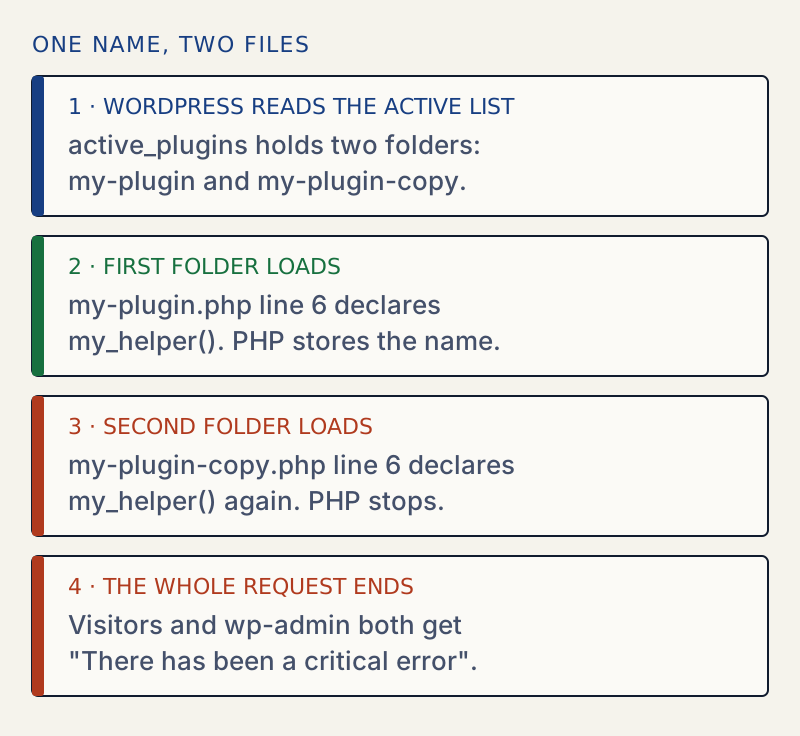
The order matters for reading the message. I put the copy first in the list on purpose, and the message swapped: the copy became "previously declared in" and the original was the file that failed. The file at the end is not always the "bad" copy. It is only the one that loaded second. You decide which copy to keep.
PHP cannot skip the second definition by itself. It stops, and nothing in the plugin gets a chance to react.
Which wording means what#
| What the message says | What it means |
|---|---|
Cannot redeclare my_helper() (previously declared in …/plugins/a/a.php:6) in …/plugins/b/b.php on line 6 | Two plugin folders define the same function |
Cannot redeclare my_helper() (previously declared in …/plugins/a/a.php:6) in …/themes/t/functions.php on line 2 | A theme and a plugin define the same function |
Cannot redeclare esc_html() (previously declared in …/wp-includes/formatting.php:4751) in …/plugins/c/c.php on line 3 | A plugin redefines a WordPress function |
Cannot redeclare str_contains() in …/plugins/d/d.php on line 3 | A plugin redefines a function that PHP has built in. There is no "previously declared in" part because the first definition is not in a file. |
Cannot redeclare twice_helper() (previously declared in …/twice/inc.php:2) in …/twice/inc.php on line 2 | Both paths are the same file, so a plugin includes one file twice |
Cannot declare class Acme_Mailer, because the name is already in use in …/plugins/cls-b/cls.php on line 3 | The same clash for a class. PHP 8.3 names only the file that failed, not the first one. |
For the class wording you have to find the first copy yourself. Search the plugins folder for the class name: grep -rl "class Acme_Mailer" wp-content/plugins. The same fixes apply.
Why a function check is not a fix#
Plugin authors often add if ( ! function_exists( 'my_helper' ) ) around a function. PHP then skips the second definition and the fatal error is gone. The problem is not gone. Both copies stay active and only the first one to load is used. I made the copy an old version (0.9) and kept the original at 1.0:
| Load order | Footer output | Which code ran |
|---|---|---|
my-plugin then my-plugin-copy | hello | 1.0 |
my-plugin-copy then my-plugin | old copy | 0.9, the older one |
So a guard can turn a loud error into a quiet one where the wrong version runs. The same checks in the other copy do not help if the plugin that loads first has no check: with the guard only in the copy and the copy loaded first, the original failed with the fatal error again.
Related checks#
- Your host may have a staging or migration tool that copies plugins. If two copies appeared after a restore, compare the folder dates in
wp-content/plugins/. - Before updating plugins in bulk, take a backup and read how to update plugins safely.
- A page that does not name the files at all is the critical error screen. A blank page is the white screen of death.
- If installing a plugin says the folder exists, see destination folder already exists. WordPress refuses to put a second copy in the same folder, but it does not stop two different folder names.
If the error appears when you activate a plugin, see also plugin could not be activated. A missing function or class is the opposite problem: see call to undefined function.
The WellTend plugins check for their own older copies. If an older version of the same plugin is active, the newer one stays off and shows a notice with a button to deactivate the other.
Sources
- PHP manual: user-defined functions · Top-level functions exist from the start; conditional ones exist only when the code reaches them
- PHP manual: function_exists() · Returns true for built-in and user-defined functions
- WordPress Plugin Handbook: best practices · Prefix or namespace everything; keep existence checks for shared libraries
- WordPress core: wp_get_active_and_valid_plugins() in load.php · Loops over active_plugins in stored order; skips entries whose file is missing
- WordPress advanced administration: editing wp-config.php · WP_DEBUG_LOG writes wp-content/debug.log; WP_DEBUG_DISPLAY hides errors on screen
One email when something breaks or changes.
New plugins and re-tested guides, about twice a month. Never a sales pitch.