Why it happens
- The code calls a function that PHP 8 removed, such as
create_function()oreach(). A plugin or theme written for PHP 7 breaks the day the host moves to PHP 8. - The function belongs to a PHP extension that is not switched on, such as
imagecreatetruecolor()(gd) orcurl_init()(curl). - The code runs too early. A plugin file calls a WordPress function such as
wp_get_current_user()while it is being loaded, before WordPress has defined it. Or someone opened a plugin file by its own address, so WordPress never loaded. - The code calls a function from a wp-admin file on a page where that file is not loaded, such as
wp_generate_attachment_metadata()on the front end. - The function belongs to another plugin that is switched off or was deleted, or the name is written wrongly for its namespace.
How to fix it
Try the fixes in this order. Each one is independent: stop as soon as the error is gone.
Read the function name and the file
- The message has two facts. The name after "undefined function" says what is missing. The path after "in" says which file called it. A path under
wp-content/plugins/old-snippets/points at the pluginold-snippets. A path underwp-content/themes/points at the theme. - If you see only "There has been a critical error on this website", the same line is in the log. Turn on
WP_DEBUGandWP_DEBUG_LOG, setWP_DEBUG_DISPLAYtofalse, reload the page once, and openwp-content/debug.log. The steps are in the debug log guide. - If the page is blank and
debug.logstays empty, a file was probably opened by its own address. WordPress was not running, so it logged nothing. Look in your host's PHP error log instead. - Use the diagram under "How to read the message" to find the row that fits the name, then use the matching fix.
Get the site back first: turn the plugin off
- With WP-CLI over SSH, run
wp plugin deactivate old-snippets --skip-plugins, with the folder name from the path. Without--skip-plugins, WP-CLI loads the broken plugin and fails with the same fatal error. - Without WP-CLI, rename the plugin's folder over SFTP, for example
old-snippetstoold-snippets.off. WordPress skips a plugin whose folder is missing. - If the path is under
wp-content/themes/, runwp theme activate twentytwentyfour --skip-themes --skip-pluginsto switch to a default theme. - This only stops the error. The plugin will fail again the next time you turn it on, so use one of the fixes below.
Removed in PHP 8: update, replace or roll PHP back
- Update the plugin or theme first. A current version rarely uses these names. If the author has stopped updating it, look for a replacement.
- If the code is yours, swap
create_function( '$s', 'return strtoupper( $s );' )forfunction ( $s ) { return strtoupper( $s ); }. This is the replacement the PHP manual gives. - To get the site up while you wait for an update, ask your host to switch the site to PHP 7.4, or the last 7.x it offers. PHP 8.0 does not help:
create_function()andeach()were removed in 8.0.0. Treat the rollback as a short delay, because old PHP versions no longer get security fixes.
Missing PHP extension: turn it on
- Check what is loaded. Over SSH,
php -mlists the extensions the command line uses. For the web server, look at Tools → Site Health → Info → Server, or ask your host. - Switch the extension on in your host's control panel. In cPanel this is usually Select PHP Version (or PHP Extensions). Tick the extension, such as
gd,curl,mbstringorintl. On your own server, install the matching package, for examplephp8.3-gd, and restart PHP or Apache. - If the host cannot turn it on, the plugin's author can check first with
if ( function_exists( 'imagecreatetruecolor' ) ). The plugin then skips the feature and the site stays up.
Too early: run the call from a hook
- WordPress loads active plugins before it loads
pluggable.php, which defineswp_get_current_user(),is_user_logged_in()and others. A call at the top level of a plugin file runs before those exist. - Move the call into a function that runs later.
add_action( 'init', function () { $user = wp_get_current_user(); } );runs once WordPress is ready. plugins_loadedis the earliest hook where pluggable functions exist. Useinitif the code needs the current user to be set up.
Wrong place: load the wp-admin file or guard the file
- Some functions live in wp-admin files that WordPress loads only on admin screens. The table under "Cause 4" gives the file for each name.
- Before the call, require the file that defines it, for example
require_once ABSPATH . 'wp-admin/includes/image.php';forwp_generate_attachment_metadata(). - If a file was opened by its own address, add
defined( 'ABSPATH' ) || exit;as its first line after<?php. The file then answers with an empty page. - Do not load
wp-load.phpfrom your own file to make it work. Use a hook, a shortcode or a REST route, so WordPress loads in the normal way.
Another plugin's function: turn it on or guard the call
- A prefix such as
wc_,acf_oracme_shop_tells you which plugin owns the function. Activate that plugin, or install it again if it was deleted. - If you cannot do that, the add-on's author can wrap the call:
if ( function_exists( 'acme_shop_get_cart' ) ) { ... }. - If the message shows a namespace, such as
Call to undefined function Acme\Tools\other_helper(), PHP looked for the function in that namespace and did not find it. Check the spelling and that the file defining it was loaded.
PHP is telling you the code called a function that does not exist at that moment. The name after "undefined function" says why. It was removed from PHP, it comes from a PHP extension that is off, WordPress had not defined it yet, or it lives in another plugin or file that is not loaded. This page covers each case with the message I got on a test site.
What you see#
The wording depends on one setting. With WP_DEBUG_DISPLAY on, the visitor gets the raw PHP message. With it off, which is the safe setting, they get WordPress's own page.

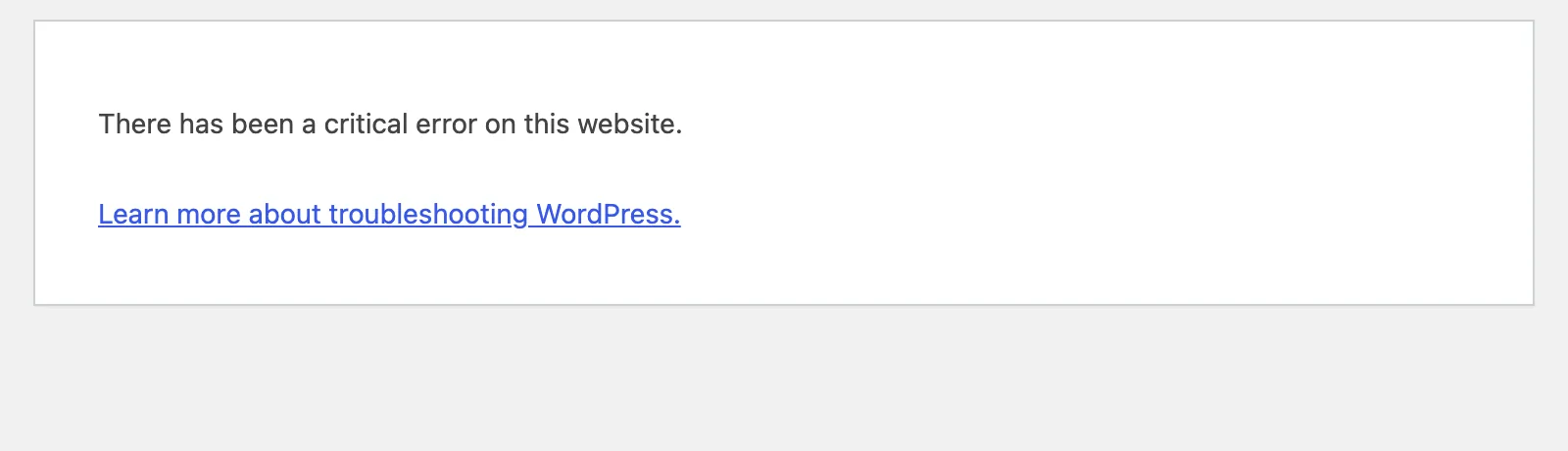
The raw version came back with HTTP status 200 in my test, because PHP had already printed text when WordPress tried to set the status. The critical error page returned 500. The name is in the log either way:
[30-Oct-2026 07:17:17 UTC] PHP Fatal error: Uncaught Error: Call to undefined function create_function() in /var/www/html/wp-content/plugins/old-snippets/old-snippets.php:3On the same test site the whole front end and /wp-admin/ both returned 500, because the plugin runs on every request. For the wider picture of that screen, see there has been a critical error on this website. A blank page with no message is a different case: white screen of death. A typo in the code gives a parse error instead.
How to read the message#
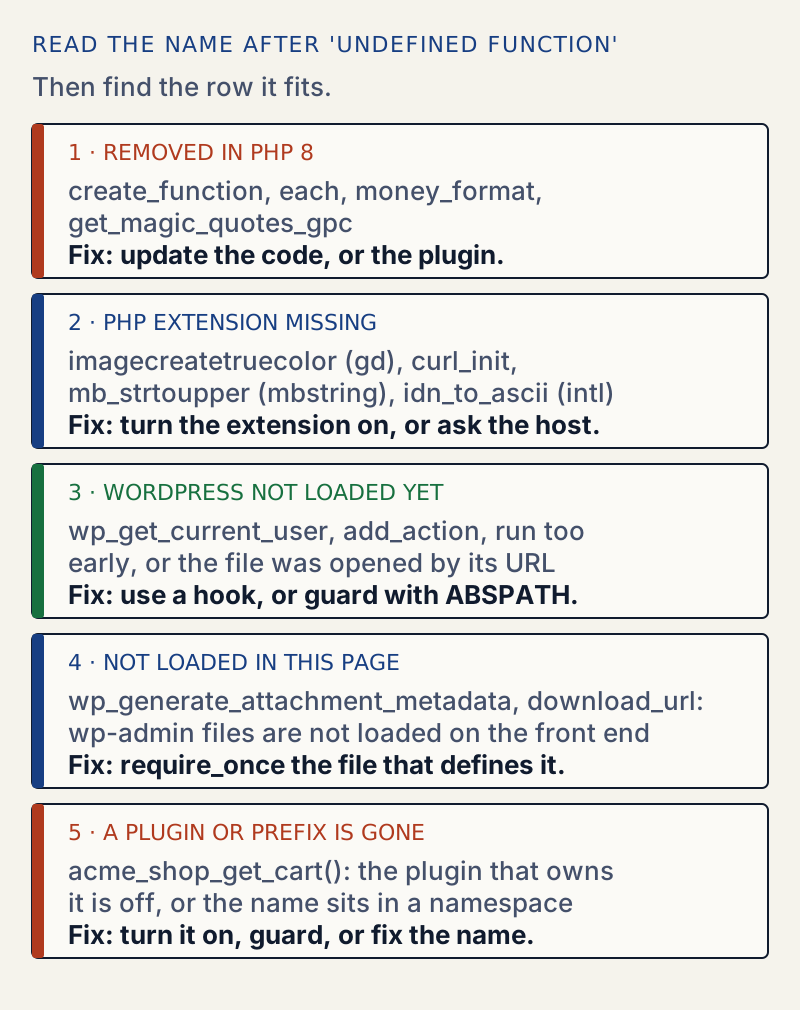
"Uncaught Error" is how PHP 7 and later report this. The call fails by throwing an Error, which is not an Exception and is not caught by catch ( Exception $e ). Nothing in WordPress catches it, so PHP stops the request. That is why one missing function takes down the whole site, not just one feature.
Cause 1: removed in PHP 8#
These are names I called on PHP 8.3, with the message PHP gave each time, and when PHP removed them according to the manual:
| Function | Message on PHP 8.3 | Removed in |
|---|---|---|
create_function() | Call to undefined function create_function() | PHP 8.0 |
each() | Call to undefined function each() | PHP 8.0 |
money_format() | Call to undefined function money_format() | PHP 8.0 |
get_magic_quotes_gpc() | Call to undefined function get_magic_quotes_gpc() | PHP 8.0 |
mysql_connect() | Call to undefined function mysql_connect() | PHP 7.0 |
ereg(), split() | Call to undefined function ereg() | PHP 7.0 |
The same code on PHP 7.4 gave a warning and ran:
Deprecated: Function create_function() is deprecated in /rm.php on line 2OKDeprecated: The each() function is deprecated. This message will be suppressed on further calls in /rm.php on line 3each okFatal error: Uncaught Error: Call to undefined function create_function() in /rm.php:2That is why the error shows up right after a host's PHP upgrade. The old code was already giving "Deprecated" lines in debug.log, which most people never read. Rolling PHP back works only if you go back to 7.x, where the function still exists. It buys time and nothing more. PHP 8.0 does not help.
Cause 2: a PHP extension is off#
Extensions add functions to PHP. If the extension is not loaded, its functions do not exist. I switched off gd on the test site, then loaded a plugin that calls imagecreatetruecolor():
PHP Fatal error: Uncaught Error: Call to undefined function imagecreatetruecolor() in /var/www/html/wp-content/plugins/gd-resizer/gd-resizer.php:3php -r 'var_dump(extension_loaded("gd"));'bool(false)Turning the module back on and restarting Apache cleared it. Two things I found:
- WordPress itself kept working. Core uses Imagick when it is there, and falls back to
gdonly if it is not. Withgdoff and Imagick on,wp_get_image_editor()still returned an Imagick editor. - Site Health did not warn. Its "PHP modules" check lists
gdas a fallback for Imagick, so it reported "Required and recommended modules are installed" withgdoff. Withintloff it said "One or more recommended modules are missing" and "The optional module, intl, is not installed, or has been disabled." So a green Site Health does not rule this cause out. Search the plugin's code for the function instead.
I could not switch off mbstring or curl in the lab image, because both are built into PHP there. So I did not reproduce Call to undefined function mb_strtoupper() or curl_init() myself. Both come from extensions in the same way as gd, and the PHP manual says mbstring is not enabled in a PHP build by default. One more fact helps with mb_ names: WordPress ships fallbacks for only four of them, mb_strlen(), mb_substr(), mb_chr() and mb_ord(), in wp-includes/compat.php. A missing mbstring can break mb_strtoupper() but not mb_strlen().
Cause 3: the code runs before WordPress is ready#
WordPress loads in a set order. In wp-settings.php it includes every active plugin first. Only after that does it load pluggable.php, and then it fires plugins_loaded and later init. A plugin that calls wp_get_current_user() at the top of its file runs before the function exists:
PHP Fatal error: Uncaught Error: Call to undefined function wp_get_current_user() in /var/www/html/wp-content/plugins/early-bird/early-bird.php:3One trap: activating such a plugin can work. WP-CLI had already loaded pluggable.php when I ran wp plugin activate early-bird, and it answered "Success: Activated 1 of 1 plugins." The next request, which loads plugins in the real order, then failed. So "it activated fine" does not mean the code is safe.
When the plugin file is opened directly, the message is the same for a different reason. Opening /wp-content/plugins/ns-plugin/direct.php in the browser ran the file with no WordPress at all:
PHP Fatal error: Uncaught Error: Call to undefined function add_action() in /var/www/html/wp-content/plugins/ns-plugin/direct.php:2The browser got a blank page with status 500. debug.log stayed empty, because WordPress was not running to write it. The message is in the web server's PHP error log. A plugin file that nobody should open directly is a sign the file lacks that guard. Adding defined( 'ABSPATH' ) || exit; to the top of the file makes it answer with an empty page and status 200.
Cause 4: the wp-admin file is not loaded#
I asked a front-end request which functions exist (a plugin hook on init, then function_exists()):
| Function | On the front end | Defined in |
|---|---|---|
is_plugin_active(), get_plugins(), get_plugin_data() | yes | wp-admin/includes/plugin.php |
wp_get_current_user() | yes | wp-includes/pluggable.php |
wp_generate_attachment_metadata() | no | wp-admin/includes/image.php |
media_handle_upload() | no | wp-admin/includes/media.php |
wp_handle_upload(), download_url(), get_home_path(), request_filesystem_credentials() | no | wp-admin/includes/file.php |
get_current_screen() | no | wp-admin/includes/screen.php |
wp_delete_user() | no | wp-admin/includes/user.php |
dbDelta() | no | wp-admin/includes/upgrade.php |
The result was the same on /wp-admin/admin-ajax.php. The first row surprised me: older tutorials say is_plugin_active() fails on the front end, but on WordPress 7.1.4 it works, because wp-settings.php (line 579 in 7.1.4) requires wp-admin/includes/plugin.php before it loads the active plugins, so is_plugin_active(), get_plugins() and get_plugin_data() exist on every request. Do not rely on that for the others. A plugin calling wp_generate_attachment_metadata() from init gave "Call to undefined function wp_generate_attachment_metadata()" and a 500 on every page.
Cause 5: another plugin, or a namespace#
A plugin that extends another plugin breaks when the other one is off:
PHP Fatal error: Uncaught Error: Call to undefined function acme_shop_get_cart() in /var/www/html/wp-content/plugins/dep-addon/dep-addon.php:3A namespace changes the name in the message. This is what I got when a function was called from the wrong namespace, with the real function named helper:
PHP Fatal error: Uncaught Error: Call to undefined function Acme\Tools\other_helper() in /var/www/html/wp-content/plugins/ns-plugin/ns-plugin.php:5When the path points at core#
If the path points at a plugin or theme, turning off that one plugin or theme is enough. Only when the name is a core function such as trailingslashit() and the path is inside wp-includes is a damaged core install possible. Then wp core verify-checksums lists changed or missing files. I did not test this case.
After the fix#
Reload the page and read debug.log once more for new lines. Turn WP_DEBUG off again when you finish. If you updated a plugin to get past this, see how to update plugins safely for a calmer routine next time. If PHP names a missing class instead, see class not found; if it cannot open a file, see failed to open stream.
Sources
- PHP manual: Backward incompatible changes in PHP 8.0 · create_function(), each(), money_format() and get_magic_quotes_gpc() removed
- PHP manual: create_function() · deprecated in 7.2, removed in 8.0, use an anonymous function
- PHP manual: The Error class · Error implements Throwable and does not extend Exception
- PHP manual: Installing mbstring · mbstring is not on by default in a PHP build
- WordPress core: wp-settings.php · line 579 requires wp-admin/includes/plugin.php, then active plugins load, then pluggable.php at line 612
- WordPress core: wp-includes/compat.php · the only mb_ fallbacks are mb_strlen, mb_substr, mb_chr and mb_ord
- WordPress Advanced Administration: Debugging in WordPress · WP_DEBUG, WP_DEBUG_LOG, WP_DEBUG_DISPLAY and the debug.log path
One email when something breaks or changes.
New plugins and re-tested guides, about twice a month. Never a sales pitch.