Why it happens
- The class is defined in another plugin that is switched off, was deleted, or has not loaded yet. An add-on that needs a main plugin breaks when the main plugin is off.
- The plugin uses Composer and its
vendor/folder is incomplete. It was left out of the zip, half uploaded, or built before a class was added, so the autoloader has no path for the name. - The file name and the class name differ in capital letters.
Client.phpsaved asclient.phploads on a Mac or Windows laptop and fails on a Linux server. - The code uses a WordPress admin class such as
WP_List_Tablebefore WordPress has loaded it. WordPress loads that class only inside the admin, and only after plugins have loaded. - A namespace slip. Inside a namespaced file,
new Exception()meansAcme\Tools\Exception, which does not exist. The message then shows a name you never wrote.
How to fix it
Try the fixes in this order. Each one is independent: stop as soon as the error is gone.
Read the class name and the file path
- The message has two facts. The text in quotes is the class PHP could not find. The path after "in" is the file that asked for it. A path under
wp-content/plugins/acme-addon/points at the pluginacme-addon. - A backslash in the name means a namespace.
Acme_Shop\Cartis the classCartin the namespaceAcme_Shop. If the namespace is one you never wrote, see the namespace fix below. - If the screen only says "There has been a critical error on this website", the same line is in the log. Turn on
WP_DEBUGandWP_DEBUG_LOG, setWP_DEBUG_DISPLAYtofalse, load the page once and openwp-content/debug.log. The steps are in the debug log guide. - Use the diagram under "How PHP finds a class" to pick the fix that matches the name.
Get the site back first: turn the plugin off
- With WP-CLI over SSH, run
wp plugin deactivate acme-addon --skip-plugins, with the folder name from the path. I tested it: the site went from 500 to 200. Without--skip-plugins, WP-CLI loads the broken plugin first and fails with the same fatal error. - Without WP-CLI, rename the plugin's folder over SFTP, for example
acme-addontoacme-addon.off. WordPress skips a plugin whose folder is missing. - This only stops the error. The plugin fails again the next time you turn it on, so use one of the fixes below.
Another plugin is missing: turn it on or install it
- If the class name starts with the name of another plugin (
Acme_Shop\Cart,WooCommerce,Elementor\...), that plugin must be installed and active before the add-on runs. - Turn the main plugin on first, then the add-on. On my test site
wp plugin activate acme-shop acme-addonmade the site return 200 again. - If you do not want that plugin any more, delete the add-on too. It cannot work without it.
- If you write the add-on, wait for
plugins_loadedand test withclass_exists( 'Acme_Shop\Cart' )before you use the class. Active plugins load in alphabetical order, so the add-on's file can run before the main plugin's.
Missing vendor folder: reinstall the plugin or run Composer
- Open the plugin's folder over SFTP. A plugin that uses Composer has
vendor/autoload.phpand avendor/composer/folder. If they are missing or the folder is empty, the upload did not finish or the plugin was copied from source without them. - The simplest fix is to delete the plugin folder and install the plugin again from its official download, so the whole
vendor/folder comes with it. - If you cloned the plugin from GitHub, run
composer install --no-dev --optimize-autoloaderinside the plugin folder. I deletedvendor/on a test plugin, ran that command, and the site came back. - If the plugin's own
requireforvendor/autoload.phpis not guarded, a missing folder gives a different message, "Failed opening required". See failed to open stream.
Rebuild the Composer class map
- This is for your own code. If you added a class and Composer's "authoritative" class map is on (
--classmap-authoritative, or"classmap-authoritative": trueincomposer.json), a class that is not in the map is treated as missing. - Run
composer dump-autoloadagain in the plugin folder, with the same flags you built with, and upload the newvendor/composer/folder. I added a class after building with--classmap-authoritative: the site failed withClass "Acme\Orders\Mailer" not found, and running the command again fixed it. - Composer's manual says to run
dump-autoloadafter you change theautoloadsection ofcomposer.json.
Fix a file name that differs only in capitals
- Composer's PSR-4 rule, and the PSR-4 standard itself, says the file name must match the class name letter for letter, capitals included.
Acme\Orders\Clientis the filesrc/Client.php. - Rename the file to match the class, for example
client.phptoClient.php. I renamed a file on the test site and the error appeared at once; renaming it back cleared it. - Mac and Windows ignore capitals in file names by default, so the bug shows up only after the code reaches a Linux server.
Load the admin class where you use it
- If the name is
WP_List_Table,WP_Posts_List_Tableor another admin class, do not extend it at the top of the plugin file. Move the class into its own file and load that file inside the function that draws the admin page. - In that function, first load the base class if needed:
if ( ! class_exists( 'WP_List_Table' ) ) { require_once ABSPATH . 'wp-admin/includes/class-wp-list-table.php'; }. Thenrequire_onceyour own class file and create the table. - I tested this on a plugin with an Orders menu page: the page showed the table, and the front end stayed at 200. The same class loaded at the top of the plugin file returned 500 on the front end and on the admin page.
- WordPress's own developer reference marks
WP_List_Tableas private and open to change. Test your table after each major WordPress update.
Fix a namespace slip
- A class name that begins with your own namespace and then a PHP or WordPress class, such as
Acme\Tools\Exception, means the code forgot the global class marker. - Add a leading backslash,
new \Exception(), or adduse Exception;under thenamespaceline. I changednew Exceptiontonew \Exceptionand the plugin activated and the site stayed at 200. - WordPress classes such as
WP_ErrorandWP_Queryneed the same treatment in a namespaced file:new \WP_Error( ... ).
PHP was asked to create an object from a class it does not know. It looked in its list of loaded classes, asked every autoloader, and found nothing, so it stopped the request. The class name in the message tells you which of five problems you have, and each has a short fix. The quickest way to get the site back is to turn off the plugin named in the file path.
What you see#
Depending on the server settings, you see one of two things. If PHP shows its errors on the page, the message appears at the top, as in the picture. If it does not, the visitor sees "There has been a critical error on this website" and the message is only in wp-content/debug.log. See the critical error page for that screen.

The log line is the same text with a timestamp, and it names the file and the line:
PHP Fatal error: Uncaught Error: Class "Acme_Shop\Cart" not found in /var/www/html/wp-content/plugins/acme-addon/acme-addon.php:6With debug display off, the same request returned status 500. With display on, it returned status 200, because PHP had already begun to send the page. That is why a monitor that only checks the status code can miss it.
How PHP finds a class#
PHP does not read every file when a request starts. A class is defined when its file runs. When code says new Client() and no class of that name is defined, PHP calls the autoloaders registered with spl_autoload_register(). Each one gets the full class name and may load a file. The PHP manual says autoloaders are "a last chance to load the class or interface before it fails with an error." If none defines it, PHP throws the Error you see.
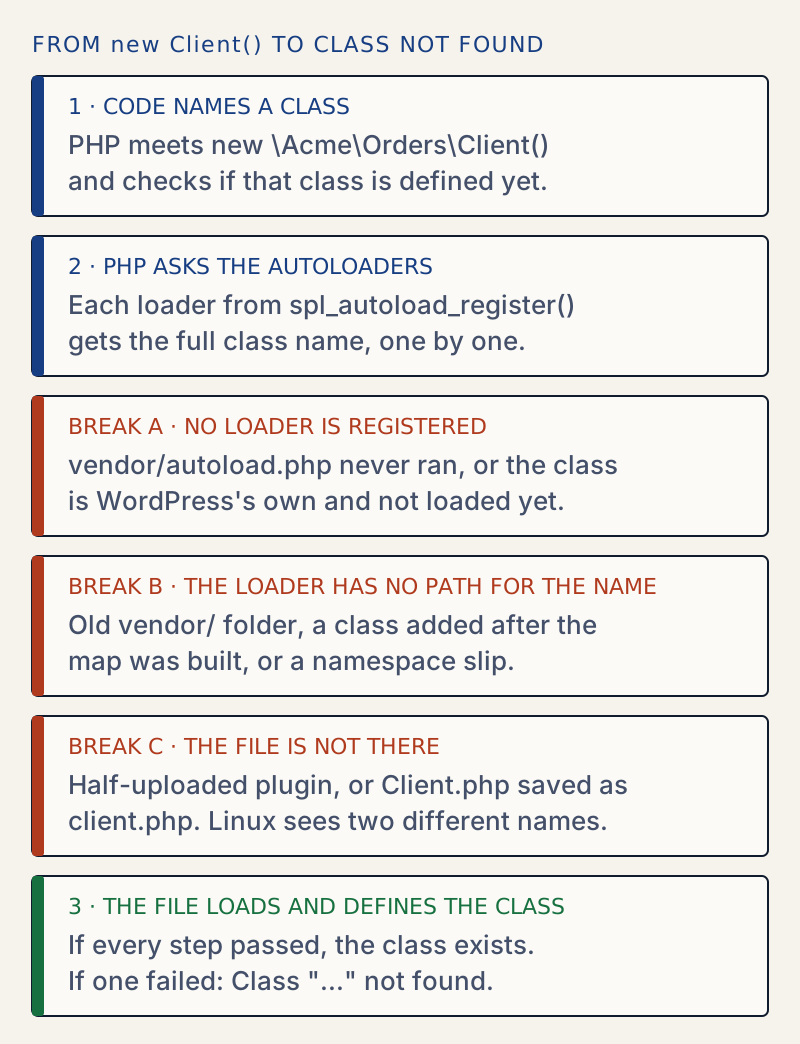
WordPress core has no autoloader for its own classes. Core loads them with require. That matters for admin classes. In WordPress 7.1, wp-settings.php includes every active plugin first and fires plugins_loaded afterwards. WP_List_Table is required from wp-admin/includes/admin.php, which wp-admin/admin.php loads, and only then does admin_init fire.
Composer plugins add an autoloader of their own. A plugin's vendor/autoload.php registers one that turns Acme\Orders\Client into the path src/Client.php. If that file is not loaded, or its map has no entry, break A or B happens.
Class names are not case sensitive in PHP, so new wp_error() works. File names on Linux are case sensitive, so the file the autoloader opens must match exactly. That is break C.
Which cause matches the message#
I made each of these on a WordPress 7.1.4 test site with PHP 8.3 and read the real log line.
| Cause | Class name in the message | Where it fails | What the site did |
|---|---|---|---|
| 1. Add-on without its main plugin | Acme_Shop\Cart | A plugins_loaded hook | 500 on every page |
2. Old or missing vendor/ class map | Acme\Orders\Mailer | An init hook | 500 on every page |
| 3. File name differs in capitals | Acme\Orders\Client | An init hook | 500 on every page |
| 4. Admin class used too early | WP_List_Table | Top of a class file | 500 on the front end and the admin |
| 5. Namespace slip | Acme\Tools\Exception | Plugin file, top level | Activation stopped: the plugin stayed off |
A renamed file and a missing src/ folder give the same line, so the log cannot tell them apart. Look in the folder. The names Acme_Shop, Acme\Orders and Acme\Tools are from my test plugins; yours will differ.
Cause 1: the main plugin is not there#
An add-on that uses a class from another plugin fails whenever the other plugin is off. The log line above is this case. WordPress keeps the active plugins in alphabetical order. I activated the shop first and the add-on second, and the saved list was still acme-addon then acme-shop. So the add-on's file is read before the shop's, even when both are active. Code that runs at load time can fail for that reason alone. Code that runs on plugins_loaded or later, as in my test, only fails when the other plugin is really missing.
I activated the add-on alone and the front end returned 500. After wp plugin activate acme-shop acme-addon, it returned 200.
Cause 2: the vendor folder#
Plugins that use Composer ship a vendor/ folder. Three things go wrong with it:
- The folder is not there. If the plugin requires
vendor/autoload.phpwithout checking, PHP stops earlier with a different message:
PHP Warning: require_once(/var/www/html/wp-content/plugins/acme-orders/vendor/autoload.php): Failed to open stream: No such file or directory in /var/www/html/wp-content/plugins/acme-orders/acme-orders.php on line 5PHP Fatal error: Uncaught Error: Failed opening required '/var/www/html/wp-content/plugins/acme-orders/vendor/autoload.php' (include_path='.:/usr/local/lib/php') in /var/www/html/wp-content/plugins/acme-orders/acme-orders.php:5- The plugin checks with
file_exists()first and goes on without it. Then the firstnewon a Composer class gives this page's message instead. - The folder is there but old. With the optimized, authoritative class map, I added
src/Mailer.phpand left the map as it was. Composer had been told that a class missing from the map does not exist, so it did not look insrc/:
PHP Fatal error: Uncaught Error: Class "Acme\Orders\Mailer" not found in /var/www/html/wp-content/plugins/acme-orders/acme-orders.php:8After composer dump-autoload --classmap-authoritative, the same request returned 200.
composer install --no-dev --optimize-autoloaderInstalling dependencies from lock fileNothing to install, update or removeGenerating optimized autoload filesCause 3: the file name differs in capitals#
On the test site I renamed src/Client.php to src/client.php. The class is still Client, PHP does not mind capitals in class names, and the autoloader asked the Linux file system for src/Client.php. It was not there:
PHP Fatal error: Uncaught Error: Class "Acme\Orders\Client" not found in /var/www/html/wp-content/plugins/acme-orders/acme-orders.php:8Renaming the file back gave 200. This is the usual reason a plugin "works on my laptop" and fails after a move to a host.
Cause 4: an admin class used too early#
This is the common one in custom plugins. A class that extends WP_List_Table is defined when its file is included. I asked a request what was loaded at each moment, with a small test plugin:
| Request | WP_List_Table loaded at plugins_loaded and init | At admin_init |
|---|---|---|
| Front page | no | not fired |
wp-admin/admin-ajax.php with an action | no | yes |
wp-admin/index.php | no | yes |
wp-admin/plugins.php | no | yes |
A request to admin-ajax.php with no action stops early with status 400 and never reaches admin_init. With an action, the class is there at admin_init but still not at plugins_loaded. So even inside the admin, a plugin that extends WP_List_Table at the top of its file fails. On the test site, a plugin with class Orders_Table extends WP_List_Table returned 500 on the front page and on its own admin page. The log said Class "WP_List_Table" not found.
One trap: the same plugin activated without a complaint. WP-CLI loads the admin files before it activates a plugin, so wp plugin activate table-early printed "Success: Activated 1 of 1 plugins." The next normal request failed. I tested this with WP-CLI. Do not take a successful activation as proof that the code is safe.
Cause 5: a namespace slip#
A file that starts with namespace Acme\Tools; looks up every class name inside its own namespace first. new Exception( 'x' ) therefore asks for Acme\Tools\Exception:
PHP Fatal error: Uncaught Error: Class "Acme\Tools\Exception" not found in /var/www/html/wp-content/plugins/ns-plugin/ns-plugin.php:7The name in the message is not one the author typed. If you see your own namespace in front of a PHP or WordPress class, add the backslash.
A plugin that fails when you switch it on#
When a plugin has the error at the top level of its file, WordPress refuses to activate it. With WP-CLI, wp plugin activate plain-missing printed the fatal error and a stack trace, and afterwards the plugin was not in the active list, so the site kept working. See plugin could not be activated because it triggered a fatal error for the browser screen. Errors inside a hook, such as init or plugins_loaded, are only found when the hook runs, so those plugins activate and then break the site.
If you change a file and nothing happens#
PHP's opcode cache checks files for changes on a timer. On the test image the timer is 2 seconds. When I changed a file and loaded the page in the same second, I saw the old result. Wait a few seconds before you decide a fix did not work.
After the fix#
Load the page, then read wp-content/debug.log for new lines. Turn WP_DEBUG off when you are done. Before you update the plugin that caused this, read how to update plugins safely. A different message, "Call to undefined function", has its own causes: see uncaught error: call to undefined function. If PHP says a function is declared twice, see cannot redeclare function.
Sources
- PHP manual: Autoloading classes · autoloaders get a last chance to load a class before it fails
- Composer: Basic usage, autoloading · vendor/autoload.php, PSR-4 mapping, run dump-autoload after changing it
- Composer: Autoloader optimization · authoritative class map treats a class not in the map as missing
- PHP-FIG: PSR-4 autoloader · file name must match the case of the class name
- WordPress Developer Resources: WP_List_Table · defined in wp-admin/includes/class-wp-list-table.php, marked private
- WordPress core 7.1: wp-admin/includes/admin.php · where core requires class-wp-list-table.php
- WordPress core 7.1: wp-settings.php · active plugins load first, then plugins_loaded fires
One email when something breaks or changes.
New plugins and re-tested guides, about twice a month. Never a sales pitch.